
You’ve launched the website, connected it to Google Search Console and waited patiently. The pages are indexed, but enquiries haven’t arrived, and the performance graph looks almost flat. That’s a common position for a UK small business, and it usually isn’t solved by publishing another generic blog post.
On-page SEO optimisation gives you control over the parts of search visibility you can change directly: page intent, titles, headings, content structure, internal links, accessibility, structured data and performance. That matters in the UK because Google accounted for 91.56% of search engine market share in July 2026, while Ofcom’s reporting indicates that around 82% of UK online adults used Google Search in a month, and that users conduct about 3 billion Google searches each month in the UK. (UK SEO statistics and search behaviour)
Search results are also becoming answer-led. About 30% of searches now show an AI Overview, and 53% of UK adults often see AI summaries, according to the same UK-focused data. (UK SEO statistics and search behaviour) Your pages need to satisfy a person who wants to buy, and a search system that needs to understand, extract and summarise the answer.
Table of Contents
Why Your New UK Site Is Quiet
A Bristol tradesperson launches a homepage, services page and contact form. The sitemap is submitted, Google indexes the pages, and six weeks later Search Console shows impressions but few clicks. The graph has barely moved.
The problem is usually page purpose. Google can find the site, but each page gives it too little reason to rank for a specific search. “Our Services” could mean boiler repairs, emergency plumbing or bathroom installation. A title that says “Home”, broad promises in the copy and no useful route to the commercial page leave both search engines and customers guessing.
What Search Console is telling you
Open the Performance report and review each valuable URL separately. Site-wide totals can hide the page that needs attention.
- Impressions without clicks: The page appears in results, but its title and description are vague, weak or poorly matched to the query. Google’s guidance supports writing titles that describe the page clearly and accurately. (Google title guidance and UK performance context)
- Queries that don’t match the page: Google is testing the URL for related searches, while the content fails to meet the intent you want.
- A low average position: The page needs clearer relevance, stronger coverage of the service and better supporting context from the site.
- Indexed pages with no performance: The URL may be thin, isolated, or aimed at a search that customers in your service area do not use.
A competitor nearby may have separate pages for “emergency plumber Bristol,” “leak repair Clifton” and “boiler installation Redland.” Their advantage may come from clearer page architecture rather than a larger marketing budget. Each page identifies the service, location and next action.
Practical rule: Improve the page closest to revenue before pursuing backlinks. You can change its intent, wording, structure and speed immediately, while brand demand and off-page authority take longer to build.
Mobile delivery also affects the result. UK performance reporting indicates that many mobile sites fail Core Web Vitals, so a page that loads poorly on a mobile connection can lose visitors before its content persuades them. Rich explanations can support trust and AI-generated summaries, but unnecessary scripts, oversized images and decorative elements slow the page. Keep the detail that answers objections, then remove weight that does not improve understanding or enquiries.
Measure the trade-off in Search Console and analytics. Track impressions, clicks, queries, engagement and completed enquiries for each priority URL. The route out of a flatline is precise intent, clearer result copy, connected pages and leaner loading weight.
Assign one primary keyword to each page.
Give every page one main search target. Add two or three supporting terms only when they belong to the same subject and help customers understand the offer.
A service page might target gas boiler servicing in Hastings, with supporting terms such as boiler servicing, annual boiler checks, and a local gas-safe engineer. Use them in useful sentences, service details, FAQs or accurate image descriptions. Do not force every variation into headings. Repetition can weaken readability without improving relevance.
Place the primary keyword where it clarifies the page:
- The title tag.
- The opening 100 words.
- One relevant H2.
- The meta description.
- The URL slug.
- Descriptive image alt text, when the image represents the subject.
Then make the page answer the commercial questions behind the query: what the customer receives, who provides it, where the service operates and how to book. Clear relevance gives Google stronger material for traditional results and can also help an eligible page contribute to an AI Overview. Treat that visibility as a result to measure, not a reason to add awkward keyword variants.
Connect the service page to supporting content.
Use the commercial page for the transaction and an article for a related information need. “How often should you book a gas boiler service?” could cover warning signs, preparation and maintenance questions, then point readers to the Hastings service page with descriptive anchor text.
| Page element | Primary keyword | Supporting keywords |
|---|---|---|
| Service page title | gas boiler service Hastings | boiler servicing |
| Opening paragraph | gas boiler service Hastings | local gas-safe engineer |
| Service H2 | gas boiler service Hastings | annual boiler checks |
| Supporting article | gas boiler service Hastings | boiler maintenance, boiler safety |
| Image alt text | gas boiler service Hastings | Only when accurate to the image |
Do not publish separate pages for every minor wording variation. Combine closely related terms when one page can satisfy the same need. Create a separate page when the service, location or intent changes. That distinction prevents thin local pages competing with one another.
National head terms are usually a poor first target for a local firm. A tradesperson has a clearer commercial case for a geo-modified query than for “plumber” or “boiler service,” where directories and national brands compete. Choose searches that state exactly what you sell and where you sell it, then track impressions, clicks, enquiries and AI Overview visibility for each priority page.
Writing Titles, Meta Descriptions and Headers That Earn Clicks
Your title, meta description, and headings should make a single promise. If the title says “Estate Agent in Didsbury,” the H1 should confirm that purpose and the opening copy should immediately explain sales, lettings or valuations.
Google recommends a unique, descriptive and concise title element for every page, while warning against repeated boilerplate and keyword stuffing. (Google guidance on title links) The Office for National Statistics’ content standard recommends title tags of no more than 60 characters and meta descriptions of fewer than 160 characters, ideally 90 to 120 characters for mobile readability. (ONS metadata guidance)
Title tags
Put the primary term near the front, add the specific benefit or service, then use the brand or location if space allows. Every URL needs a distinct title.
Before:
Home
After:
Estate Agent in Didsbury, Sales, Lettings & Valuations | Brand
The improved version identifies the business category, location and services before the user clicks. Google can rewrite weak titles, and UK SEO commentary cites one large analysis in which Google rewrote 61.6% of meta titles overall and nearly all titles longer than 70 characters. (Google guidance on title links) Front-load what matters most.
Meta descriptions
Google automatically creates snippets from page content, but you can guide and constrain the result with nosnippet, max-snippet and data-nosnippet. (Google snippet guidance) Write a benefit-led description rather than repeating the title.
Example:
Didsbury estate agents for sales, lettings and accurate valuations. Speak to a local team about your property today.
The description should tell the searcher what the page offers, who it serves and what to do next. It isn’t a place to list every keyword.
For detailed implementation advice, use this guide to SEO copywriting as a practical reference for aligning title tags, openings and subheadings.
Headers
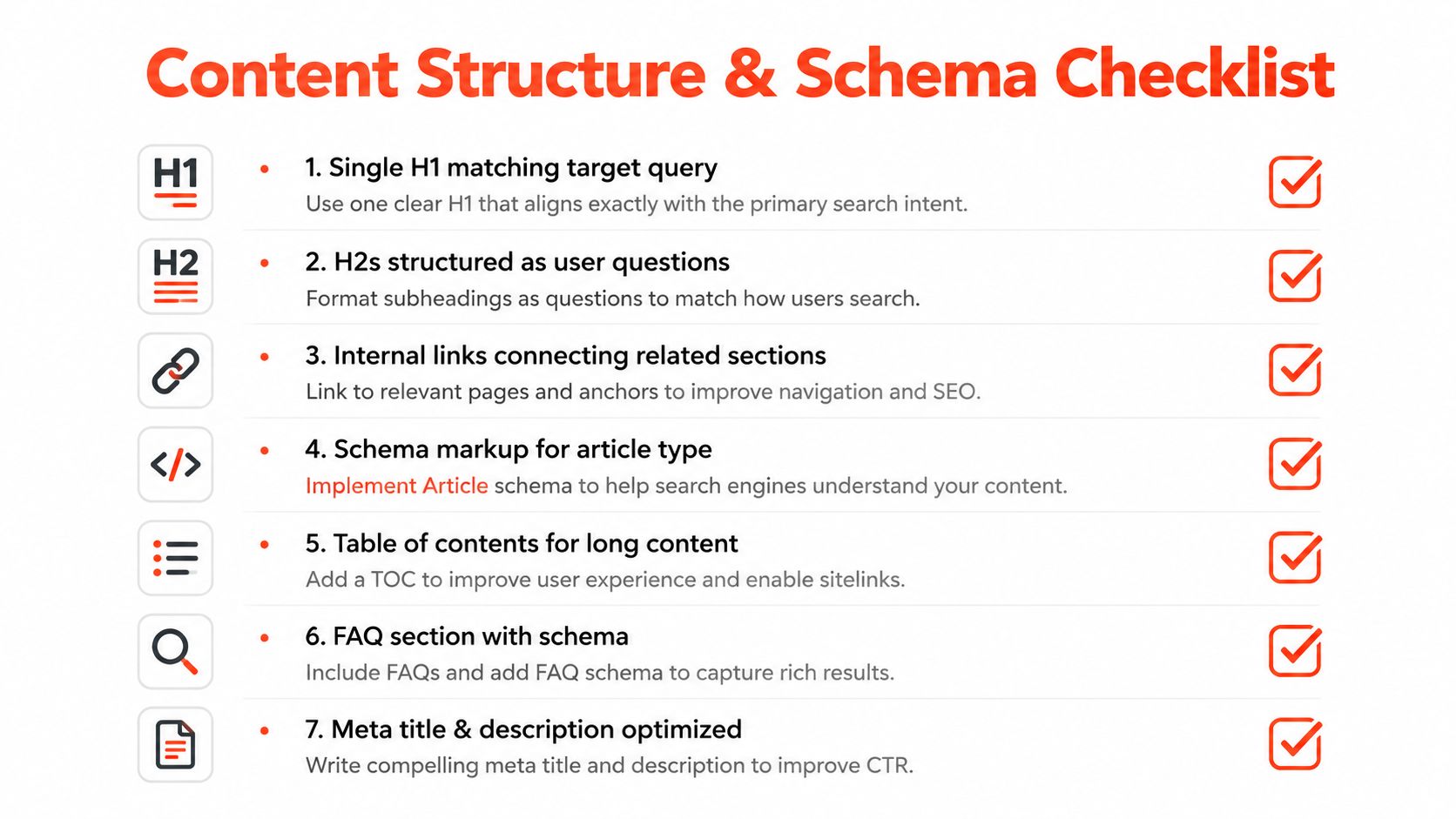
Use one H1 that matches the visible page headline and the title’s intent. H2s should divide the page into useful questions or tasks, such as “How our Didsbury valuations work” or “What properties we let,” while H3s should appear only when a genuine subtopic needs further separation.
Skip keyword-stuffed H2s, clickbait descriptions and H1 tags that contradict the visible headline. Consistency helps both visitors and systems understand what they’ve landed on.
Structuring Content, Internal Links and Schema
A new UK service page can rank for its target phrase yet remain invisible in AI Overviews if its answer is buried. Put the direct answer near the top, then support it with evidence, process details and clear next steps. This structure helps search engines interpret the page and gives AI systems clean passages to extract.
Use one H1 that matches the page topic. Build H2s around questions a UK customer would ask, keep each section focused, and use lists or tables when they make a choice easier to follow. Write short paragraphs, but allow enough detail to address objections and show experience.
Build a connected content cluster.
Audit existing URLs before publishing another article. A local electrician could link a guide about fuse-box warning signs to an electrical inspection service page, then connect both to the contact page. Use three to five contextual internal links per post as a working range, provided every link helps the reader.
- Use descriptive anchors: Write electrical inspection in Leeds, not “click here”.
- Link upwards: Point supporting articles towards the main service page.
- Link downwards: Connect the service page with relevant guides, FAQs or specific sub-services.
- Repair orphan pages: Make every valuable URL reachable through navigation or a relevant contextual link.
Keep the cluster useful rather than forcing a link quota. For XML sitemap work, creating an XML sitemap can help keep indexable URLs discoverable as the site expands. Measure assisted conversions, engaged sessions and clicks between related pages to find links that support business outcomes.
Add only matching schema
Use JSON-LD that reflects information visible on the page.
- Article or BlogPosting: For editorial guides.
- LocalBusiness: For a service page with a genuine UK business address.
- FAQPage: Only when the questions and answers appear on the page.
- Product: For product pages with relevant product information.
Schema does not replace useful content or justify claims visitors cannot verify. Test the implementation in Google’s Rich Results Test before publishing and after significant CMS changes.
Clear sections also support AI-summary visibility. A UK AI Overview study reports varying visibility across query types, with particularly strong presence for some how-to and definitional searches. Answer first, make key passages self-contained and give readers a clear reason to continue. Track impressions, clicks and assisted conversions separately for pages targeting AI Overview visibility.
Here’s a practical walkthrough of the page-level principles:
Balancing Rich Content With Page Speed
A new UK service page can answer every objection and still lose visitors if its hero image, scripts or video delays the first useful interaction. Rich content earns trust only when customers can reach it quickly.
Set performance priorities before adding detail. Google’s Core Web Vitals provide a practical framework, while Google’s page experience guidance helps frame the performance requirements. UK-focused reporting also shows that mobile performance remains weak across many sites. Test the pages that matter to enquiries, not just a polished demo URL.
| Metric | Target | Why it matters | Quick fix |
|---|---|---|---|
| LCP | Under 2.5 seconds | Shows whether the main content appears quickly | Compress and preload the hero image |
| INP | Under 200 milliseconds | Indicates how quickly interactions respond | Defer or remove heavy scripts |
| CLS | Under 0.1 | Prevents content jumping during loading | Reserve image and advert space |
Use CrUX data where available, then compare it with PageSpeed Insights and WebPageTest. Check mobile rendering on a realistic UK connection. A strong desktop score can hide the experience customers receive on mobile, and poor speed can reduce the visibility of content intended to support Google AI Overviews.
Keep the detail that earns trust.
Cut repetition before useful information when depth and speed conflict. Put the direct answer near the top, use a summary box for the decision point, and place secondary objections in collapsible FAQs. Lazy-load media below the fold, convert suitable images to WebP or AVIF, and remove plugins that add no customer value.
Ask which content helps this customer choose, then make that content available quickly.
Measure rankings, impressions, clicks and form completions separately. A faster page helps only when it preserves the answer, proof and action that turn a visit into an enquiry. For managed infrastructure, compare your current setup with web hosting for small business before rebuilding the page around more content. Review these measurements after each change so speed improvements do not erase useful detail.
Quick Wins and How to Measure Results
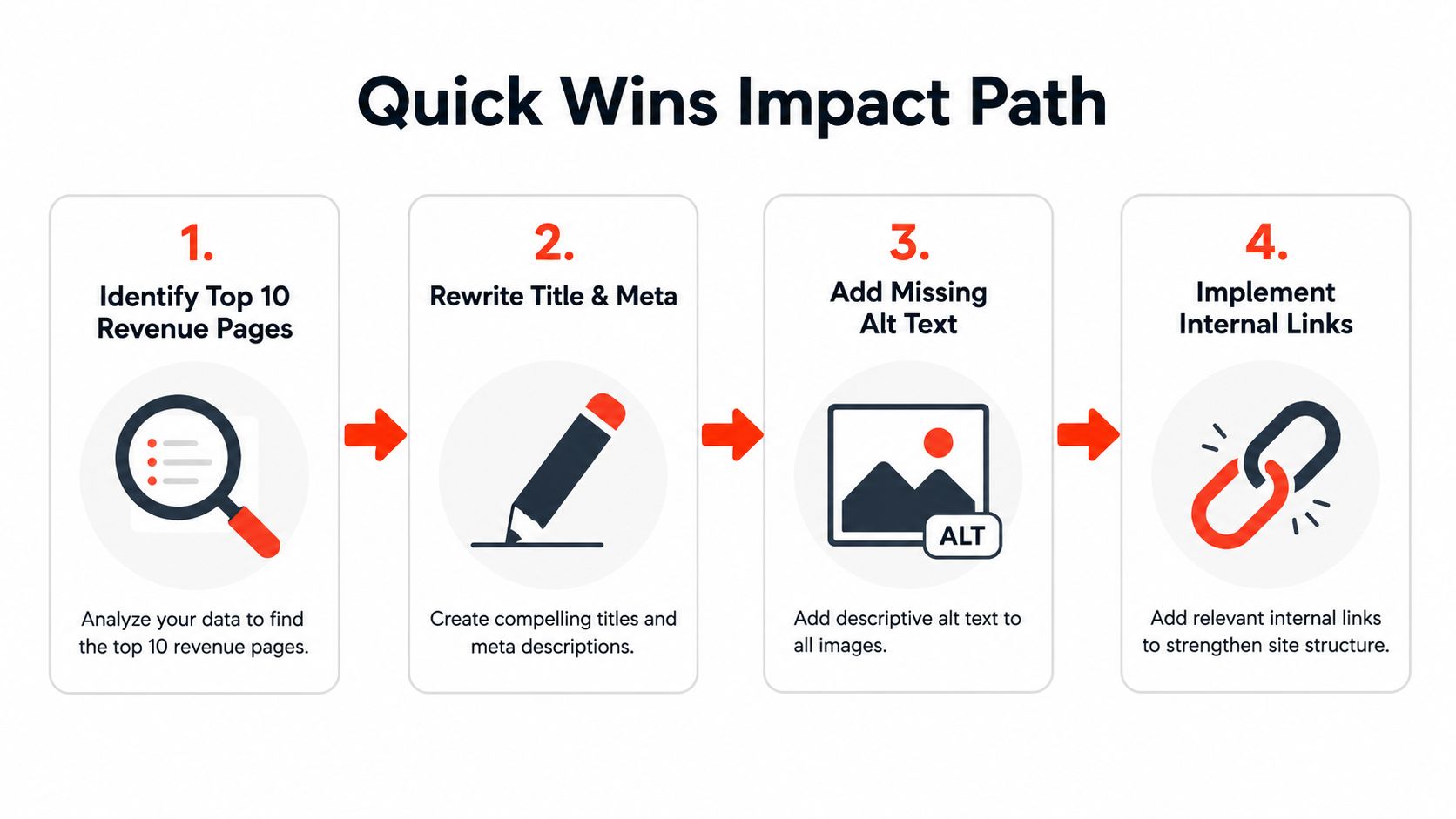
Start with pages closest to revenue. A main service page with a generic title deserves attention before an old opinion post. Prioritise URLs that can generate calls, bookings or sales, then measure whether each change improves visibility and enquiries.
Make the first changes count
Apply these changes in one focused pass:
- Rewrite priority titles and descriptions: Select the ten pages most likely to convert. Put the service and location near the front, then write a specific description that gives searchers a reason to click.
- Connect relevant pages: Add contextual links from related guides, category pages and the homepage to those commercial URLs.
- Match the schema: Publish one relevant schema type, ensure its content appears on the page, and validate it in Rich Results Test.
- Remove loading weight: Compress images, defer non-critical scripts and remove plugins that add no customer value.
- Refresh discovery signals: Submit the updated sitemap and request indexing for priority URLs in Search Console.
Measure the page, not your feelings
Use Search Console as the baseline. Record impressions, clicks, click-through rate and average position for every changed URL. In GA4, record enquiries, calls or completed purchases, and annotate the date and type of each page change.
UK search behaviour makes the title and snippet important pre-qualification copy. UK SEO reporting cites a roughly 69.5% zero-click rate for UK Google searches, alongside Google’s 91.56% UK market share, so do not treat rankings as the only visibility measure. (UK SEO statistics and search behaviour)
Review the data after 28 days. If a page achieves under 50% of the improvement you expected, iterate rather than abandon the work. Recheck search intent, title wording, local proof, page speed and the queries appearing in Search Console.
AI Overview visibility also needs a content check. Keep the direct answer, supporting evidence and clear next action near the top, even when speed work removes excess copy. Compare impressions and clicks for pages that gain visibility but lose engagement.
More impressions with flat clicks indicate a snippet problem. More clicks with weak enquiries indicate a landing-page or offer problem. Diagnose the gap before changing everything at once.
A 30-Day On-Page SEO Action Plan
Use a four-week calendar and assign one clear job to each week. Small businesses lose momentum when keyword mapping, copywriting, technical fixes and reporting all compete for attention on the same day.
Week 1, map the foundation
List the top ten commercial URLs. Assign one primary keyword to each, classify the intent and identify supporting terms. Check indexation, canonical signals, mobile rendering and the internal links leading to each page.
Week 2, rewrite the visible promise
Update title tags, meta descriptions and H1s using the character rules above. Rewrite the opening copy so the service, audience, location and next step are clear without scrolling.
Week 3, improve structure and speed
Add contextual internal links, implement the schema that matches each page and validate it. On slow pages, trim repeated copy, compress images and defer scripts before adding more content.
The trade-off is practical. If schema will delay a launch, publish a clean, useful page first and add the markup immediately afterwards. If a page is unusably slow, fix the layout and media weight before commissioning another long rewrite.
Week 4, establish the baseline
Record Search Console impressions, clicks, average position and indexed pages. Record Core Web Vitals and conversion actions in GA4, then annotate every change so you can connect movement to work completed.
At the end of the month, decide what to keep, cut or escalate. Schedule the first monthly review for the same date next month, with each priority URL and its original baseline ready on screen.
Launch your website fast with a domain, SSL, hosting and maintenance included, in an hour, with the 1stNet.AI website team. We transform your online presence with a stunning website, offer an interactive live chat system to design your website, and include a 30-day money-back guarantee. Call us now at 0204 577 2255, or visit 1stNet AI Ltd to discuss a fast, search-ready website for your business.