

You’ve launched a new website, checked that the pages load, and expected Google to start sending visitors. Instead, your business barely appears in search. The pages are live, the design looks polished, and yet discovery is slow or incomplete. The missing piece may be an XML sitemap, or more accurately, a sitemap that was created once and then forgotten.
XML sitemap creation should be treated as part of your publishing workflow. A reliable sitemap changes as your pages, services, products, and locations change. The file itself is simple, but keeping its URLs accurate is where small business sites often fail.
Getting Clear on What an XML Sitemap Actually Does
An XML sitemap is a file stored on your website that lists the pages you want search engines to discover and consider for indexing. It gives crawlers a direct list of important URLs instead of making them find every page by following internal links alone.
That distinction matters most on a new site. A small business may have a service page that isn’t linked prominently from the navigation, a recently published article, or a location page that sits several clicks deep. Google can discover these pages through links, but a sitemap provides a clearer route to the URLs you consider important.
A sitemap is a suggestion, not an instruction. Adding a URL doesn’t force Google to crawl or index it, and it doesn’t override a noindex directive, a canonical preference, or other technical signals. It tells search engines which URLs you believe deserve attention.
Practical rule: Put important, indexable pages in the sitemap, but don’t use the sitemap to argue with your site’s canonical and indexing rules.
What a sitemap isn’t
An XML sitemap isn’t the same as robots.txt. The sitemap lists URLs you want search engines to find. The robots file gives crawling instructions about areas that should or shouldn’t be accessed. A robots file can point crawlers towards your sitemap, but it doesn’t replace it.
It also isn’t on-page SEO. A sitemap won’t improve weak copy, repair poor internal linking, or make an irrelevant page rank. It supports discovery and technical clarity, while your page content, structure, links, and reputation determine what happens after discovery.
For practical guidance on the wider process, use this guide to optimising a website for search engines.
The benefit for a growing site
A maintained sitemap helps search engines discover canonical pages more completely and notice meaningful changes more clearly. Google supports submitting a sitemap through Search Console or referencing it in robots.txt, and its guidance allows sitemaps to be generated manually, through a CMS, or with automated tools according to Google’s sitemap creation guidance.
For a small business, the recommendation is straightforward. Have a sitemap, submit it, and make sure it updates automatically whenever the site changes.
The Sitemap Format Broken Down in Plain English
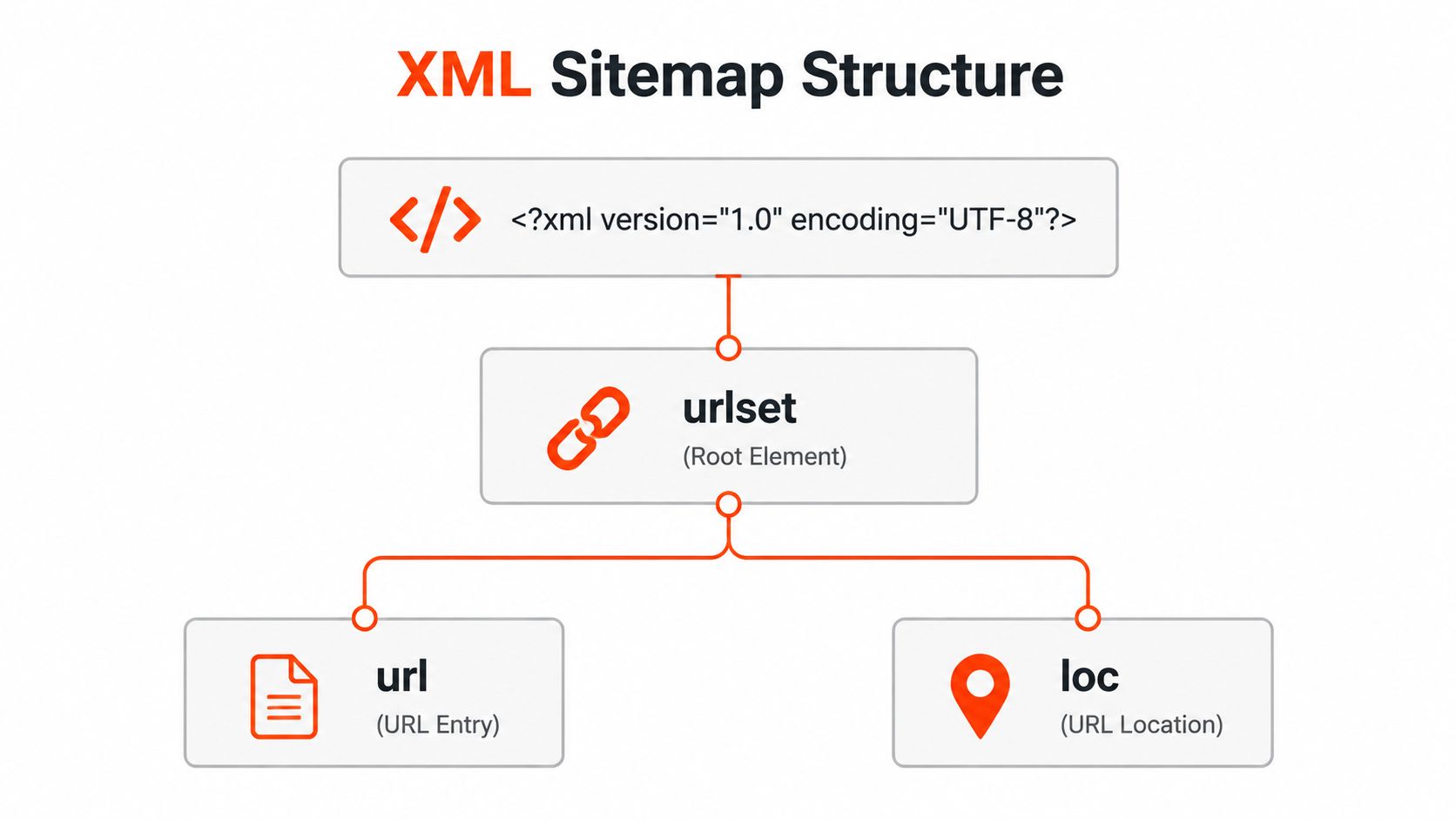
You can manage XML sitemap creation without becoming a developer. A reliable sitemap follows a simple structure: an XML declaration, one wrapper for the entries, and a separate block for each URL. Treat it as a publishing file that must stay accurate as pages are added, changed, or removed.
The parts that matter
The opening declaration identifies the file as XML and states its character encoding. UTF-8 is required for reliable handling of characters, especially when URLs or page names include non-ASCII characters.
The <urlset> element wraps the sitemap and includes a namespace declaration. That namespace identifies the sitemap protocol the document follows. A standard page sitemap then contains one <url> block for each page entry.
Inside each block, <loc> holds the full, absolute URL. Include the complete protocol, normally https, the domain, and the correct path. Relative paths such as /services/ do not provide enough information.
<lastmod> is optional, but it helps when it records a real, significant content change. Google advises against changing it for cosmetic edits such as styling, footer changes, or sidebar updates. Misleading dates can weaken trust in the signal over time, as explained in Google’s guidance on sitemap last modification dates.
Tags you shouldn’t overvalue
<changefreq> suggests how often a page changes. <priority> suggests relative importance among URLs on the same site, using values from 0.0 to 1.0, with 0.5 as the default. It does not compare your pages with pages on other websites, under the sitemap protocol.
Google has said it does not use changefreq or priority. Do not spend time tuning them by hand. If your platform adds them, leave honest defaults in place or omit them. Put your attention on accurate URLs and trustworthy lastmod values.
Watch for these construction errors:
- Relative URLs: Replace them with complete absolute URLs.
- Missing protocol: Use the live HTTPS version when that is the canonical version.
- Duplicate homepages: Include the preferred homepage URL once.
- Encoding failures: Keep the document in UTF-8 and escape special characters correctly.
A dependable sitemap contains the pages you publish and maintains their details as the site changes. A managed provider such as 1stNet AI can handle that upkeep, reducing the manual work that lets small business sitemaps become outdated.
Choosing the Right Way to Generate Your Sitemap
A new service page goes live, but the sitemap still lists an old URL. That gap usually comes from the publishing process, not the XML format. Choose a generation method that keeps the file aligned with the way your business adds, removes, and restructures pages.
CMS plugins suit WordPress, Shopify, Wix, and Squarespace sites well. They can regenerate the sitemap as content changes, although output quality depends on plugin settings, theme behaviour, taxonomy configuration, and correct exclusion of noindex pages. Assign someone to review the file after major site changes.
A standalone generator or crawler fits a non-CMS website, a rebuild, or a technical audit. Screaming Frog, xml-sitemaps.com, and Yoast’s external generator can crawl the live site and create a file. The owner must run the tool again and upload a replacement whenever the site changes, so this approach works best for stable sites or one-off projects.
A managed build connects sitemap creation to deployment. The platform can generate the file, preserve URL rules, and update it as pages are created or removed. For owners who do not want to check plugin settings after each structural change, this workflow removes the manual task that lets sitemaps decay.
Compare the routes before choosing
| Route | Best For | Maintenance |
|---|---|---|
| CMS plugin | Sites publishing through WordPress, Shopify, Wix, or Squarespace | Low when configured correctly |
| Standalone generator | Non-CMS sites, audits, or one-off rebuilds | Manual regeneration after changes |
| Managed build | Owners who want generation and upkeep handled with the website | Included in the publishing workflow |
Cost matters, but the maintenance burden matters more. A low-cost file can become expensive if nobody notices that it has stopped reflecting the live site.
For small businesses, use a plugin when a named person owns its settings and checks its output. Choose a standalone generator for a stable website with infrequent changes. Choose a managed workflow when sitemap upkeep should happen alongside publishing, without relying on memory or a recurring manual task. Review website design and hosting options if you are selecting the platform that will manage both the website and its sitemap.
Deciding Which URLs Belong in the Sitemap
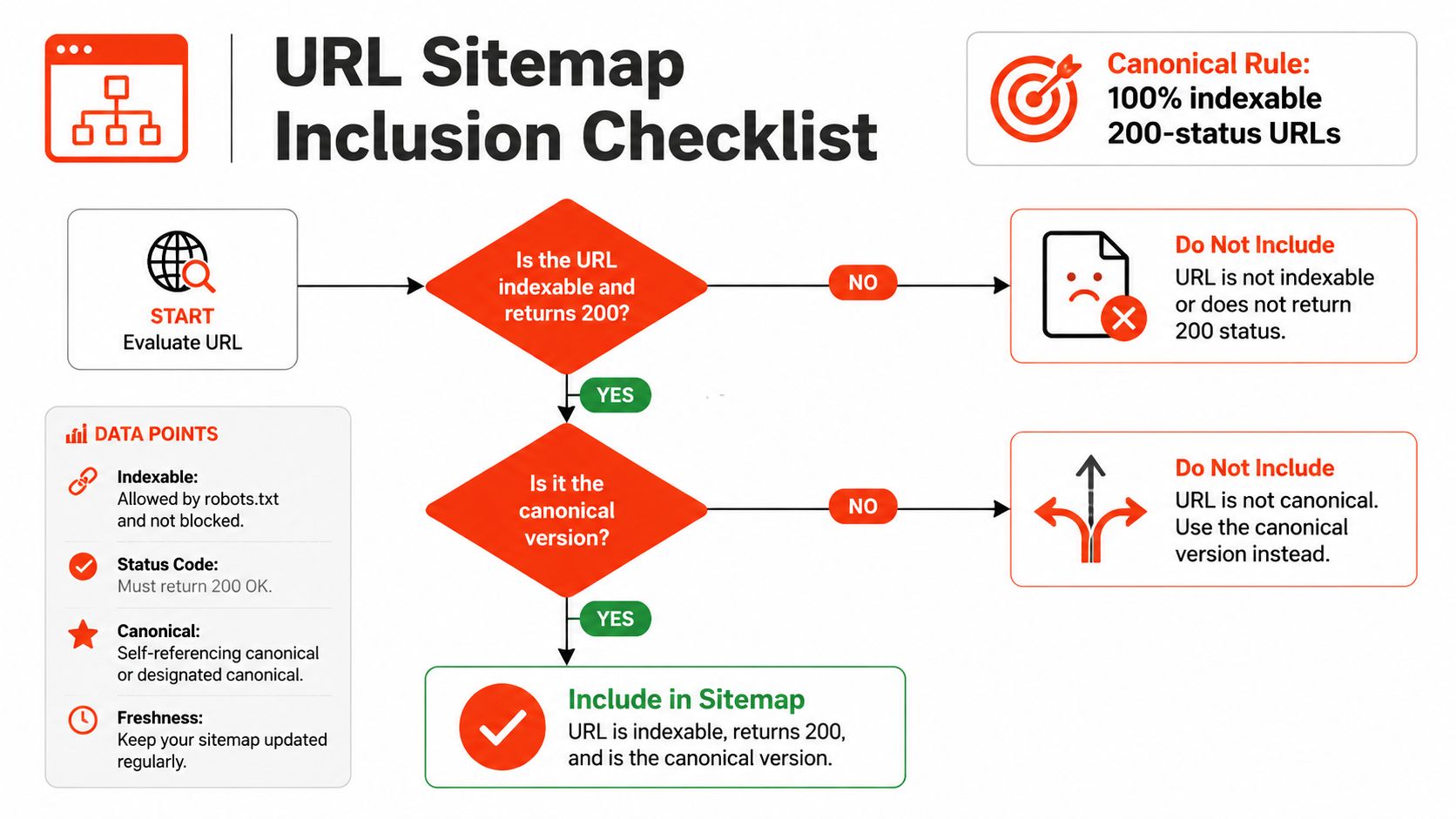
Build the sitemap around pages that deserve discovery in search. Include only indexable, canonical URLs that return a 200 status. Each listed URL should be live, accessible, and the preferred version of its content. This gives search engines a focused set of destinations to crawl.
Use the visitor test
Ask one question: Should this page appear in search results without the visitor needing a special link or context?
If yes, include the canonical URL and add a sensible lastmod value when your publishing process can maintain it accurately. If no, leave the URL out and handle its visibility through the site’s access and indexing settings.
Common exclusions include:
- Admin and staging pages: These are private or temporary destinations.
- Internal search results: They generate combinations instead of useful landing pages.
- Cart, checkout, and confirmation pages: Visitors reach these through a transaction, rather than a search query.
- Thank-you pages: They usually offer little standalone value.
- Thin tag archives: An archive with minimal useful content rarely deserves a place in search.
- Duplicate paginated views: Use the preferred view, such as a view-all page, rather than listing alternate versions.
- Tracking parameters: Remove campaign parameters when they leave the content and canonical URL unchanged.
Parameters require a page-by-page decision. A parameter that changes the product, filter, or language may create a distinct search destination. A tracking string usually identifies the visit, not a separate page.
Watch for structural traps
Review the live response and canonical relationship, rather than relying on the URL list in your CMS. Redirect chains, orphan URLs, and duplicate variants can make a sitemap appear complete while sending crawlers toward the wrong destinations.
Treat inclusion as part of publishing. Whenever a page is created, replaced, consolidated, or removed, the sitemap rules should reflect that change. A managed-build provider such as 1stNet AI can connect URL selection with publishing, reducing the manual upkeep that allows small business sitemaps to decay.
When a site grows beyond one practical file, use a sitemap index that points to separate sitemap files. Google’s standard limits are 50,000 URLs and 50MB uncompressed per sitemap file, so larger sites need a split-file structure as set out in Google’s sitemap documentation. GOV.UK demonstrates this pattern at national scale. Its main sitemap is an index referring to around 30 separate XML sitemap files, and the index was updated on 2026-08-13, showing that sitemap maintenance is an ongoing publishing operation through the GOV.UK sitemap index.
Submitting Your Sitemap to Google and Bing
Before submission, open the sitemap’s stable public URL, usually at the root of the site. It should return a successful response and display valid XML rather than a branded error page, login prompt, or HTML template.

Google Search Console
In Google Search Console:
- Choose the property: Select the verified website property.
- Open Sitemaps: Go to the Indexing area and choose Sitemaps.
- Submit the path: Enter the sitemap URL or sitemap index path and submit it.
- Read the report: Watch the status row and the discovered pages information as Google processes the file.
A success status means Google could fetch and read the sitemap. A failed status points to access, formatting, or URL problems. Partial results mean the file was read but some entries need investigation. The coverage information beneath the report helps you compare submitted URLs with the pages Google has processed.
Don’t treat submission as a promise of indexing. It gives Google a clean discovery source and gives you a place to inspect errors.
Bing Webmaster Tools
Bing uses the same fundamental process. Verify the website in Bing Webmaster Tools, open the Sitemaps area, add the live sitemap URL, and review the processing status. The interface may look older than Search Console, but the objective is identical, provide a reliable list of preferred URLs.
Use URL Inspection tools for individual pages and a site: search for a broad visibility check. Neither confirms that every page will rank, but both can reveal whether important URLs are discoverable.
This video provides a practical visual walkthrough of sitemap submission:
When to resubmit
Search engines can revisit a submitted sitemap as it changes. Resubmit after a major restructure, domain move, or substantial URL change. If you’ve made a minor content update and the sitemap is automated, leave it in place and allow the next crawl to occur.
Expect processing to take days rather than minutes. A sitemap accelerates discovery, but it doesn’t bypass crawling decisions or quality evaluation.
The Errors That Break Small Business Sitemaps
A sitemap may load in a browser and still send search engines the wrong URL list. Treat it as a publishing workflow, not a file you upload once and forget. Each site change can introduce an outdated, blocked, or technically invalid entry.
The most common failure is a noindex page slipping into the sitemap. A content management system may include an entire content type by default, even when those pages should stay out of search results. Remove the URL from the sitemap, then address the indexing directive separately.
| Error | Typical Cause | Quick Fix |
|---|---|---|
| Noindex URLs included | CMS or plugin includes excluded content types | Remove them and check the indexing settings |
| 404 URLs listed | Deleted pages remain in a static file | Regenerate the sitemap |
| 301 chains listed | Old URLs weren’t replaced after a migration | Use the final canonical destination |
| Invalid XML | Plugin emits HTML, fragments, or unclosed tags | Validate the document and update the generator |
| Incorrect namespace | Manual editing or faulty template settings | Restore the standard sitemap namespace |
Misleading lastmod | Build dates, cosmetic edits, or stale values | Record meaningful content changes only |
| Sitemap blocked in robots.txt | A broad disallow rule catches the file | Allow crawler access to the sitemap |
| Empty media extensions | Image, video, or news tags lack valid data | Remove the extension or complete it correctly |
| Oversized file | A single file exceeds protocol limits | Split files and use a sitemap index |
| Encoding errors | Non-UTF-8 characters or unescaped symbols | Save as UTF-8 and escape special characters |
The sitemap protocol allows a single file to contain 50,000 URLs or 50MB uncompressed. A growing site needs an index before reaching that boundary. Check whether your generator can split files automatically, rather than waiting for a submission error.
lastmod creates a separate risk. A future date, the same build date on every page, or a value that never changes makes the signal unreliable. Record a meaningful content update, not a design adjustment or routine deployment.
Check the sitemap’s access path in robots.txt, too. A broad disallow rule can block the file and prevent crawlers from reading it. If the server returns an unexpected response, investigate that response instead of assuming the XML is malformed. Read this 400 Bad Request explanation to distinguish request errors from sitemap-format problems.
For a small business, automated generation is the practical fix. A managed provider such as 1stNet AI can update the file as pages change, apply the site’s URL rules, and reduce the manual upkeep that lets sitemap errors return after every launch or migration.
Your Sitemap Checklist and How 1stNet AI Handles It
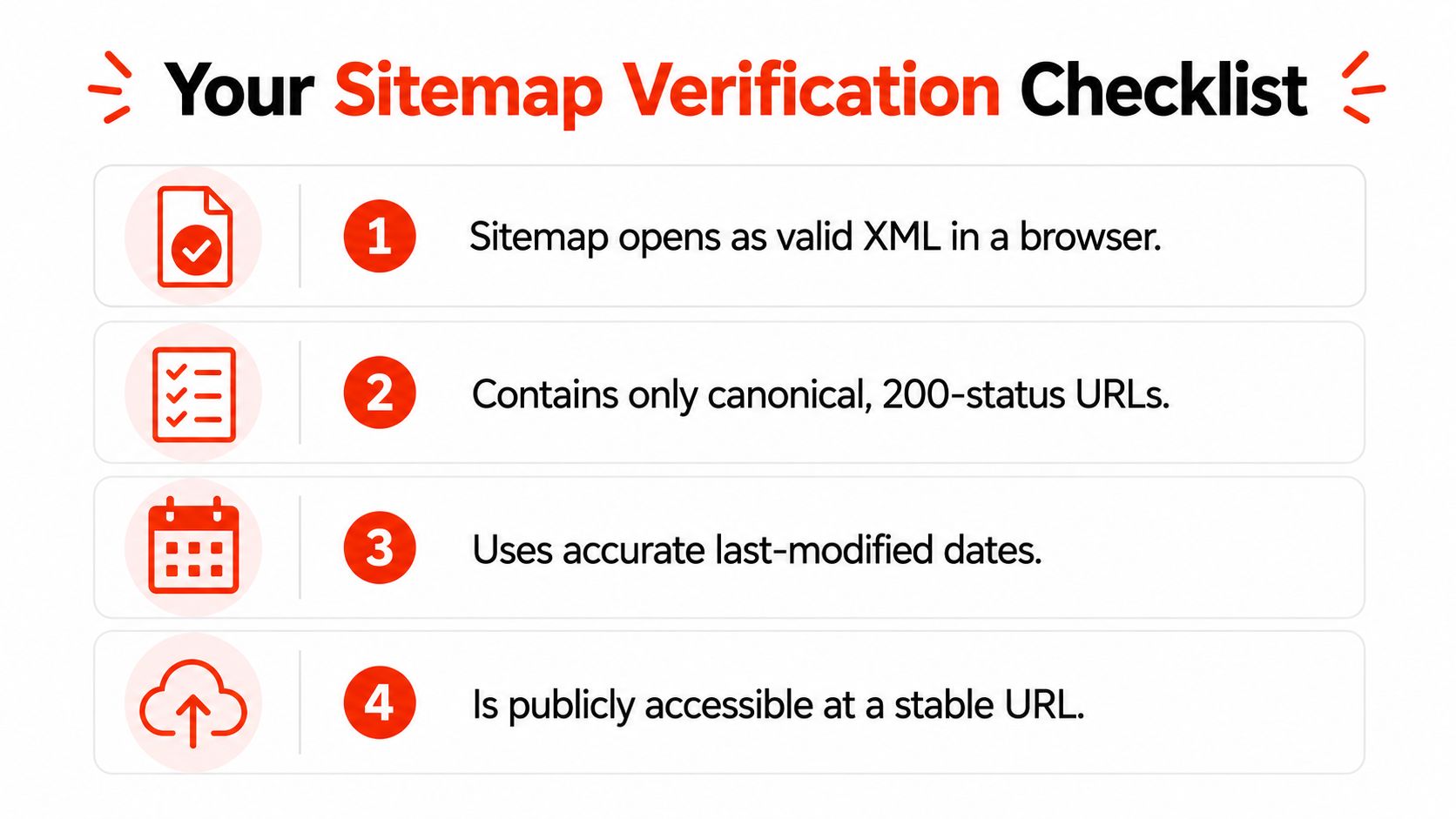
A sitemap should be reviewed whenever you launch a site, change its URL structure, or replace its generator. Use this checklist:
- Open the file: Confirm its public URL loads as valid XML in a browser.
- Check every destination: Keep canonical, indexable URLs that return 200.
- Verify dates: Add
lastmodonly for genuine content changes. - Confirm access: Keep the sitemap at a stable public URL and reference it in
robots.txt. - Remove clutter: Exclude redirects, noindex pages, duplicate parameters, forms, internal search results, and other non-search destinations.
- Inspect reporting: Submit the sitemap index or main sitemap in Google Search Console and Bing Webmaster Tools. Review status and coverage information.
- Schedule ownership: Assign responsibility for checks after publishing services, products, locations, or structural changes.
Treat XML sitemap creation as part of publishing, not as a one-time file upload. A managed website build can configure generation at launch, connect the live sitemap to search-engine tools, preserve canonical URL rules, and monitor changes as the site develops.
That workflow prevents the upkeep problems that make small business sitemaps decay. Owners retain access to the files and reporting platforms, while the process keeps the sitemap aligned with new pages and structural changes. With a CMS plugin, assign someone to review its output. With a standalone generator, schedule regeneration after every meaningful URL change.
Test the current sitemap first. Then configure the right plugin or arrange a managed-build review before publishing more pages.
1stNet AI provides fast, SEO-friendly websites with domain, SSL, hosting, maintenance, and ongoing support included. XML sitemap creation becomes part of the launch and publishing workflow instead of a forgotten file. To learn more about a managed website build, visit 1stNet AI or use the interactive live chat to discuss your project. Call 0204 577 2255 to get started. Every project includes a 30-day money-back guarantee.