

You’re probably in one of two places right now. Either you’ve delayed launching your online store because every guide turns into a maze of apps, tax settings, themes, plugins, and jargon, or you’ve already tried piecing it together and realised the “easy” route still eats evenings, weekends, and patience.
That’s normal. Most small business owners don’t fail because they lack ambition. They get stuck because building an online shop involves business decisions, legal setup, operations, payments, content, mobile design, and visibility simultaneously. If any one of those is weak, the whole thing feels fragile.
The opportunity is still real. Online retail dominated UK business registrations in 2025, with exactly 24,240 new online store startups recorded, making it the largest single category of new ventures in the country, according to Companies House-based reporting covered by Digital Journal. That tells you two things at once. Starting is more accessible than ever, and competition is no longer forgiving.
If you want to learn how to start an online store properly, the aim isn’t just to get a site live. It’s to launch a store that can take payments cleanly, survive first contact with real customers, and avoid burning months on avoidable setup errors.
Table of Contents
- Starting Your Journey into UK E-commerce
- Planning Your Business Before You Build
- Choosing How to Build Your Online Store
- Configuring Payments, Shipping,g and Tax
- Preparing for Launch with SEO and Marketing
- Understanding Timeliness, Costs, and the Accelerated Path
- From Plan to Profit: Profit Your Next Step
Starting Your Journey into UK E-commerce
Most UK business owners don’t start with a clean brief. They start with pressure. A supplier is ready. A competitor is already selling online. Customers keep wondering if they can find the website. Or a side project has outgrown DMs, spreadsheets, and bank transfers.
That pressure often leads to the wrong first move. People jump straight into themes, logos, and platform comparisons before they’ve decided what they’re selling, how fulfilment will work, or what kind of buying experience their customers expect. That’s how stores go live: polished on the surface, messy underneath.

Why the market is attractive and crowded
The UK is a serious e-commerce market, not a fringe channel. It’s mature, customers are comfortable buying online, and mobile shopping now shapes most buying journeys. That makes online retail a genuine route for a small business, not just a bolt-on to a physical operation.
It also means buyers are less patient than owners expect them to be. They compare your shop to the last five they used. If your store is slow, unclear, awkward on mobile, or fuzzy on delivery and returns, they won’t give you the benefit of the doubt.
Practical rule: Your first version doesn’t need every feature. It does need to look trustworthy, load cleanly, and answer buying questions fast.
What matters more than getting online fast
Speed matters, but rushed confusion is expensive. A quick launch works only when the essentials are already decided. That means your products, pricing logic, delivery approach, returns handling, and business setup are organised before the build work starts.
A useful way to think about how to start an online store is this:
| Focus area | Weak launch | Strong launch |
|---|---|---|
| Product offer | Too broad, unclear | Specific, easy to understand |
| Customer journey | Attractive but confusing | Simple path from browse to checkout |
| Operations | Figured out later | Ready before traffic starts |
| Mobile use | Shrunk desktop design | Built for phone-first buying |
| Trust signals | Missing or inconsistent | Clear policies, secure checkout, business details |
If you get those basics right, the technical side becomes far easier to manage. If you skip them, even a good-looking store can become a daily source of friction.
Planning Your Business Before You Build
Before you choose Shopify, WooCommerce, or anything else, decide what business you’re building. A lot of wasted money comes from treating the website as the business plan. It isn’t. It’s the sales interface.
Choose a market you can actually serve
Start with a narrow offer. “Homeware” is too broad. “Hand-poured soy candles for gifting” is clearer. “Replacement parts for vintage hi-fi equipment” is clearer still. Specific beats broad because it sharpens your pricing, photography, delivery promise, and product descriptions.
Work through these questions before you touch a design template:
- What problem are you solving: Convenience, price, specialist supply, customisation, speed, or quality?
- Who is the buyer: Busy parents, trade customers, collectors, local buyers, gift shoppers, repeat household purchasers.
- What makes your version easier to buy: Better bundles, clearer sizing, local delivery, faster dispatch, easier returns, or stronger product guidance?
- How will you fulfil orders: Hold stock yourself, make to order, source per order, or run a hybrid model?
A practical early task is securing your brand name and web address. If you need help understanding how naming and web addresses fit together, this guide on what a domain name is is worth reading before you register anything.
If you can’t explain in one sentence who the store is for and why they should buy from you, the website will struggle no matter how nice it looks.
Sort the business structure and compliance early.
In the UK, many founders leave compliance until the store is nearly ready. That’s backwards. Your legal setup affects invoicing, banking, tax, customer trust, and how you trade from day one.
Decide early whether you’ll operate as a sole trader or a limited company. Then make sure your public-facing details, payment setup, and bookkeeping match that decision. If you’re forming a limited company, Companies House registration isn’t optional. If your turnover exceeds the VAT threshold, you must register for VAT.
Operational planning matters as much as legal setup. A 2025 UK small business survey found that 42% of new e-commerce sellers experienced a major operational failure within 30 days of launch, often because they lacked clear processes for issues such as overselling or returns, as reported by Grumspot’s review of UK e-commerce setup problems.
That number rings true in practice. Stores rarely break because the homepage colour was wrong. They broke because the owner didn’t decide what would happen when:
- An item is out of stock after purchase
- A parcel goes missing
- A customer wants a refund
- An order arrives damaged
- Payment is captured, but the order doesn’t sync properly
Write those workflows down in plain English. Keep them short. Your future self will need them when the first awkward order lands on a Friday afternoon.
Choosing How to Build Your Online Store
Most owners lose momentum, assuming the decision is purely technical, when it’s really about time, risk, and who will maintain the thing once it’s live.
What the DIY route gives you
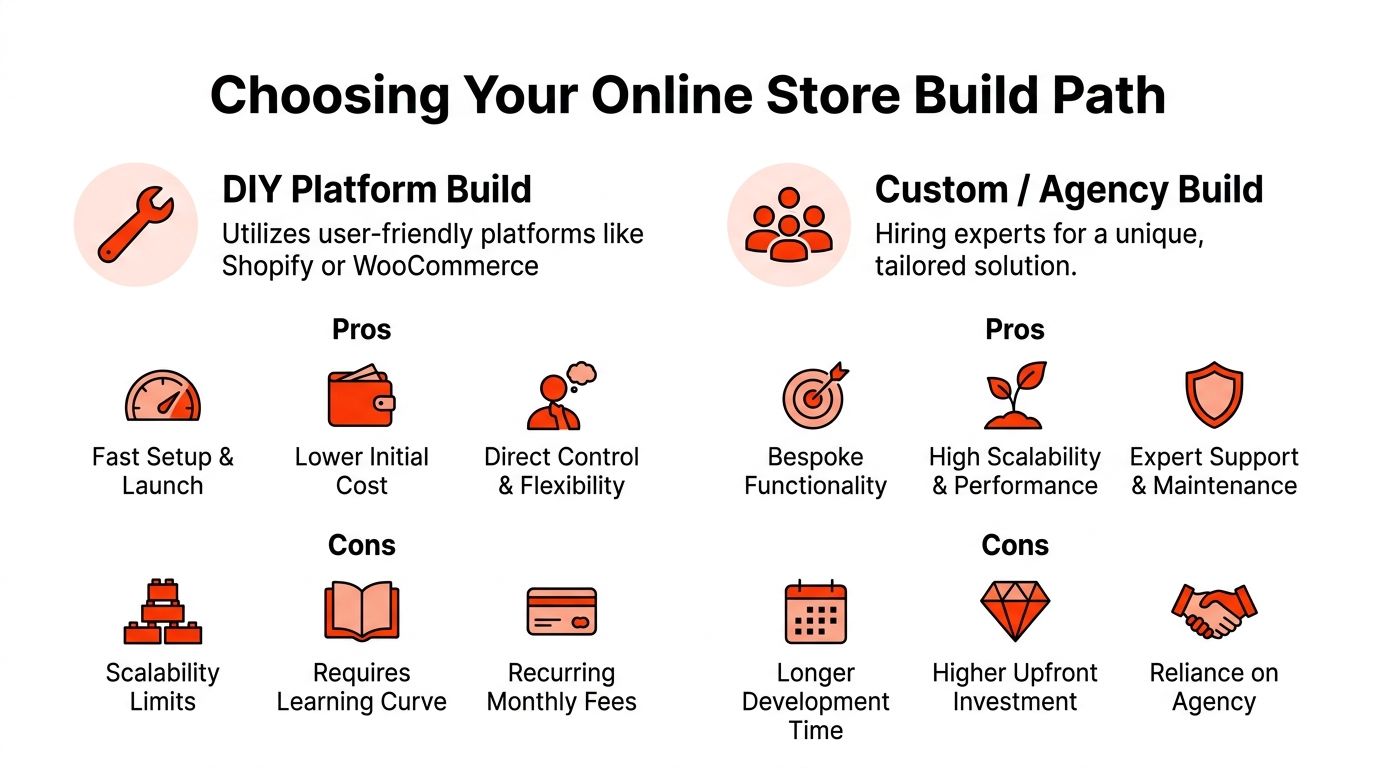
DIY platforms such as Shopify and WooCommerce are popular for a reason. They reduce the barrier to entry and let you control the build directly. If you’re comfortable learning as you go, they can work well.
The appeal is obvious:
- You can start quickly: pick a theme, add products, and begin shaping the shop yourself.
- You control the stack: Apps, plugins, page layout, copy, and product structure stay in your hands.
- Initial spending can feel lower: You can spread the cost across monthly tools rather than paying for a full custom project upfront.
The problem is that platform access isn’t the same as launch readiness. Checkout flow, mobile behaviour, shipping logic, tax settings, image handling, and trust signals still need proper work. In the UK, 68% of new online stores launched on self-build platforms fail within 12 months, primarily due to inadequate checkout optimisation and weak mobile-first design, according to Shopify’s UK guidance on starting an online store.
That failure point is usually not dramatic. It’s death by friction. Product pages load too slowly. Variant selection is clumsy. Delivery terms are vague. Checkout feels awkward on a phone. The owner keeps patching problems instead of selling.
A short video can help frame the build decision before you commit to a route:
What a managed build changes
The alternative is a managed build, where a specialist team handles site setup, technical configuration, design, security, hosting, and ongoing upkeep as a single service.
This route suits owners who don’t want to become part-time web managers. You still need to make business decisions, approve content, and provide product information. Still, you don’t have to troubleshoot plugin conflicts, compare hosting plans, or decode payment gateway settings at midnight.
The trade-off is straightforward:
| Build route | Best for | Main risk |
|---|---|---|
| DIY platform | Owners with time, curiosity, and tolerance for trial and error | Hidden complexity and inconsistent execution |
| Managed service | Owners who need speed, accountability, and less technical burden | Less hands-on control over every small technical choice |
A simple decision filter
Choose DIY if most of these are true:
- You enjoy the technical setup
- You have time every week for testing and maintenance
- Your product range is modest
- You’re comfortable fixing problems after launch
Choose managed if most of these are true:
- You need to launch without a long build cycle
- You don’t want separate providers for hosting, SSL, and maintenance
- You want one point of responsibility
- Your time is better spent on sourcing, fulfilment, and sales
A store owner should spend more time improving the offer than debugging the shop.
That’s the trade-off. Not freedom versus restriction. It’s whether your business benefits more from direct technical control or from getting a reliable store live without carrying the whole build on your back.
Configuring Payments, ShippingTax, and Tax
A store can look excellent and still fail at the boring parts. Payments, shipping, and tax settings are the engine room. If they’re wrong, customers feel it immediately.
Payments first because trust breaks fastest here
Start with payment gateways that UK customers already recognise, such as Stripe or PayPal. What matters isn’t just brand familiarity. It’s whether checkout feels secure, fast, and clear on mobile.
Your payment setup should cover:
- Secure processing: Use a properly configured SSL-secured setup and established gateways rather than improvised payment arrangements.
- Clear card and wallet options: Offer the methods your audience is likely to expect.
- Simple checkout flow: Remove unnecessary fields and test every step on a phone.
- Confirmation emails: Customers should know their order went through without having to guess.
If you’re comparing providers or trying to understand the practical side of checkout integration, this guide to a website payment gateway gives a useful overview.
A common mistake is focusing on fees before conversion. Saving a small amount on processing means very little if the checkout experience feels uncertain and buyers abandon the basket.
Shipping rules need clarity, not guesswork.
Shipping is where many new stores create avoidable support work. If your rates are confusing, your dispatch times are vague, or your zones are wrong, customers start emailing before they order.
Set up shipping in layers:
Define where you deliver
UK only, selected regions, local delivery, or broader coverage.Choose a pricing model.
Flat rate, free shipping above a threshold, product-based charges, or weight-based rules.Set dispatch expectations
Say when orders go out, not just how long delivery might take.Write the exceptions
Highlands, islands, made-to-order items, larger parcels, and busy periods need clear wording.
Practical discipline proves its worth. A neat storefront won’t compensate for delivery surprises. Customers care less about how clever your shipping matrix is and more about whether you told them the truth before they paid.
Tax is boring until it becomes expensive.
Tax setup needs sober attention. If you’re trading in the UK, understand when VAT registration becomes mandatory and how your platform handles VAT-inclusive or VAT-exclusive pricing.
Key points to lock down early:
- VAT threshold awareness: If turnover exceeds £90,000, VAT registration becomes mandatory under HMRC rules, a requirement noted in the verified guidance above.
- Displayed pricing: Ensure customers understand whether prices include VAT, where applicable.
- Record keeping: Your accounting should match how your store records sales, refunds, and shipping charges.
- Entity consistency: Business name, bank account, invoices, and tax treatment should all line up.
Customers forgive a late parcel more readily than a messy refund or a payment problem.
The owners who handle this well don’t necessarily use complex systems. They make clear decisions early and test every transaction path before launch.
Preparing for Launch with SEO and Marketing
A store that isn’t visible won’t rescue itself by being well built. Visibility starts before launch, not after the first disappointing month.
Build visibility into the store before launch.
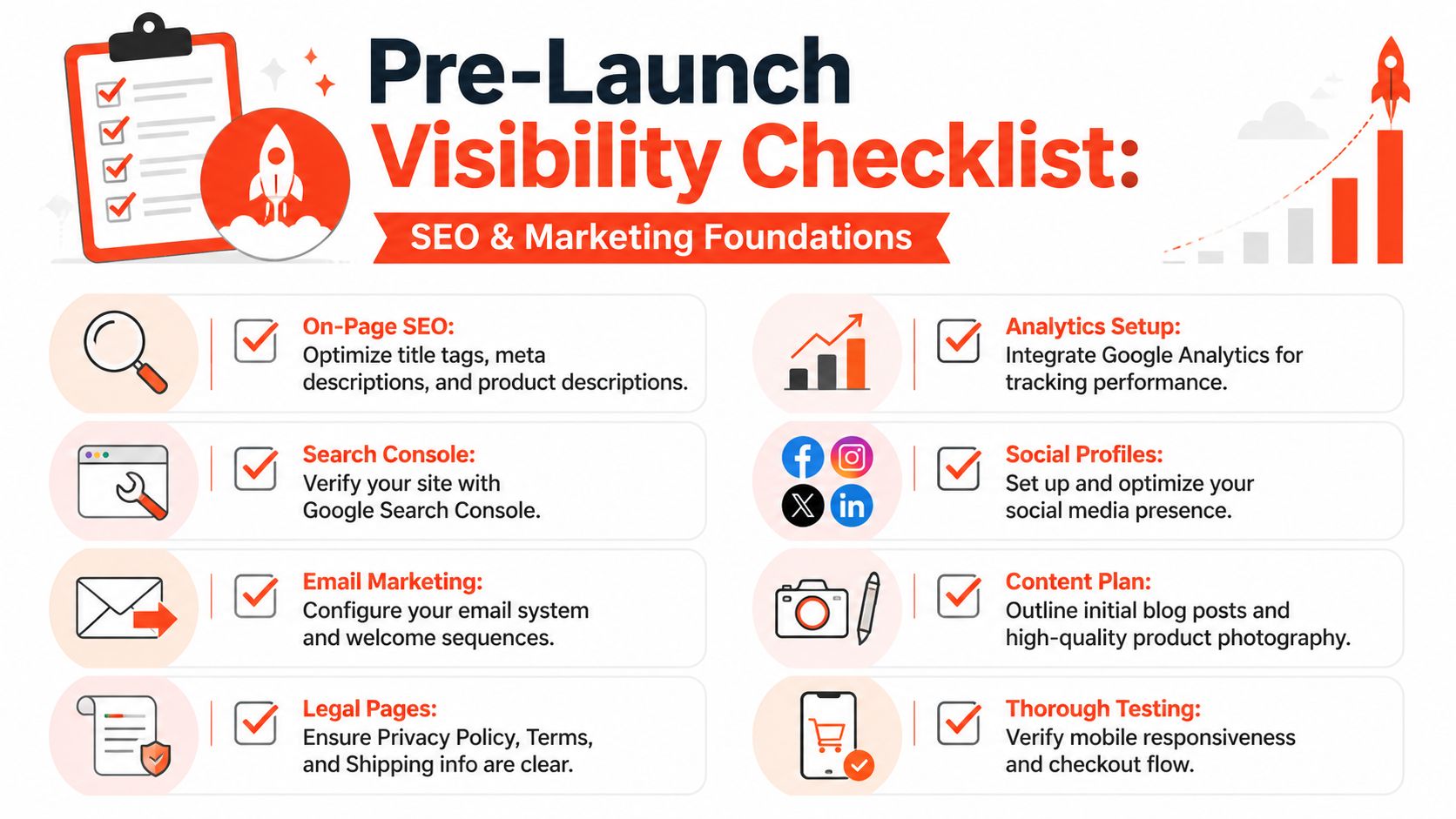
The basics still matter. Every important page needs a sensible title tag, a useful meta description, clean headings, and copy that sounds like a real person helping a buyer make a decision. Product descriptions should answer the obvious questions buyers have. Category pages should explain what belongs in each category. Images should have meaningful file handling and supporting text.
Structured data is often the missing piece. It helps search engines understand products, prices, reviews, and availability in a more organised way. That matters even more now that search results increasingly pull information into richer formats.
Stores that implement AI-visibility optimisation, such as product and review schema markup, see a 2.3x increase in organic traffic within 60 days of launch, according to Real Business coverage on setting up an online shop in the UK. If you want the design side of this done properly from the beginning, this overview of SEO-friendly web design is a good reference point.
A practical pre-launch marketing stack usually includes:
- Google Analytics 4: So you can see where traffic comes from and what people do.
- Google Search Console: So indexing issues and search visibility don’t stay hidden.
- Email capture: Even a simple signup box gives you a list to build from.
- Core social profiles: Secure your brand handles and point them to the store.
- Foundational content: Clear About, Shipping, Returns, Privacy, and Contact pages.
Do the checks that most owners skip
Many launches underperform because no one tested the entire buying journey end-to-end. Owners click around the homepage, admire the design, and then announce the store. That isn’t testing.
Run through the site like a sceptical customer:
| Pre-launch check | What to verify |
|---|---|
| Mobile browsing | Navigation, filters, text size, image behaviour |
| Product page clarity | Price, options, delivery, returns, trust cues |
| Basket and checkout | Edits, coupon logic, shipping calculation, and payment success |
| Emails | Order confirmation, payment confirmation, and enquiry forms |
| Legal pages | Returns, privacy, terms, shipping information |
Launch day should not be the first time you place a full test order on your own website.
You don’t need a huge marketing plan on day one. You do need a store that search engines can read, customers can trust, and analytics can measure.
Understanding Timelines, Costs, and the Accelerated Path
Most owners ask two questions early. How long will this take, and what will it really cost once all the extras appear? Both matter because delays and hidden costs usually go hand in hand.
What the normal timeline looks like
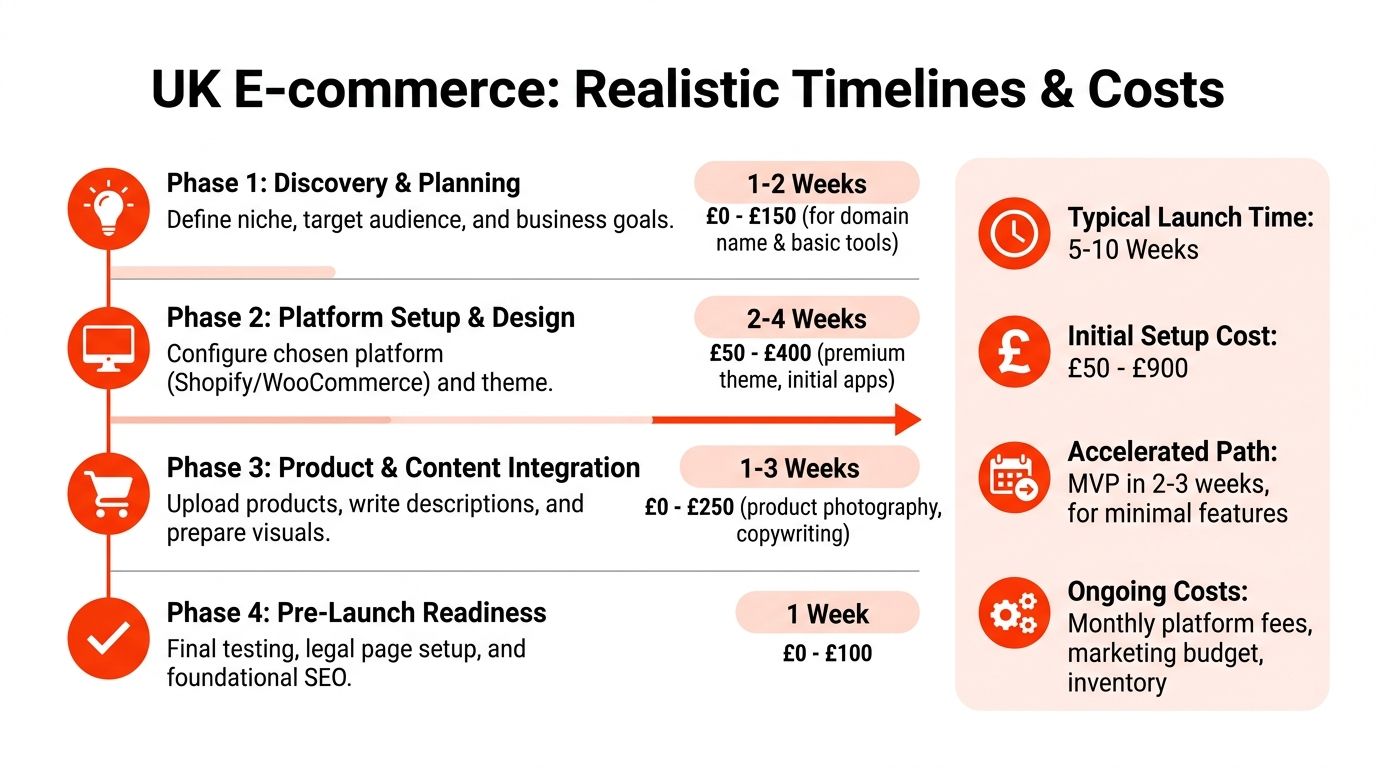
A standard UK e-commerce build usually takes longer than first-time founders expect. That isn’t because developers type slowly. It’s because decisions, revisions, content, product data, approvals, and testing all take time.
According to Cambria Digital’s overview of UK website build timelines, an e-commerce shop typically requires 8 to 14 weeks. That aligns with what many small businesses experience once product uploads, legal pages, and revisions are included.
Another point owners often miss is that the main bottleneck is frequently client readiness, not code. Superfast Websites’ discussion of small business website timing notes that the biggest variable is how quickly the client provides final content and approvals. In plain terms, if your products, pricing, photos, and policies aren’t organised, any “fast build” promise starts slipping.
What costs continue after launch
The initial build is only part of the budget. UK small businesses should also expect ongoing spend for hosting, maintenance, updates, and security.
Two benchmarks are useful here:
- A professionally built small business website in the UK priced between £2,000 and £5,000 typically pays for itself within 6 to 12 months through increased enquiries, according to Weblane’s UK small business website statistics.
- Ongoing hosting, maintenance, and security updates typically cost £50-£200 per month, according to Cloudswitched’s guide to web design costs for UK small businesses.
Those figures matter because piecemeal setups often look cheaper than they are. A low-cost start can turn into multiple subscriptions, separate hosting support, security add-ons, paid plugin renewals, and adhoc developer fixes.
Why the accelerated route appeals to SMEs
There’s a reason accelerated builds are gaining traction with UK SMEs. They cut dead time. Instead of waiting through a conventional agency cycle, owners can move from idea to live presence much faster if the essentials are prepared.
The performance case for this approach is notable. While a standard UK ecommerce shop takes 8 to 14 weeks to build, an accelerated build methodology can significantly compress this timeline, leading to a 34% higher first-year survival rate for startups. That benchmark appears in the verified data tied to the Real Business reporting already cited earlier.
The practical catch is simple. Fast only works when the scope is disciplined.
A workable accelerated launch usually depends on:
- Content-first readiness: Product names, prices, descriptions, images, and policies are prepared before build starts.
- A bundled setup: Domain, SSL, hosting, maintenance, and design are handled together.
- Clear review steps: Fewer rounds of vague revisions, more decisive approvals.
- A realistic first version: Launch the core shop now, then improve based on real use.
That’s why managed, all-in-one services appeal to non-technical owners. They reduce handoffs, cut coordination overhead, and turn a sprawling project into a controlled launch process.
From Plan to Profit: Your Next Step
The cleanest way to start an online store is rarely the most glamorous. You choose a focused offer. You sort out the business setup early. You make the operational rules clear. You build a store that works on mobile, processes payments correctly, and tells customers exactly what to expect.
That approach beats endless tinkering.
If you’ve got time, technical confidence, and patience, a DIY route can work. If you need speed, accountability, and less friction, a managed path usually makes more commercial sense. The mistake is thinking you must do everything yourself to keep control. In practice, smart owners keep control by making the key business decisions and removing avoidable technical drag.
A strong first launch doesn’t have to be perfect. It has to be credible, usable, and ready for real customers. That’s what gets you from planning to revenue.
Launch your website fast with a domain, SSL, hosting & maintenance included. In an hour. 1stNet AI Ltd website team. We transform your online presence with a stunning website. Call us now at 0204 577 2255. Don’t miss this chance to boost your brand!
All our work comes with a 30-day money-back guarantee. WE OFFER AN INTERACTIVE LIVE CHAT SYSTEM TO DESIGN YOUR WEBSITE.