For a UK small business, website maintenance costs can start at £20 to £40 a month for a very basic, largely automated setup, and rise to £80 to £200 a month for managed support, with some services going beyond that when you need more hands-on help. The price comes down to one thing: how much support your website needs once it’s live.
That’s usually the moment the confusion starts. The site has launched, the logo looks right, the contact form works, and then the emails begin. WordPress update available. Plugin licence renewal is due. SSL needs checking, and the hosting invoice is due. Backup failed. Security alert. Suddenly, what felt like a finished project turns into an ongoing responsibility.
Most small business owners don’t mind paying for proper upkeep. What they mind is not knowing what they’re paying for, who’s responsible when something breaks, and why year one felt manageable but year two starts to look expensive. This is the core issue with website maintenance costs in the UK. It’s rarely just one fee. It’s often a stack of separate services, separate suppliers, and separate problems.
If you run a brochure site, a local service business website, or a small online shop, the smart question isn’t” What’s the cheapest plan?” It’s “What’s the total cost of ownership, and what risks am I taking on if I cut corners?” That’s where bundled, predictable support often beats the piecemeal route.
A common scenario goes like this. A business owner pays for a new website, gets the handover, and assumes the main spend is done. A month later, the hosting renews. Then a premium plugin asks for a licence renewal. Then, the contact form stops sending because something was updated in the background. Nobody feels like they were lied to, but plenty of owners feel they were only told half the story.
That’s why website maintenance costs are often misunderstood. It sounds like a technical extra. In practice, it’s what keeps your site open, secure, loadable, and usable for customers who don’t care whether the problem sits with hosting, WordPress, a plugin, or your SSL certificate. They see a business website that works, or one that doesn’t.
For a small UK business, the cost isn’t just the monthly invoice. It’s the cost of fragmented responsibility. If one supplier hosts the site, another built it, a third sold the plugin, and you’re left coordinating updates, you end up paying in time and stress as much as money. That’s why I usually tell owners to look at the whole ownership picture, not a single line item. A helpful starting point is this guide to website costs, because launch and maintenance costs are more closely tied than is commonly understood.
What that monthly fee is really buying
A maintenance plan isn’t there to make your site prettier. It’s there to reduce business risk.
Think of it as paying for:
Operational continuity so the site stays live and functional
Preventative care, so updates and checks happen before faults pile up
Recovery options so there’s a way back if something breaks
Accountability so one party is responsible when there’s an issue
Practical rule: If your website brings in enquiries, bookings, or sales, maintenance is not a technical luxury. It’s business overhead.
The awkward part is that many cheap plans only cover the easy jobs. They automate updates, run a scan, and send a report. That can be fine for a simple static site. It’s much less fine when your site has booking tools, WooCommerce, paid themes, premium plugins, or regular content changes.
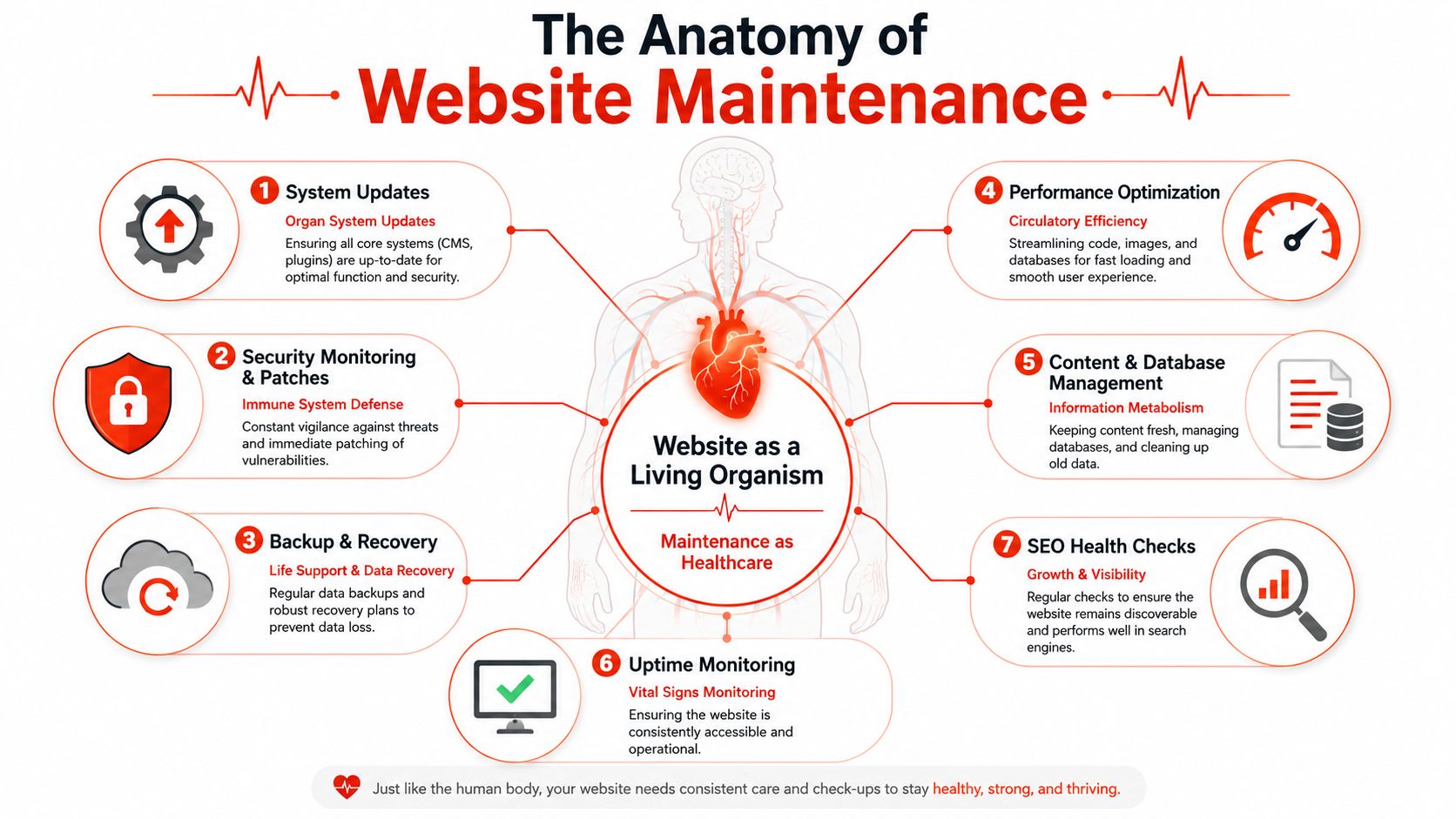
What Is Included in Website Maintenance Services
Website maintenance covers the work that keeps your site available, secure, fast enough to use, and recoverable when something goes wrong. For a UK small business, that matters because a cheap plan can look fine in year one, then turn expensive in year two when plugin renewals, hosting issues, broken forms, and support gaps start landing on your desk separately.
A proper service usually includes several jobs working together. If one is missing, the saving often shows up later as downtime, admin time, or a repair bill.
Security monitoring checks for malware, suspicious logins, vulnerable plugins, and other known weaknesses before they become live problems.
Software updates keep WordPress, themes, plugins, and sometimes server software current. Updates prevent bigger security and compatibility issues, but they also need testing because they can break forms, layouts, or checkout tools.
Backups and recovery give you a usable restore point. That matters more than the word “backup” on a sales page. If a provider cannot restore the site quickly and cleanly, the backup is not worth much.
Performance checks look for slow pages, heavy images, bloated databases, caching issues, and other factors that degrade the user experience.
Uptime monitoring alerts someone when the site goes down, instead of waiting for a customer to tell you.
Content and database housekeeping clears out spam, revisions, broken media references, and old plugin leftovers that build up over time.
Support and troubleshooting cover the messy real-world jobs. A plugin update conflicts with your theme. A form stops sending. A page builder behaves oddly after a PHP change. Someone has to investigate and fix it.
Hosting
often sits in the middle of this, even when it is sold separately. Slow servers, weak backups, limited support, or outdated PHP can create maintenance problems that no plugin can solve. If you are comparing providers, it helps to understand what good web hosting for small businesses includes, because hosting and maintenance costs overlap more than many owners expect.
The part that catches people out is the scope.
Some providers include routine fixes, plugin licence management, hosting support, and a small allowance for content edits. Others run automated updates, store backups, and stop there. Both can be called “maintenance”. Only one reduces the time you spend chasing different suppliers when the site misbehaves.
Compliance is another common gap. Baslon Digital notes in its breakdown of UK website maintenance costs that many generic guides quote £50 to £150 per month for small-business maintenance, while UK SMEs needing GDPR-focused support can face an additional £200 to £500 per month for legal data auditing and automated compliance updates. That is exactly the kind of cost that gets missed in a DIY setup until the second year.
Ask one direct question before you sign anything.
“If an update breaks my contact form, booking system, or checkout, do you fix it within the plan, or do you quote for the repair separately?”
The answer tells you what you are really buying. A bundle with hosting, licences, monitoring, updates, backups, and actual support usually costs more on paper. Still, it gives you a far more predictable total cost of ownership than stitching five services together and hoping they cooperate.
Key Factors That Influence Your Maintenance Costs
A small business site can look modest from the outside and still be expensive to keep stable. The key question is not how many pages it has. It is how many things have to keep working together every day without someone on hand to sort out the fallout.
Complexity is usually the first thing that drives up costs. A five-page brochure site with one contact form is one job. Another is a lead generation site with CRM integrations, call tracking, cookie tools, page builders, and event tracking. Add online payments, customer accounts, or custom code, and the maintenance work shifts from routine admin into active risk management.
The pattern is usually straightforward:
Brochure sites cost less to maintain when content changes are rare, and the site does not store customer data or process payments.
Lead generation site needs closer attention because broken forms, tracking errors, or integration failures can cut off enquiries.
E-commerce site costs more because revenue depends on checkout, payment gateways, stock sync, account access, and data security, working together.
Custom functionality raises support time because off-the-shelf maintenance tools rarely diagnose bespoke problems properly.
Hosting matters as well. Cheaper shared hosting can be fine for a simple site, but it often gives you less performance headroom, less control, and slower fault-finding when something goes wrong. If you are weighing up the trade-offs, this guide to web hosting for small businesses is worth reviewing, because hosting and maintenance are often billed separately, even though they affect the same outcome.
The second big cost driver is technical debt.
This is the part that creates Year Two Shock for small businesses. A site may launch at a low upfront price, then become expensive to maintain because it relies on too many plugins, duplicate tools, expired licences, and quick fixes that no one documented properly. The monthly fee looks manageable in year one. The renewals, conflicts, and repair work show up later.
Gravitate Design’s guide to website maintenance costs highlights this problem directly, noting the hidden cost of plugin churn. Tools such as Yoast or Elementor can add £100-£500 per year, and Year Two renewals can turn a £30 per month site into a £100+ per month burden.
A cheap build can create an expensive maintenance plan if it depends on too many add-ons to stay functional.
I see this most often with fragmented setups. One company supplies hosting. Another built the site. Plugin licences sit on a freelancer’s account. Backups live in a separate tool. No single provider owns the full stack, so every issue turns into a blame trail and an extra invoice. On paper, each service looked cheaper. In practice, the total cost of ownership is higher because the business owner ends up paying for delays, fixes, and lost time.
That is why maintenance costs are rarely about one line item. They are shaped by site complexity, build quality, hosting quality, and the number of suppliers involved when something breaks. Bundled plans usually cost more than bare-bones automation, but they often give UK small businesses a more predictable bill and far fewer surprises after launch..
Typical UK Website Maintenance Price Ranges for 2026
A small business owner often starts with a simple question. What should this cost each month?” The honest answer is that the price depends less on the website itself and more on who is taking responsibility when updates fail, forms break, or the site slows down after a plugin change.
That is why UK maintenance pricing is set in bands rather than a single neat average. You are paying for a mix of software, time, monitoring, support access, and risk transfer. Dotwise’s UK maintenance cost analysis shows the average monthly cost for basic website maintenance rose from £69.83 in 2018 to £102.00 in 2025, a 46% increase. Dotwise links that increase to tighter security requirements, routine platform updates, and ongoing performance checks.
What the market ranges actually tell you
The cheapest end of the market usually covers the basics: scheduled updates, backups, and limited support through a ticket system. For a stable brochure site, that can be enough. For an active business site, the low monthly fee often hides a second bill when something needs proper investigation or manual repair.
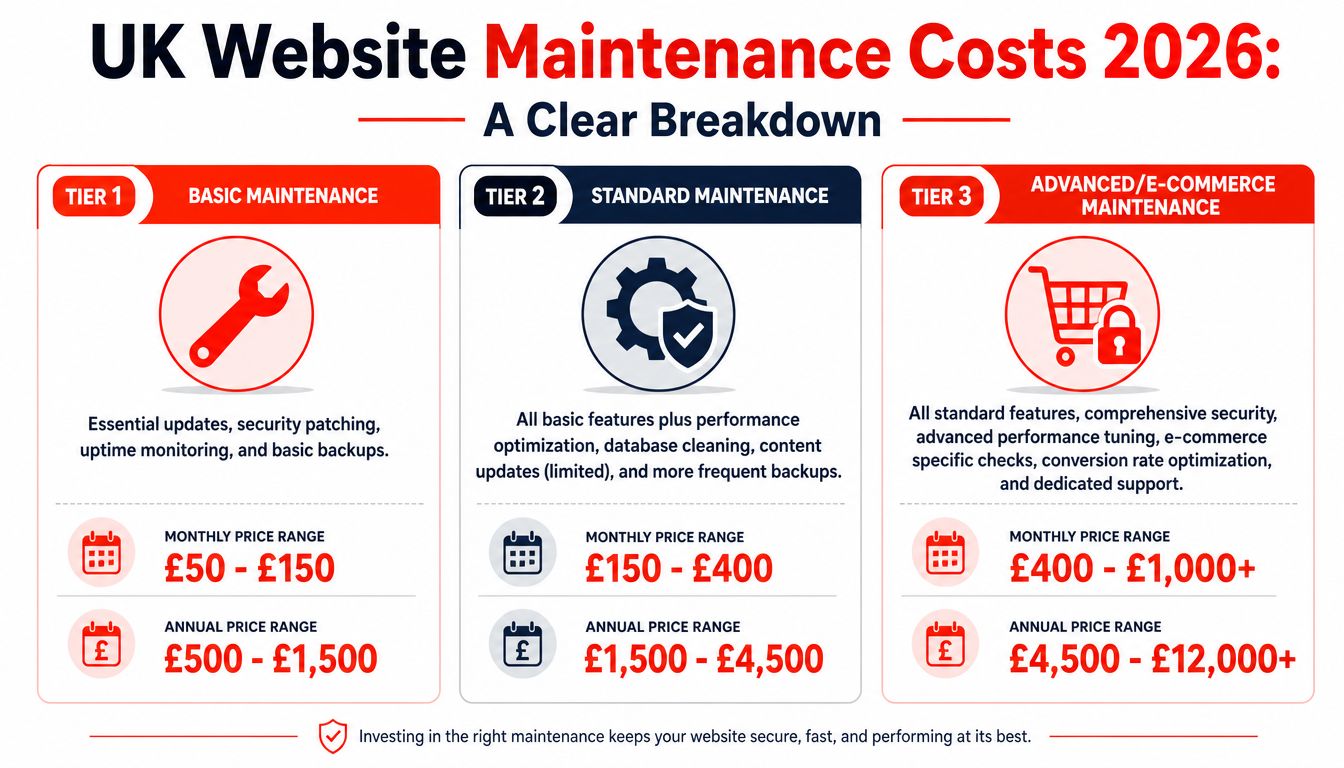
In practice, most UK small businesses fall into three broad pricing bands.
£20 to £40 per month usually buys automated cover for a simple site with very few changes
£80 to £200 per month is the range where managed support starts to make sense for active lead generation sites
£200 to £500+ per month is more common where a provider is handling more hands-on management, coordination, and troubleshooting
£750 to £5,000 per month is typical for e-commerce or revenue-critical sites with higher security, uptime, and operational demands
Those ranges matter because they expose the trade-off. A lower fee can work if the site is clean, lightly used, and not central to day-to-day sales. Once the site drives enquiries, bookings, or online orders, cheap maintenance tends to shift cost into delays, chargeable fixes, and owner time spent chasing different suppliers.
I see the biggest pricing mistakes in year two. The site looked affordable at launch, then licence renewals land, premium plugin support expires, and nobody is quite sure who owns what. A bundled maintenance plan can cost more on paper, but it often gives a small business a steadier monthly number and one clear point of responsibility.
2026 UK Website Maintenance Cost Tiers
Service Tier
Typical Monthly Cost
Best For
Automated basic support
£20 to £40
Simple brochure sites with limited changes
Managed small business support
£80 to £200
Lead generation sites, active business websites, and smaller WooCommerce setups
Agency or strategic support
£200 to £500+
Complex websites needing more hands-on management
E-commerce and revenue-critical support
£750 to £5,000
Online stores with layered operational and security demands
This video gives a useful visual overview before you compare providers in detail.
Cheap pricing only works when the scope covers the jobs that actually keep the site usable, secure, and accountable.
Sample Budgets: Three Ways Startup, Pro, and Max
Let’s apply those price ranges to three common UK business scenarios.
The useful question is not “What is the cheapest plan?” It is “What will this site cost me to keep useful, secure, and accountable over the next 12 to 24 months?” That is where small firms get caught. Year one often looks tidy. Year two brings renewals, odd faults, supplier chasing, and time lost to jobs nobody priced in at the start.
Startup
A local tradesperson, consultant, or solo professional usually needs a straightforward brochure site that loads properly, shows up for core searches, and sends enquiries without fuss. The workload is usually light. The risk lies in the basics being missed for months because nobody is checking them.
This budget usually suits a simple site with low change volume and a clear setup. You are paying for routine updates, backups, security monitoring, and someone to fix obvious problems before they become bigger jobs.
Cheap plans can work here. They stop being cheap when every small fix becomes a separate invoice, or when you end up spending your own Friday afternoon chasing hosting, plugins, and forms across three suppliers.
Pro
A growing consultancy, clinic, or service business usually needs more regular attention. New landing pages go live. Staff details change. Blog posts and campaign content need to be published. Forms, tracking, and booking tools all need to keep working together.
Monthly costs rise for a sensible reason. The site is active, so the support needs to be active as well. More checks, faster responses, and a bit of included support time usually save money compared with paying ad hoc every time something breaks or needs updating.
For many small businesses, this is the point at which fragmented services start to cost more than they seem. Hosting sits with one company, plugins with another, the developer is freelance, and no one owns the full outcome. A fully managed website support plan gives you one budget line and one point of responsibility, which is often worth more than shaving a little off the monthly fee.
Max
A small e-commerce business, membership site, or lead machine sits in a different category. The website is tied directly to sales or operations. If the checkout fails, stock sync breaks, or a key integration stops talking to the rest of the stack, the problem shows up in revenue straight away.
That changes the budget discussion. You are no longer buying light-touch maintenance. You are buying response time, testing, monitoring, and the capacity to address issues before they lead to missed orders, support tickets, or refund requests.
Here is how the three budgets align with business needs:
Startup suits businesses that need the site to be kept stable and trustworthy
Pro suits businesses that update the site regularly and rely on it for steady lead flow
Max suits businesses where the site supports sales, bookings, or other revenue-critical actions
Choose based on dependency, not optimism.
If the website is a digital brochure, a lean plan may be enough. If it feeds your pipeline or processes payments, the total cost of ownership usually favours a bundled service with a clear scope, because it cuts hidden costs for owner time, emergency fixes, and supplier confusion.
Choosing Your Path: Self-Managed vs Fully Managed
Many small business owners start with the DIY route for a good reason. It looks cheaper, and in year one it often is. Then year two arrives. Renewals stack up, plugins need attention, the hosting company blames the theme, the freelancer who built the site is harder to reach, and you are the one trying to join the dots.
This is the choice here. It is not self-managed versus fully managed. It is whether you want a lower visible cost now, or a more predictable total cost of ownership over time.
What you’re really trading off
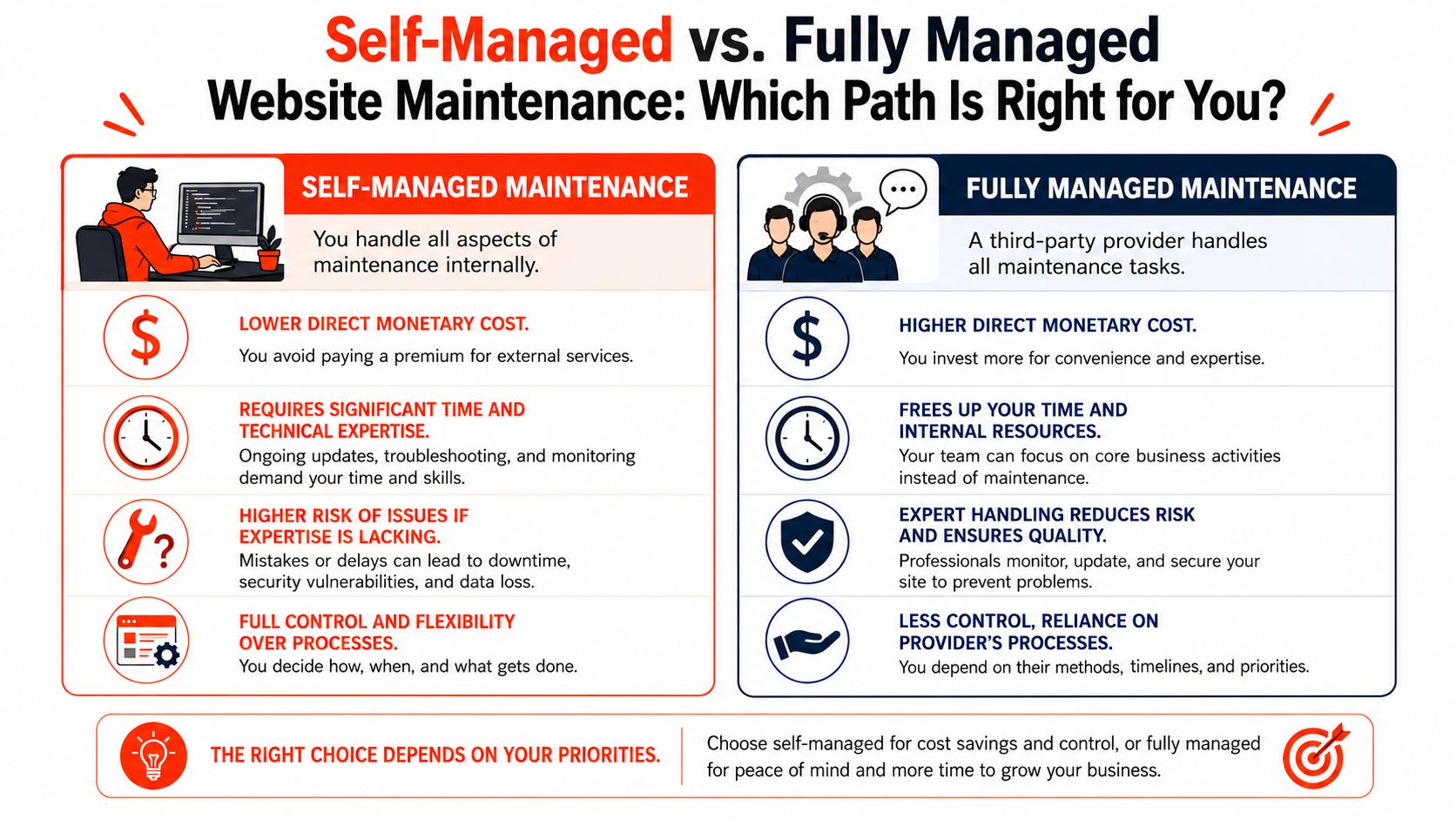
Self-managed can work well for a small brochure site with few moving parts. If someone in the business is comfortable handling updates, checking forms, maintaining backups, and spotting problems early, it can help keep cash spending down.
The trade-off is management overhead.
You are not only paying with money. You are paying with owner time, slower response when something breaks, and a higher chance that minor issues sit unresolved until they affect enquiries or credibility. For many UK small businesses, that is where the DIY option stops being the cheaper one.
Here is the practical difference:
Approach
Usually works best when
Main downside
Self-managed
The site is simple, low-risk, and can be handled by someone in-house for routine checks.
Owner or staff time gets pulled into technical admin
Fully managed
The site supports enquiries, bookings, sales, and reputation
Higher fixed monthly cost
Hybrid
You want to keep content edits in-house, but outsource the technical layer
Scope gaps can lead to confusion over who fixes what
The hybrid option is common, and it can work well. But only if responsibilities are clearly documented. If the provider handles updates but not testing, or backups but not restore support, you still carry more risk than the monthly fee suggests.
When fully managed, it makes sense.
Fully managed support earns its keep when the website has a job to do. Lead generation, bookings, ecommerce, member access, integrations, stock sync, and event registrations. In those cases, the value is not only technical work. It is accountability.
One provider owns the outcome. That matters when a plugin update knocks out a form on Friday afternoon, or a checkout problem appears after a payment gateway change. Without clear ownership, small businesses often end up paying twice. First in emergency fixes, then again in lost leads or interrupted sales.
A bundled plan also protects against the Year Two Shock. Instead of separate renewals, ad hoc support, and surprise fault-finding, you get a clearer monthly cost and a defined support process. That makes budgeting easier and reduces the admin load on the owner.
Choose self-managed if the site is simple, your risk is low, and someone reliable has the time to stay on top of it.
Choose fully managed website maintenance if your business cannot afford downtime, your website drives your sales pipeline, or you no longer want to coordinate hosting, updates, security, and fixes across multiple suppliers.
Choose a hybrid if your team can handle routine content changes, but you want one technical partner responsible for the parts that can break the site.
The cheapest route on paper often becomes the most expensive once you include interruptions, supplier handoffs, and your own time. For many small businesses, the better question is not “What is the monthly fee?” It is “Who takes responsibility when something goes wrong?”
Actionable Ways to Reduce Your Website Costs
Many small businesses overspend on websites in quiet, unglamorous ways. It is rarely the monthly hosting fee that does the damage. It is the pile-up of duplicate tools, scattered renewals, and small technical jobs billed individually.
The cheapest setup at launch often becomes the one you end up living with. By year two, the site that looked affordable can start collecting plugin renewal fees, support callout fees, malware cleanup fees, and time spent chasing different suppliers. That is where the total cost of ownership matters more than the sticker price.
The practical way to cut costs is to remove waste while keeping the parts that prevent bigger bills later.
Reduce supplier overlap. If different companies handle hosting, updates, security, and support, ask what you are paying for twice. Many firms end up covering the same ground in monitoring, backups, or troubleshooting.
Audit plugins regularly and remove anything you no longer use. Old form builders, duplicate SEO tools, and abandoned page-builder add-ons often sit there renewing every year.
Keep the setup simple where possible. A tidy WordPress site with a clear theme, a small plugin stack, and fewer custom workarounds usually costs less to support.
Keep routine content changes in-house if someone on your team can safely update text, images, blog posts, and opening hours.
Protect the basics. Backups, security monitoring, core updates, and uptime alerts are cheaper than emergency repair work.
Match support to the site’s job. A brochure site and an e-commerce site do not need the same response times, monitoring, or testing.
One common mistake
Is trimming the wrong line items. Owners cancel maintenance to save a few pounds, then pay far more when a failed update breaks a contact form or checkout. Cheap plans can also hide extra charges for restores, malware fixes, or plugin conflicts, so the full cost only shows up when something goes wrong.
The Year Two Shock is real. Splendid Web’s article on the hidden costs of WordPress notes that first-year website costs for UK small businesses often range from £1,000 to £5,000. In comparison, DIY sites that begin around £15 to £40 per month can rise to £80 to £300+ per month after the first year, once premium theme and plugin renewals start landing.
For many UK small businesses, the best savings are not in squeezing every monthly fee. It is choosing a setup that stays predictable. One bundled plan with clear ownership is often cheaper over 24 months than a low-cost build held together by separate renewals, ad hoc fixes, and your own time.
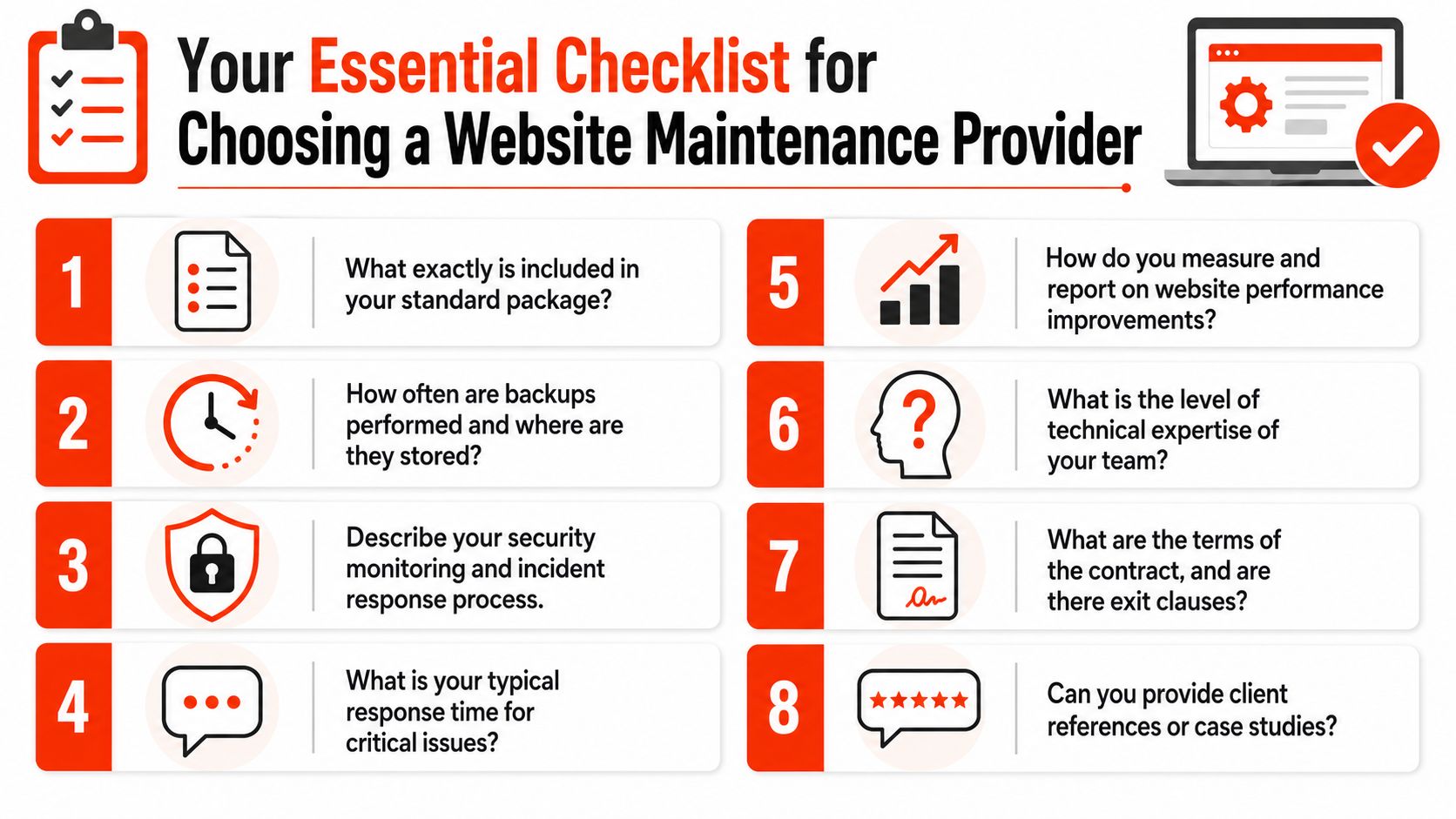
Your Checklist for Choosing a Maintenance Provider
Choosing a provider is really about choosing how much uncertainty you are willing to carry. A cheap monthly fee can still turn expensive if hosting sits with one company, updates with another, and fixes depend on whoever answers first. For many UK small businesses, that is where Year Two costs start creeping up. Not because the website suddenly needs more work, but because no one owns the whole job.
A good provider should be able to explain their service clearly, in plain English, before you sign anything. If the quote is vague, the handover will be vague too.
Questions worth asking before you sign
Use this checklist in real conversations:
What’s included exactly? Ask your provider whether the plan includes hosting, backups, updates, monitoring, content edits, and troubleshooting or charges for them separately.
What happens if an update breaks something? Ask who fixes it, how quickly they respond, and whether recovery work is covered.
How often does your provider take and test backups? Backups only protect your website if your provider can restore them.
Who do I contact when there’s a problem? Some businesses are fine with ticket support. Others want a named contact or a direct phone number.
What’s excluded from the monthly fee? This is often where the true cost sits.
Do you support sites like mine? A brochure site, a booking site, and a WooCommerce shop each pose different risks and require different support.
Can I leave easily if it’s not working? Check contract length, notice periods, and whether you keep access to hosting, domains, and licences.
Will I receive reports I can understand? You should be able to review completed work, see what changed, and identify anything that needs attention.
What a good answer sounds like
Good answers are specific. You want a clear scope, clear ownership, and clear limits. A solid provider explains what they update, how they test changes, where they store backups, how they handle incidents, and what counts as extra work.
That matters more than a polished sales pitch. In practice, the safest option is often the provider who is happy to talk through awkward details such as failed plugin updates, recovery time, third-party conflicts, and who deals with your domain if you decide to leave.
Bundled plans are not always the cheapest on paper. They are often cheaper over time because they reduce coordination, surprise renewals, and finger-pointing between suppliers. That predictability is worth real money for a small business owner who would rather spend Tuesday morning serving customers than chasing hosting support.
If you want one provider to handle the lot, 1stNet AI Ltd offers domain, SSL, hosting, maintenance, and support in one place, with a fast launch process, live chat design workflow, and a 30-day money-back guarantee. Businesses that want to avoid fragmented costs and keep website ownership straightforward often find a bundled approach to be a sensible fit. Call 0204 577 2255 to discuss whether it matches your site.