
Your website is live, your hosting account is paid, and customers have been visiting without problems. Then someone tries to check out and sees a browser warning instead of a payment page. The contact form fails, staff receive urgent messages, and nobody knows whether the certificate is stored in the hosting panel, a CDN, or an old developer’s account.
That isn’t a certificate purchase problem. It’s an SSL certificate management problem. A certificate must be discovered, installed, monitored, renewed, replaced, and retired across every service that uses it. The operational risk is increasing because publicly trusted certificates are moving towards much shorter lifespans. UK small businesses that still rely on spreadsheets and calendar reminders need a more dependable process.
When Your SSL Certificate Expires Unexpectedly
A customer may be the first person to report the problem. They see a browser security warning instead of your website, the checkout page fails to load, or a contact form stops submitting. Internally, the site can appear normal until someone tests the customer journey.
An expired certificate does not become gradually less trusted. Once its validity period ends, browsers and other clients can reject the connection. The visible error may point to a hidden operational failure: a missed renewal, a failed payment, an unattended hosting dashboard, or a replacement certificate issued but never installed on the server handling traffic.

Why the old calendar reminder fails
Many small businesses still treat SSL as a one-time setup task. A developer enables HTTPS, the padlock appears, and responsibility fades into the background. That process remains dependable only if the same person retains ownership, the hosting environment stays stable, and automated renewal continues working without interruption.
Ownership is often the weak point. Certificates can cover a main website, subdomain, online shop, API, or staging service. Without a complete inventory, a business may renew the certificate customers see while an overlooked hostname continues presenting an old one.
Operational rule: A certificate is not managed until someone knows where it is installed, who owns it, how it renews, and how a failed renewal will be escalated.
The UK National Cyber Security Centre recommends automated provisioning and renewal where possible, since manual work creates opportunities for human error and expiry. Its guidance also recommends monitoring issuance and renewal with enough lead time to identify and correct failures before service is affected. The NCSC certificate management guidance sets out these practices.
Lifespans are becoming an operations issue
Certificate lifespans are shrinking, which changes the workload for small teams. Publicly trusted certificates will be limited to 200 days from 15 March 2026. Future timelines are projected to move to 100-day certificates from 2027 and 47-day certificates from 2029.
That timetable is a projection of future certificate requirements, not a current requirement for every deployment. It still exposes the weakness of manual workflows. A process that depends on one person remembering to log in, download a certificate, upload files, restart a service, and verify the result becomes harder to operate as renewals occur more often.
For an SME without DevOps automation, the practical answer is to remove individual memory from the process. Use an ACME-capable platform or hosting service where appropriate, record every hostname and installation point, and alert a named owner when renewal or deployment fails.
If a certificate has already expired, restore service first. Then identify which control failed, whether ownership was unclear, and why monitoring did not raise an alert earlier. A customer-discovered expiry indicates a management gap, not merely an isolated certificate error.
Choosing the Right Certificate Type and Provider
The right certificate depends on what customers need to trust, what your hosting platform supports, and how much operational responsibility your team can carry. Paying for a higher validation level won’t automatically make a website safer, while choosing a free automated option can be perfectly sensible for a straightforward business site.
Validation levels in practical terms
Domain Validation, or DV, confirms control of the domain. It’s commonly automated and suits many brochure sites, local service websites, blogs, and small online businesses. Let’s Encrypt is a well-known example, particularly where the hosting platform supports automatic ACME renewal.
Organisation Validation, or OV, adds checks on the organisation behind the domain. It can be appropriate where procurement teams, customers, or internal policies expect a verified business identity in the certificate details.
Extended Validation, or EV, applies more extensive organisation checks. It’s not a substitute for secure development, patching, access control, or monitoring. Choose it only when a customer, regulator, contract, or internal policy requires that level of verification.
Certificate choices side by side
| Certificate Type | Validation Level | Issuance Time | Typical Cost | Best For |
|---|---|---|---|---|
| DV | Domain control | Usually automated | Free or paid | Standard business websites and simple services |
| OV | Domain and organisation checks | Requires additional verification | Paid | Organisations needing verified business identity |
| EV | Extended organisation verification | More involved verification | Paid | Specific contractual, regulatory, or trust requirements |
Cost isn’t the only trade-off. Free DV certificates are attractive because automation can remove repetitive administration, but support may come from your hosting provider or technical team rather than the certificate authority. Paid providers may offer account support, replacement processes, centralised administration, and commercial service arrangements, but those benefits matter only if your business uses them.
Before choosing, answer four questions:
- Business model: Does the website collect payments, handle sensitive customer information, or generate enquiries?
- Customer expectation: Will buyers inspect company identity, or do they mainly need a working, familiar HTTPS connection?
- Compliance context: Does a contract or certification programme specify a certificate type?
- Technical capacity: Can someone safely operate automated renewal and investigate failures?
Your hosting decision affects all four. Review the wider best web hosting options for small businesses before selecting a certificate in isolation. A certificate that fits the provider’s automation and support model is usually more useful than one selected purely because its product page sounds prestigious.
Installing and Configuring Your Certificate
A certificate does not protect a website until the live service presents it correctly. Installation usually requires the private key, certificate file, intermediate chain, and server settings that redirect visitors from HTTP to HTTPS. With certificate lifespans shrinking, a repeatable process also prevents rushed manual work during renewal.
A repeatable installation process
Generate a Certificate Signing Request, or CSR, in the environment where the certificate will run. It contains the public key and the names the certificate should cover. Protect the matching private key. Do not email it casually, paste it into support tickets, or leave it in an unmanaged shared folder.
Submit the CSR through the certificate authority or an automated ACME client. After validation, download the issued certificate and required intermediate certificates. The intermediate chain lets browsers build a trusted path from the website certificate to a root they already trust. Keep the certificate, key, and chain clearly labelled so an automated deployment can select the correct files.
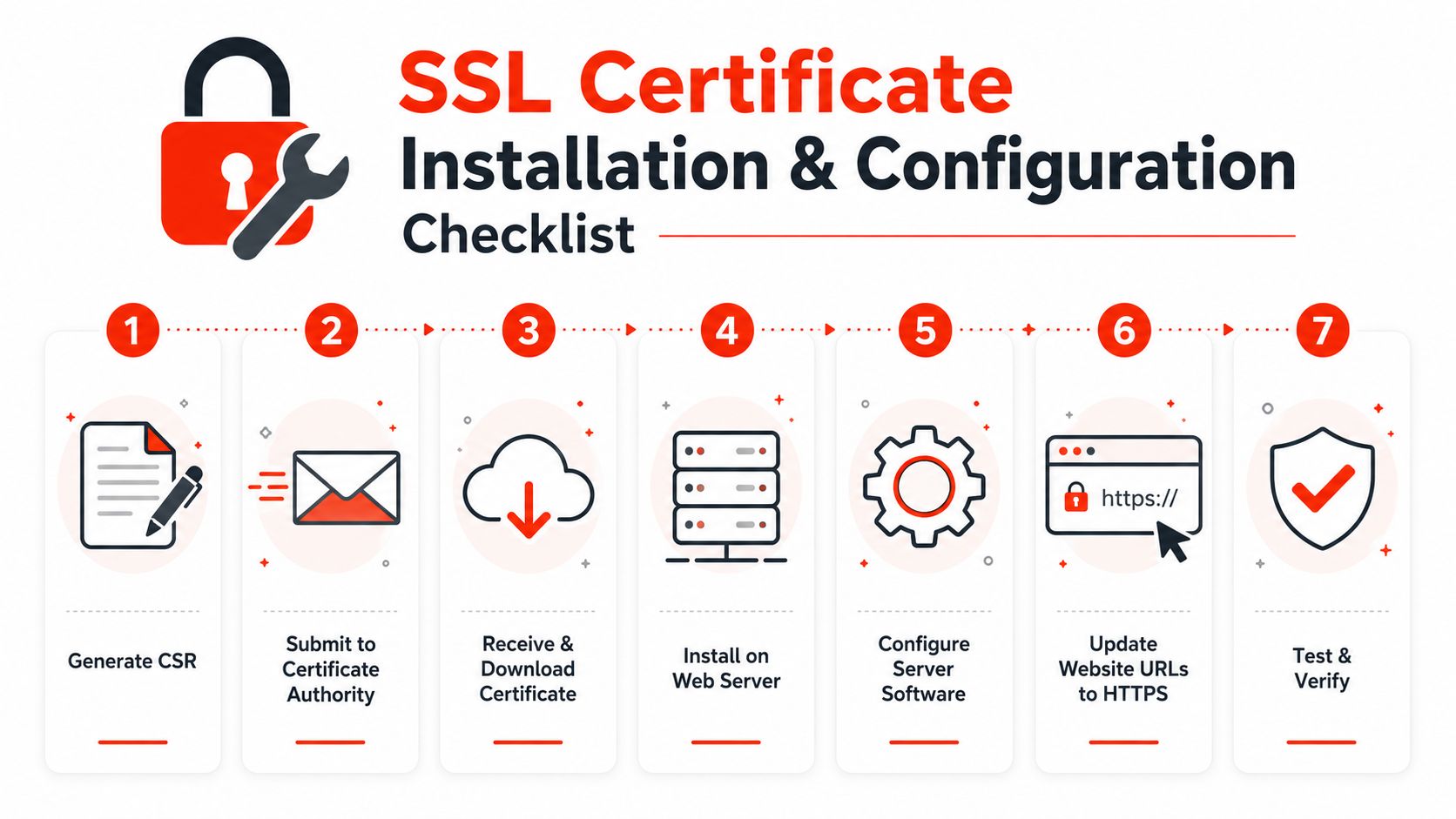
On cPanel shared hosting, use the SSL or Security area to upload the certificate and key, or allow the host’s AutoSSL feature to manage them. On a managed WordPress platform, SSL is often enabled from the hosting dashboard after the domain is connected. Confirm whether the platform handles redirects, hostname coverage, and renewal. A green padlock alone does not prove that every hostname works.
Cloud infrastructure needs clearer ownership. In AWS or Azure, the certificate may be attached to a load balancer, application gateway, CDN, or reverse proxy instead of the web server. Installing a replacement at the wrong layer leaves customers seeing the old certificate.
Verify before declaring success
Use a practical test sequence:
- Check the served certificate: Confirm that the live hostname presents the intended certificate, not just that a new file appears in a control panel.
- Check the chain: Test with multiple browsers or a reputable TLS testing service to find missing intermediates.
- Check every hostname: Review the main domain, relevant subdomains, redirect destinations, and separate checkout or customer portal.
- Check mixed content: Replace images, scripts, fonts, and embedded resources that still load over HTTP.
- Check redirects: Send HTTP requests to HTTPS and confirm there are no loops or important paths left unsecured.
- Check HSTS carefully: The UK government’s TLS guidance recommends automatic HTTP-to-HTTPS redirects and HSTS alongside modern TLS libraries. Introduce HSTS only after HTTPS works consistently across the names and services you intend to protect.
- Record ownership: Log the issuer, covered names, renewal method, installation location, and responsible person in your inventory.
For a visual walkthrough, watch the installation video after reviewing the hosting provider’s instructions.
The domain is part of the same operational picture. Understanding what a domain name is helps non-technical owners identify which provider controls the domain, hosting, DNS, and certificate workflow before a renewal problem occurs. Record those relationships before handing renewal to automation.
Automating Renewals and Monitoring Certificate Health
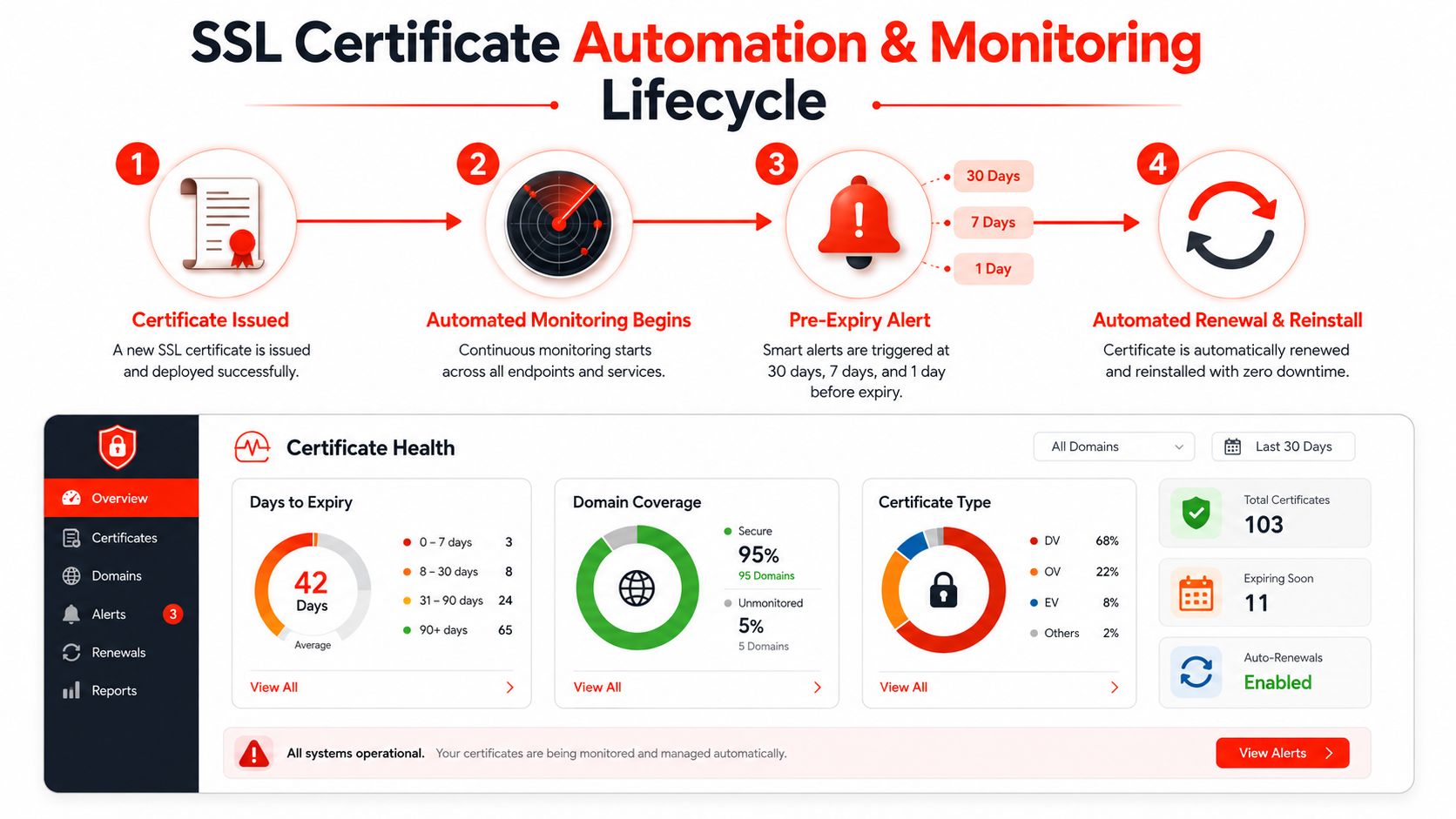
A certificate can renew successfully for months, then fail because validation breaks, DNS access changes, hosting settings are altered, or the deployment step stops working. The old certificate remains live until it expires unless the workflow checks both renewal and installation.
The NCSC recommends automated certificate provisioning and renewal where possible. It also stresses monitoring the process itself. A dashboard showing a healthy certificate today will not reveal yesterday’s failed renewal unless it checks the renewal job, the certificate served publicly, and the deployment result.
What to monitor
Expiry alerts are only one part of certificate health. A useful monitoring setup should check:
- Expiry status: Alert the owner early enough to investigate and recover, rather than waiting until failure is imminent.
- Hostname coverage: Confirm that the live certificate includes the domain names customers use.
- Chain validity: Detect missing or incompatible intermediate certificates.
- Renewal results: Record failed ACME challenges, authentication errors, and deployment failures.
- Configuration drift: Identify when a load balancer, CDN, or hosting change causes the service to serve a different certificate.
- Private key access: Keep the key available to the deployment process while limiting unnecessary human access.
Match automation to your technical capacity
A technical team can use Certbot or another ACME client to request and renew DV certificates. The workflow should reload the relevant web server or proxy, verify the certificate presented by the live service, and send a clear failure notification. A successful command proves only that a request completed. It does not prove that customer traffic now receives the replacement certificate.
Managed WordPress and hosting platforms can handle much of this work. Check what the provider automates, including issuance, renewal, installation, redirects, monitoring, and escalation. “SSL included” may describe a fully managed lifecycle, or it may leave someone responsible for manual renewal.
Shorter certificate lifespans make that distinction more important. The projected UK timetable calls for 200-day certificates from March 2026, dropping to 100 days by March 2027 and 47 days by March 2029, as outlined in the earlier certificate lifespan guidance. For an SME managing certificates manually across several services, each shorter cycle creates another opportunity for a missed account, failed validation, or incomplete deployment.
Practical test: Trigger or simulate a renewal failure. If nobody receives an alert, knows who owns the incident, and can replace the certificate without searching through old accounts, the automation is unfinished.
Assign a named technical owner and a backup. Test renewal on a non-critical hostname where possible, then verify the live endpoint after each automated deployment. The NCSC also advises preparing for shorter lifetimes, using individually scoped certificates where appropriate, considering cloud key management services, and maintaining access to private keys in its updated TLS certificate guidance.
When to Choose Managed SSL Services
The assumption that SSL is a one-time setup is expensive because it hides the labour after installation. Someone still needs to maintain the inventory, watch renewal jobs, update certificates across hosting layers, investigate warnings, and respond when a deployment fails.
Self-management can work well for a technically confident owner with one predictable hosting platform. It becomes less attractive when the website supports sales, several people share responsibility, or the person who installed the certificate no longer works with the business.
Compare the responsibility, not just the certificate price
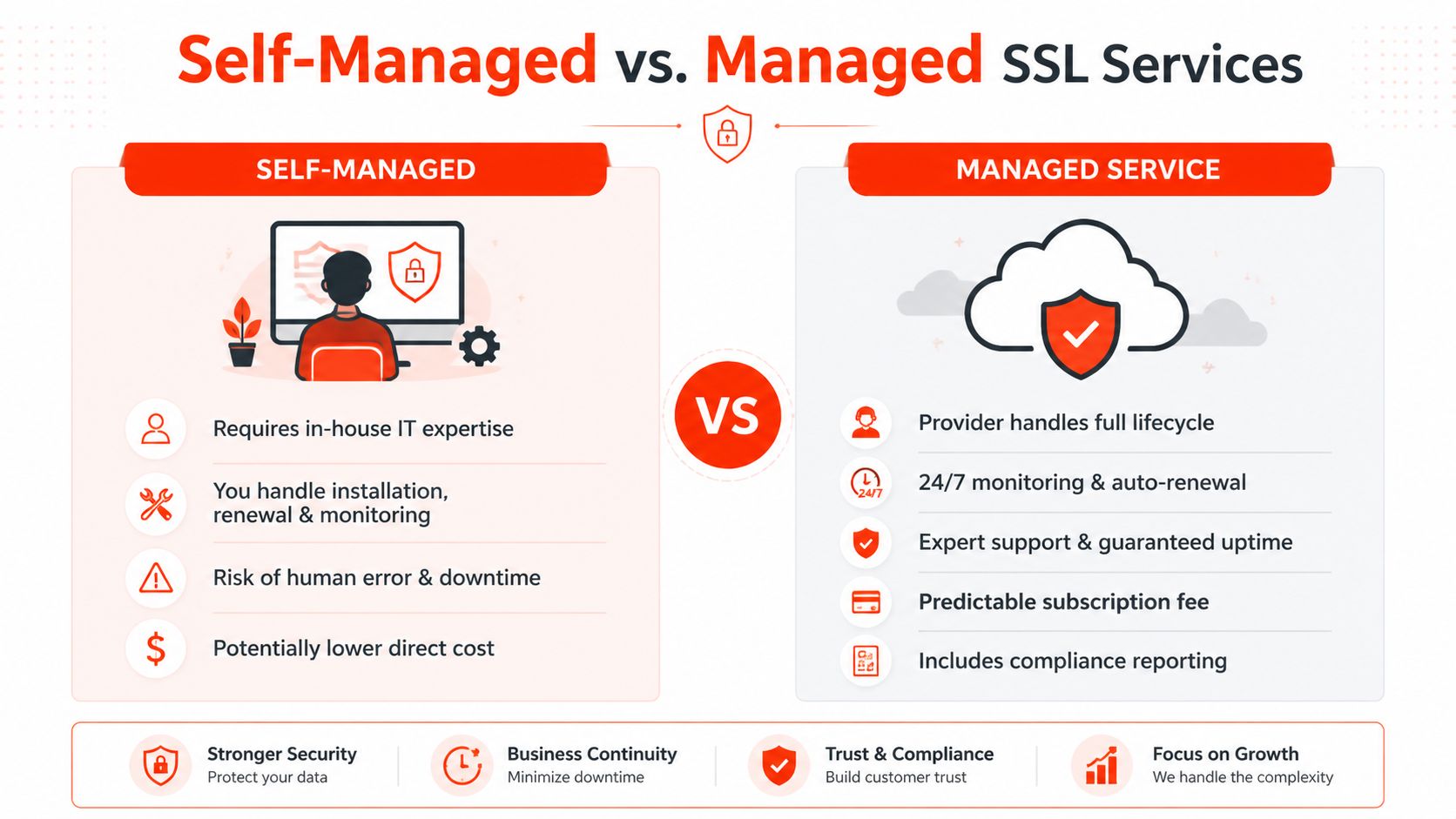
A self-managed approach gives you direct control and may have a lower direct cost. It also leaves your team responsible for the entire lifecycle:
- Inventory: You maintain the record of certificates, covered names, owners, and installation points.
- Renewal: You operate the CA account, ACME client, or hosting workflow.
- Monitoring: You configure alerts and decide who responds outside normal working hours.
- Recovery: You investigate chain errors, failed challenges, expired certificates, and broken redirects.
- Documentation: You record enough detail for another person to take over safely.
A managed service shifts those tasks to a provider. That can include automated provisioning, renewal monitoring, configuration support, maintenance, and incident assistance. The subscription is not just a charge for a certificate. It pays for reduced operational ownership and a defined support route.
Where managed support makes sense
Managed SSL is particularly practical for businesses without in-house technical staff, online retailers where a failed checkout has immediate commercial consequences, and organisations that need evidence of consistent security processes. Cyber Essentials isn’t an SSL-only scheme, but it reflects the broader move towards routine, documented security controls. The UK government reported 55,995 Cyber Essentials certificates awarded in 2025, including 42,288 Cyber Essentials and 13,707 Cyber Essentials Plus, in its Cyber Essentials management information.
Evaluate providers on concrete commitments:
- Ownership clarity: Who controls the certificate account, private keys, domain access, and deployment credentials?
- Monitoring scope: Does the service check expiry, the served certificate, chain validity, and renewal failures?
- Support response: What happens when automation fails, and who can act?
- Portability: Can you export certificates, documentation, and configuration if you leave?
- Commercial terms: Is pricing transparent, and are maintenance tasks included?
- Compliance evidence: Can the provider supply useful records without exposing private keys?
A managed website maintenance arrangement can make sense when SSL sits alongside updates, hosting, backups, and monitoring. Review the website maintenance services for UK businesses as one example of a wider support model rather than treating certificate renewal as a standalone purchase.
Building Your Certificate Management Strategy
A certificate can expire while the business owner is away, the web agency is unavailable, or the hosting platform has changed. Start with an inventory rather than another purchase. Record every public hostname, service, hosting platform, CDN, load balancer, certificate authority, expiry date, covered name, renewal method, private key location, and accountable owner. Mark unknown details as risks so they receive follow-up.
Shrinking certificate lifespans make this inventory operationally important. Certificates will last 200 days in 2026, 100 days in 2027, and 47 days in 2029, making calendar reminders and manual renewals increasingly unreliable for SMEs. Use automated issuance, renewal, deployment, and alerting wherever the hosting environment allows it. The UK government’s TLS guidance remains a useful technical baseline for HTTPS, redirects, HSTS, modern TLS libraries, and certificate parameters such as 2048-bit RSA with SHA-256 or ECDSA-256 with SHA-256, then adapt those settings to the actual platform.
Choose an operating model
| Business situation | Suitable approach | What must be in place |
|---|---|---|
| One simple website and confident technical owner | Self-managed with automation | Automated renewal, live monitoring, documented access |
| Several services or limited technical capacity | Partially managed | Hosting automation plus independent expiry and endpoint checks |
| E-commerce, regulated work, or no technical owner | Fully managed | Lifecycle ownership, escalation, support, and evidence |
Implement the plan in stages:
- First phase: Discover certificates, assign owners, check live endpoints, and create alerts for expiry and renewal failure.
- Second phase: Enable automatic issuance and renewal. Test deployment, web-server reloads, redirects, chain delivery, and mixed-content fixes.
- Third phase: Remove abandoned certificates, review private-key access, document recovery steps, and compare managed support with internal ownership.
The NCSC Annual Review 2024 reported 33,836 Cyber Essentials certificates awarded in 2024, an estimated 2.0% fail rate, down from 2.45% the previous year, while renewals increased by 6%. These figures are not SSL-specific, but they illustrate the value of repeatable ownership, renewal, and remediation processes.
For a solo professional, one monitored hosting account and a documented recovery contact may be enough. A growing retailer may need centralised inventory, automated deployment, independent endpoint monitoring, and managed escalation. The right strategy still works when the original installer is unavailable.
1stNet AI Ltd can provide a website with a domain, SSL, hosting, and maintenance, alongside accelerated build support, live chat, security updates, SSL renewal, and a 30-day money-back guarantee. Call 0204 577 2255 or visit 1stNet AI Ltd to discuss a managed website and certificate setup.