
On a Monday morning, the phone starts ringing before the kettle’s boiled. A customer says your checkout page won’t load, another says the contact form has vanished, and your team can’t tell whether the problem is the site, the hosting, or a plugin update that nobody tested. That’s the moment website maintenance services UK buyers usually realise the site wasn’t “finished”, it was just left alone.
For a small business, that gap matters because the website is often the first place customers judge trust, speed, and reliability. A site that isn’t monitored, updated, and backed up can turn a routine change into a public problem. The practical question isn’t whether maintenance sounds nice; it’s which level of support matches your risk, your budget, and how much downtime you can live with.
Table of Contents
Why website maintenance matters for UK businesses
A website usually fails in the worst possible moment, not on a quiet afternoon. An update lands, a plugin clashes with a theme, and your homepage is fine, but the basket or contact form isn’t. Customers don’t care why it happened; they see a broken service and move on.
That’s why maintenance isn’t a decoration on top of web design; it’s part of keeping the business open. UK maintenance guides consistently tie proper care to scheduled updates, daily backups, security scanning, monitoring, staging-tested changes, and support response levels. Redeagle Tech. If you sell online or rely on enquiries, those tasks protect revenue, search visibility, and the basic trust signal that your site works when people need it.
Practical rule: if the website helps you win work, take payments, or book appointments, it needs a named maintenance owner.
A lighter brochure site can often run on a simpler plan, but even then, the basics still matter. A neglected site can drift out of date, expose avoidable security risks, and create a poor first impression long before anyone reaches your actual offer. If your site needs to support growth, it also needs to stay aligned with the rest of your marketing, including the structure and speed work described in SEO-friendly web design.
What business owners usually underestimate
Most owners think about maintenance as “fixing things when they break”. In practice, the greater value is preventing breakage from happening in the first place. That’s especially true when staff changes, plugins age, and the site becomes harder to understand six months after launch.
If you want a simple mental model, treat maintenance like servicing a van that your business depends on. You wouldn’t wait for the engine light to come on before checking oil, tyres, and brakes. A website works the same way, just with updates, backups, and security checks instead of spanners.
Understanding maintenance components and SLA levels
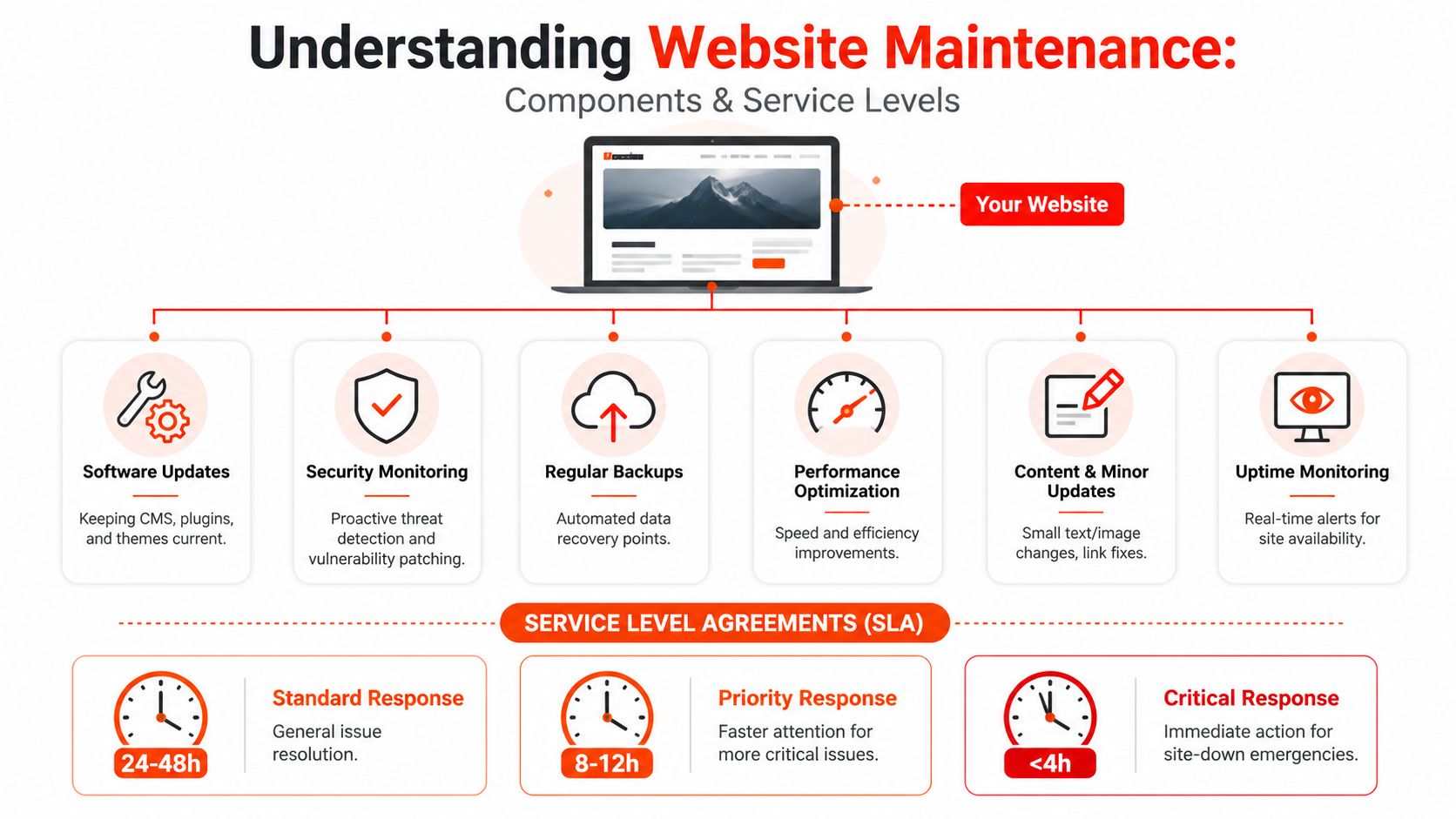
A good maintenance plan is a bit like keeping a building running. The landlord handles the structure, the electrician handles faults, the cleaner keeps things usable, and the fire alarm is tested before anyone assumes it’ll work. On a website, those jobs are split across updates, backups, security monitoring, performance checks, content edits, uptime monitoring, and SSL management—Altitude Design.
Core maintenance tasks and what they protect
Software updates keep the CMS, plugins, and themes up to date. That matters because old software is where compatibility problems and security weaknesses usually start.
Backups are your recovery plan. If a change goes wrong, a recent working copy lets a provider restore the site without rebuilding everything from scratch.
Security monitoring watches for vulnerabilities, malware, and unusual behaviour. Performance checks catch slow pages, bloated plugins, and other issues that frustrate visitors. Uptime monitoring tells you whether the site is reachable, not just whether it looks fine in a browser tab.
How SLA levels change the risk picture
SLA means the support promise behind the plan. A basic business-hours arrangement is fine if a delay won’t cause much harm. A site that takes orders, books jobs, or supports customer logins needs stronger response times because downtime has a direct cost to the business.
The difference isn’t just speed, it’s process. A proper SLA usually defines who responds, how quickly they act, and what counts as urgent. That’s why plans with 24/7 cover sit higher than those that only respond during office hours, even when the underlying tasks look similar. GrowCreate.
A maintenance package without a clear response promise is just a task list with hope attached.
If you’re comparing vendors, read the SLA as carefully as the feature list. The support window, response commitment, and escalation route matter more than a fancy label on the brochure. A calm, predictable process is usually worth more than a long list of vague extras, especially if your site sits at the centre of sales or lead generation.
If your hosting and maintenance need to work together cleanly, it also helps to understand the infrastructure side of the service, which is why the best web hosting for small business is a useful companion topic when you’re evaluating support depth.
Exploring pricing models and cost factors
UK maintenance pricing looks messy at first because providers bundle different things. Some charge hourly, some use a monthly retainer, and some sell fixed packages that bundle support hours, updates, and monitoring. The best way to read the market is to ask what risk the plan is covering, not just what the headline price is.
A useful benchmark is the spread in the UK market. Independent guides place small-business maintenance at about £50-£150 per month, while more complex e-commerce sites move into £150-£400+ and can exceed £1,000 per month in high-traffic environments (Redeagle Tech). Another UK guide shows a broader market where budget plans may start at £20-£40 per month, local specialists often charge £80-£200 per month, and larger agencies charge £200-£500+ per month. Redeagle Tech. For buyers, that spread is the clue that “website maintenance” can mean very different things.
Typical UK maintenance pricing tiers
| Plan type | Monthly cost | Key features |
|---|---|---|
| Budget or automated | £20-£40 | Basic automation-led updates and limited hands-on support |
| Small business retainer | £50-£150 | Routine updates, backups, monitoring, and light support |
| Local specialist support | £80-£200 | More direct help, clearer accountability, and broader task coverage |
| Agency package | £200-£500+ | Deeper support, more coordination, and wider service scope |
| Complex or high-traffic site | £600-£1,200+ | Stronger coverage for e-commerce, integrations, and critical uptime |
What pushes the price up
Site complexity is the main driver. A simple brochure site is easier to test and stabilise than a store with bookings, payment flows, CRM integrations, and multiple plugins.
Support depth matters too. If a provider is checking the site after updates, watching uptime, and keeping some development time available, the retainer will reflect that. UK pricing guides also show that support intensity changes cost sharply, with 9-5 support ranging from £100 to £1,250 per month and 24/7 support from £300 to £3,500 per month iConcept.
For owners comparing quotes, the useful question is simple. Are you paying for a tool that runs in the background, or a person who tests, verifies, and responds when the site breaks? That distinction separates cheap support from useful support, and it’s why website maintenance costs should always be read alongside scope, not in isolation.
Identifying red flags and selecting a provider
A low quote can be expensive if it doesn’t cover the moment something goes wrong. The biggest mistake is buying maintenance as if all providers deliver the same thing. They don’t, and the differences usually show up in response times, reporting, and accountability, rather than just in the monthly fee.
UK coverage of the market shows a wide spread, with plans ranging from £20 to £500+, depending on the scope of DesignStack’s support. That spread exists because some plans are barely more than automated housekeeping, while others include real human oversight. If the provider can’t explain the difference in plain English, that’s already a warning sign.
Red flags worth taking seriously
- Unclear SLA response times. If the contract doesn’t say how quickly they respond to urgent issues, you’re guessing.
- Vague task lists. If they can’t name what they update, back up, check, and report on, the plan is too fuzzy.
- Hidden emergency fees. If every urgent fix becomes a separate invoice, your “retainer” becomes unpredictable.
- No clear ownership. If three vendors touch the site and nobody owns failures, problems linger.
- Weak security language. If the provider skips security checks or can’t explain patching, the risk sits with you.
- Poor communication. If support is slow now, it’ll be slower when your site is down.
What to ask before you sign
Ask who checks the site after updates, what gets tested, and how often reporting arrives. Then ask what happens if a plugin update breaks checkout, forms, or another key journey. A provider who answers directly is usually safer than one who talks only in general promises.
Ask for the process, not just the promise.
You should also check whether the plan is built for your actual workload. A small brochure site, a lead-generation site, and an e-commerce store don’t need the same rhythm of support. The question isn’t “what’s cheapest?” but “what will still matter when the site is under pressure?”
If you want a practical visual prompt while comparing suppliers, the provider checklist in this maintenance red flags guide can help you keep the conversation focused on service quality rather than sales language.
Comparing maintenance package tiers
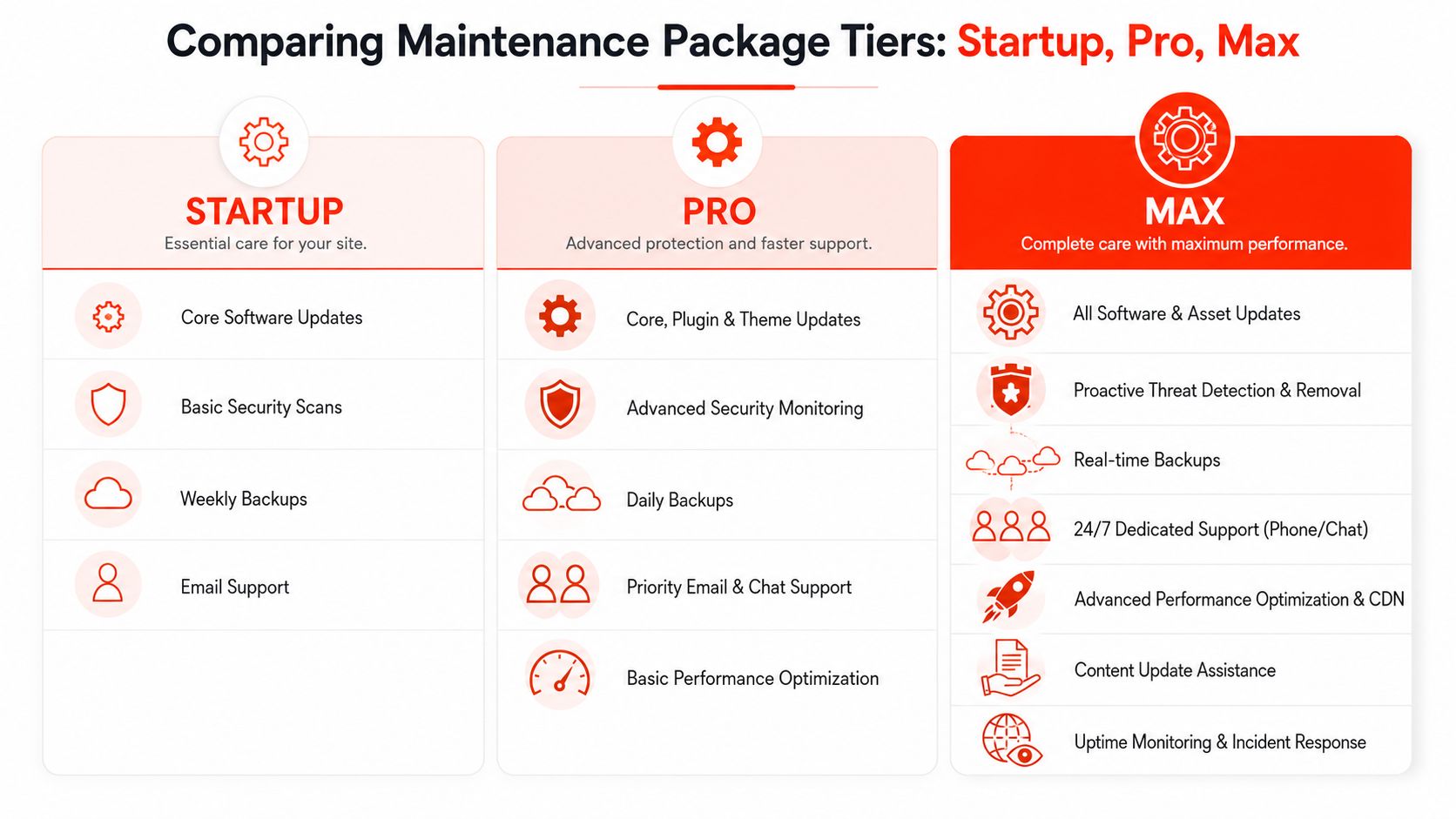
Different vendors use different labels, which makes comparison harder than it should be. One company’s “basic” might include real monitoring, while another’s “pro” is mostly a marketing label for a few automated tasks. The cleanest way to compare them is by service depth, not by the tier title.
How the tiers usually differ
A startup is usually built for small sites that need the basics kept tidy. That means core software updates, basic security scans, backups, and email support. It suits owners who mainly need reassurance that the site won’t drift out of date.
Pro adds more active protection. Core, plugin, and theme updates are checked more carefully, backups are more frequent, and support is quicker. The extra value comes from reduced downtime risk and better handling of day-to-day change.
Max is for sites that can’t afford loose ends. It usually bundles broader software coverage, proactive threat detection, real-time backups, 24/7 support, performance optimisation, content help, and incident response. That’s the right shape for a site where downtime, security, or speed directly affects revenue.
How to choose the right tier
- Choose Startup if the site is simple, stable, and not central to daily sales.
- Choose Pro if the website drives leads, bookings, or regular customer action.
- Choose Max if outages, security issues, or speed problems would create immediate business damage.
Independent UK comparisons support that tiering logic. Brochure sites sit around £50-£300 per month for 9-5 support and £300-£900 for 24/7 SLA-backed support, while e-commerce sites range from £300-£1,200 for 9-5 support to £1,200-£2,500+ for 24/7 support GrowCreate. Those figures show that the package structure should follow risk, not vanity.
The simplest buyer test is this. If the provider removed one item from the plan, would you notice the gap next month? If the answer is no, you’re probably paying for noise. If the answer is yes, the tier is doing real work.
Conclusion and next steps with fast launch offer
The safest choice in website maintenance services in the UK isn’t the cheapest; it’s the one that matches your site’s actual risk. A sensible plan protects you with updates, backups, monitoring, and support that answers when you need it. The right provider should also be clear about the scope, response times, and what happens when something breaks.
If you want a faster route from idea to live site, 1stNet AI Ltd offers a website team that can launch a site quickly with domain, SSL, hosting, and maintenance included, backed by a 30-day money-back guarantee. The team also offers an interactive live chat system to design your website, which helps keep decisions moving without the usual back-and-forth.
Call 0204 577 2255 if you want to get a site live quickly and keep the upkeep in one place.
A CTA for 1stNet AI Ltd.