
You’re probably looking at a site that’s “fine” most days, until it isn’t. The homepage is slow, the inbox has a vague warning from a host you’ve never spoken to, and the last time a plugin update went wrong, your developer had to be dragged in after hours. That’s usually the point where managed hosting for WordPress stops sounding like a nice-to-have and starts looking like the sensible way to stop losing time, enquiries, and sleep.
For UK small businesses, the decision is rarely about chasing bells and whistles. It’s about whether your website behaves like a reliable business asset or a recurring interruption. Managed hosting earns its keep when the person running the company doesn’t want to spend Monday morning checking backups, patch notes, or broken forms.
The Moment Most UK Small Businesses Start Shopping for Managed Hosting
A Leeds accountancy firm does not start by looking at hosting. It starts when a client cannot reach a tax page during a Making Tax Digital deadline, and nobody wants to be the one explaining that the website is “having issues”. A Cardiff retailer feels it too when a cart plugin update breaks checkout, because every minute offline means lost sales and more apologising.
A Manchester therapist gets a 4am security alert from a host they have never spoken to. The message says something needs attention, but gives no clear next step. That is the part owners remember, because they still carry the stress even after paying for a service meant to reduce it.
The trigger is rarely a single outage. It is the slow drain of enquiries that never arrive, the Monday morning dread of checking email, and the awkward call to a developer who charges for every tiny fix. At that point, the site is no longer a marketing asset. It is a risk to revenue, bookings, and deadlines.
Practical rule: if a website problem can derail a sale, a booking, or a deadline, treat it as an operations issue.
That is why so many owners move off overloaded shared hosting and into a managed setup after one too many evenings firefighting a plugin, a backup, or a security warning. The security exposure on WordPress usually sits in plugins, themes, and half-finished maintenance, not the headline platform itself. If you are still trying to launch or rebuild quickly, a structured build-and-hosting model like 1stNet AI’s small business website builder can be a cleaner route than stitching together separate vendors.
The change happens when the owner decides the site should drive growth, not weekend worry. Managed hosting exists to take routine technical work off your desk, but the business owner still owns the content, the sign-off, and the decisions that affect performance.
What Managed Hosting for WordPress Means
Managed hosting for WordPress means the provider handles the server layer and the routine work that keeps a WordPress site stable. You are not buying empty space on a machine. You are buying an environment that is tuned, monitored, backed up, and supported by people who understand how WordPress behaves under pressure.
What the host usually handles
A decent managed provider should deal with the jobs that cause most headaches for small business owners. That usually includes a tuned server stack, automatic core updates, plugin and theme updates within safe windows, daily off-site backups with restore options, WordPress-aware malware scanning, a firewall layer, staging for testing changes, and support staff who can tell a cache issue from a broken template.
The UK security angle matters. The government’s Cyber Security Breaches Survey 2025 reported that 43% of British businesses experienced a cyber breach or attack in the previous 12 months, affecting about 612,000 organisations (UK government survey summary). For WordPress sites, the primary exposure usually sits in plugins and themes, then in half-finished maintenance that leaves those weak points open.
What still stays with you
Managed hosting does not remove responsibility from the business owner. You still own the content, the branding, the publishing decisions, and the discipline around strong passwords and two-factor authentication. You also still need to track domain renewals and SSL certificate renewals, because a host can support the process, but it cannot make business decisions on your behalf.
A host can cut admin time. It cannot replace editorial judgement or the decision to approve risky plugins in the first place.
That split varies by provider, which is why the evaluation checklist later in this guide matters. If a host cannot say clearly what it manages and what remains yours, you are not buying clarity. You are buying a support headache with a monthly invoice.
Managed WordPress Hosting Compared to Shared VPS and Self-Managed Hosting
Most small businesses shop for hosting around one question, does the site stay up and keep out of the way while you run the business? That is the split between managed WordPress hosting, shared hosting, VPS, and self-managed setups. The decision comes down to cost predictability, admin time, performance under pressure, security posture, and how much technical work still sits with your team.
Shared hosting is the cheap starting point. It works for basic sites, but your WordPress install shares resources with many others, so performance and isolation are limited. A VPS gives you more control and dedicated resources, but that control comes with responsibility. Updates, hardening, backups, and server tuning end up back on you or on a freelancer.
Self-managed cloud hosting sits at the hardest end of the scale. It can run fast and scale well, but only if someone on your side understands Linux, server configuration, security, and caching properly. Managed WordPress hosting takes the middle ground and removes the routine work most owners do not want and most generalist hosts do badly.
Side by side comparison
| Factor | Shared Hosting | VPS Hosting | Self-Managed (Cloud) | Managed WordPress Hosting |
|---|---|---|---|---|
| Cost predictability | Low upfront, often simple pricing | Moderate, can rise with configuration and support | Variable, depends on setup and labour | Higher monthly cost, but clearer service scope |
| Day-to-day admin time | Low at first, then rises when things break | High unless someone manages it for you | Highest, because you own the stack | Low, because most routine admin is handled |
| Performance under spikes | Weak when neighbours or traffic hit hard | Better, if tuned well | Strong, if engineered properly | Strong, because the stack is built for WordPress |
| Security posture | Basic, usually generic | Better, but mostly your responsibility | Depends entirely on your hardening | Stronger, because monitoring and WordPress controls are built in |
| Skill required | Low | Medium to high | High | Low to medium |
For a UK SME site, managed hosting is often the sensible compromise when you want a better stack without hiring a systems person. A UK guide notes that quality WordPress hosting in the UK typically starts around £3 to £5 per month (UK hosting comparison), but that is not the same as managed service. Managed hosting costs more because you are paying for support, tuning, isolation, and fewer emergencies, not just disk space.
That extra spend makes sense if a crash means your team loses orders, misses enquiries, or spends half a day trying to get back online. If someone on your side can recover a broken site at 9pm on a Friday, cheaper tiers can still work. If that sounds like a bad trade, managed hosting usually pays for itself in fewer interruptions and less time wasted on fixes. If you want a practical way to compare suppliers, this small business hosting guide is a useful place to start.
Core Features That Matter for a UK Small Business Website
A small business site needs a short list of features that keep it working day to day. That matters most when traffic jumps, a plugin breaks, or a customer tries to book at the worst possible moment. The priority is simple, protect revenue and reduce avoidable downtime.
Performance comes first. UK benchmarking has shown London-hosted infrastructure can cut delay for UK audiences, with one test round reporting the fastest UK load times among five major hosts at 193 ms, 150 ms, and 190 ms across three tiers, and stating that London data centres outperformed US ones for UK traffic (UK benchmarking round). For a domestic audience, proximity still matters. It helps with dynamic pages, cache misses, and the general sense that the site is either sharp or sluggish.
Security comes next, and many owners get caught out here. WordPress core is not usually the weak point, the risk sits in the plugins, themes, and add-ons bolted around it. The UK-focused security guide cited 7,966 new WordPress vulnerabilities in 2024, a 68% year-on-year increase, with 96% coming from third-party plugins rather than core, plus over 54 billion malicious requests blocked and an average attack frequency of every 34 minutes (UK WordPress security guide). If your host is not handling patching, scanning, and firewalling properly, you are carrying more risk than you need to.
What good looks like in practice
- Server-level caching and CDN delivery: These reduce load pressure and help pages stay fast when a campaign or press mention drives a spike.
- Daily off-site backups with easy restores: Recovery speed matters more than bragging rights. A backup you cannot restore quickly is just storage.
- Managed updates for core, plugins, themes, and PHP: Owners should not be left babysitting dashboards or guessing which update is safe.
- Support from people who understand WordPress: Generic ticket queues waste time when the issue is a plugin conflict or a cache edge case.
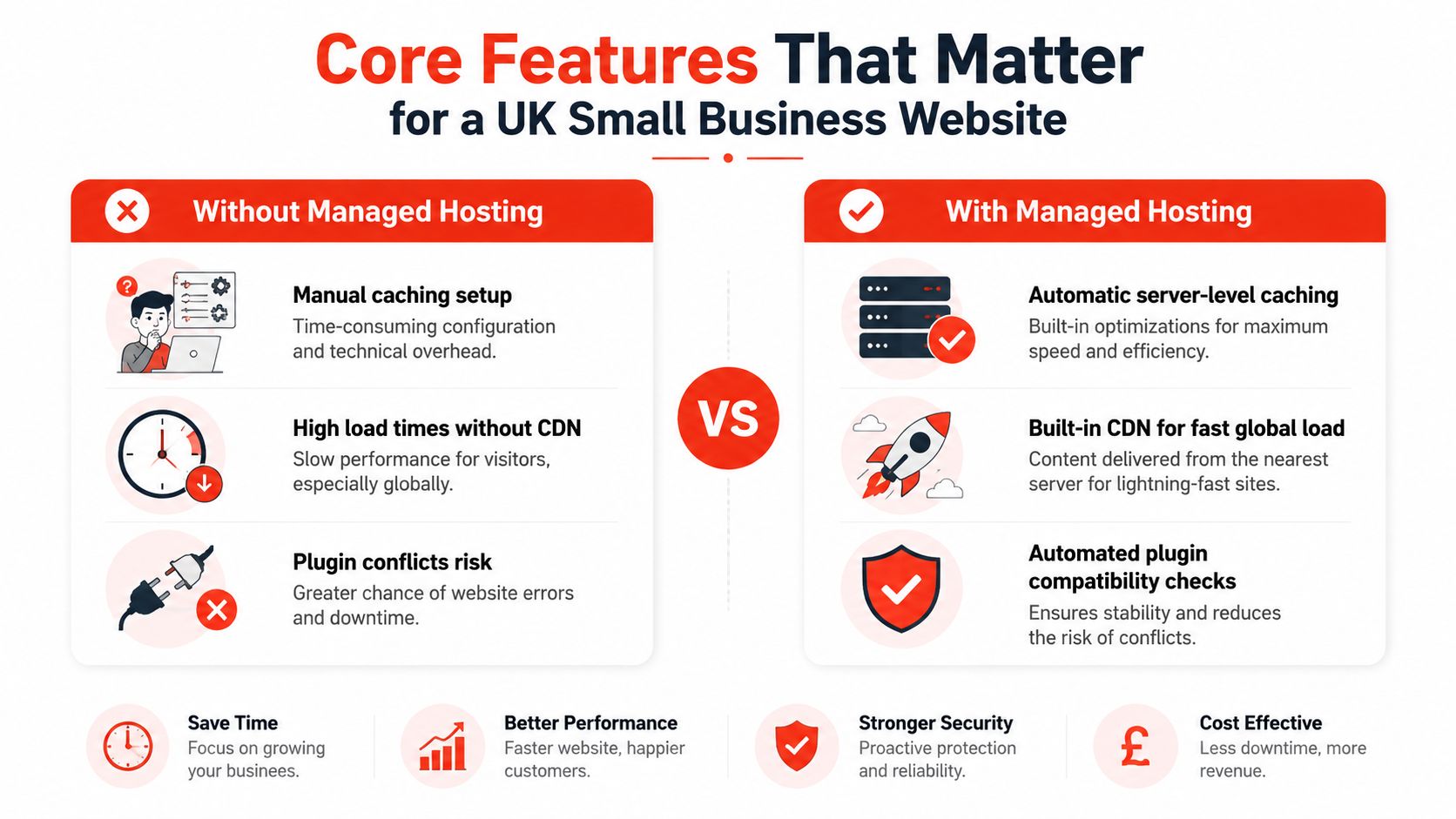
Backups and recovery need separate attention. UK guidance for small businesses repeatedly recommends daily encrypted off-site backups, managed patching, malware scanning, WAF protection, and clear incident response terms, because backup responsibility is often misunderstood and restore testing is often forgotten (UK SMB WordPress security guidance). If a host cannot explain restore testing in plain English, the process is probably weaker than it sounds.
Support is the final filter. A host can run decent infrastructure and still be poor value if nobody can help when the booking form or checkout breaks. For a UK small business, support that works in British hours is not a nice extra, it is the difference between a quick fix and a lost morning.
A Realistic Migration Timeline from Sign-Up to a Fully Managed Site
A proper migration should feel uneventful. The site moves in controlled steps, with checks at each stage, instead of one late-night switch that leaves forms, payments, or analytics in doubt. Small businesses that rush this work usually buy themselves an outage.
Week by week, without the drama
Start with discovery. List every plugin, payment gateway, booking tool, email integration, and third-party service the site depends on. Check the current hosting contract at the same time, so you know whether the old provider can slow the handover or hold anything back.
Next comes staging. The host clones the site into a temporary environment, then tests performance and security settings without touching live visitors. That is where plugin conflicts, layout breaks, and awkward theme behaviour surface before customers do.
The cutover should stay controlled as well. DNS propagation can take time, so the old site should remain live while traffic settles and the new setup proves itself. A slower switch is usually the safer one, and the business owner still needs to approve the final handover with eyes open.
Don’t skip the staging copy. That shortcut is where a routine migration turns into a support queue.
What to test before you call it done
- Forms and lead capture: Make sure enquiries still arrive where they should.
- Bookings and ecommerce flows: A site that looks fine but cannot take money is not finished.
- Login and admin access: If staff cannot get into the right places, the migration is not complete.
- Caching and security settings: Confirm they are active without blocking normal site behaviour.
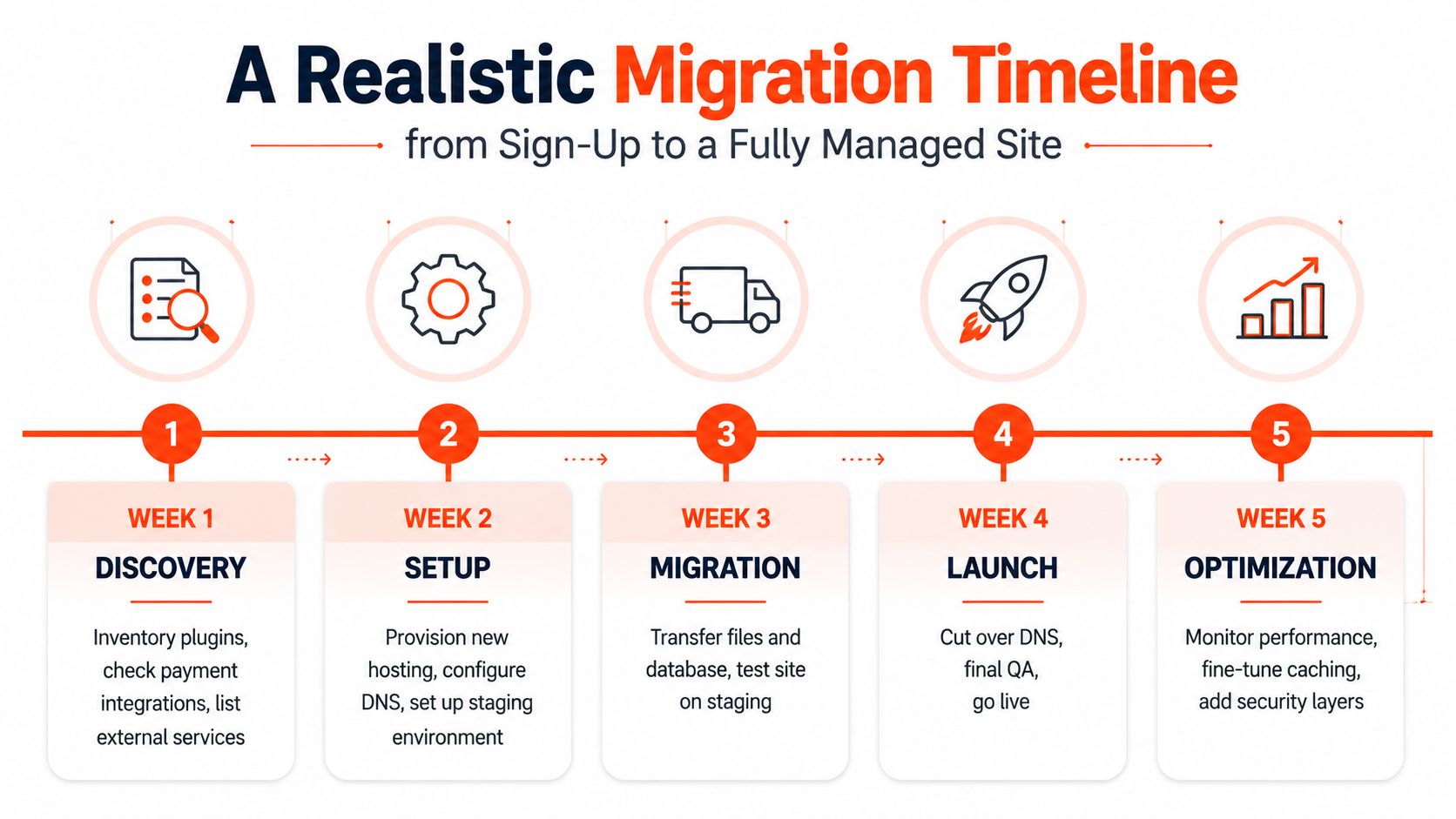
The official quick-start flow from hosting.com follows the same pattern, build on a temporary site, prepare the domain, configure SSL, then update DNS. It notes that DNS can take up to 24 hours to fully propagate (hosting.com Managed WordPress Quick Start Guide). I am not interested in the branding. I am interested in the process, because this is how real migrations stay under control.
Plan for the setup work, then allow a little slack for plugin surprises and content checks. A rushed migration looks cheap on paper and expensive in lost trust.
Pricing Contracts and the Hidden Costs Most Buyers Miss
A low headline price often hides the full bill. A cheap intro offer looks tidy on a comparison page, then the renewal lands and the extras start stacking up. Price the contract, not the sign-up deal.
The biggest trap is the renewal jump. If a supplier will not show year-two and year-three costs in plain English, they are banking on month-one comparison shopping. That is a bad way to buy hosting, because it is a recurring utility, not a one-off purchase.
The smaller charges are where buyers get caught out. Bandwidth overages, backup storage caps, migration fees per site, premium support add-ons, SSL renewal charges after the first year, and billable restores all turn a managed plan into a menu. The wording may sound polite, but the effect is the same.
Rule of thumb: if the sales page is glossy but the contract is vague, treat that vagueness as a cost.
What to price across the full term
- Renewal pricing: Check what the contract costs after the introductory period.
- Migration scope: Confirm whether moving one site or several sites changes the fee.
- Restore policy: Ask whether backups are included, and whether restores are free.
- Exit terms: Know how hard it is to leave if the service disappoints.
UK buyers should also watch the contract length. A 12-month or 24-month lock-in can work if the provider is transparent and the service is strong, but it is risky if support quality is unclear. Hosting and care are often sold together, yet the workload still lands on you if routine maintenance is not included. A separate look at website maintenance costs helps keep those numbers honest.
The hidden cost is labour. If the host does not handle updates, incident response, or restore work properly, someone on your side has to do it, and that time is never free. The cheapest plan is not the cheapest outcome if your team keeps rescuing the site after hours.
A Provider Evaluation Checklist and Your Next Steps
A good sales call should feel like a screening process, not a performance. You’re not asking whether the host has features, you’re asking whether it will protect your site, your time, and your margin. If the answers are vague, keep moving.
What to ask before you sign
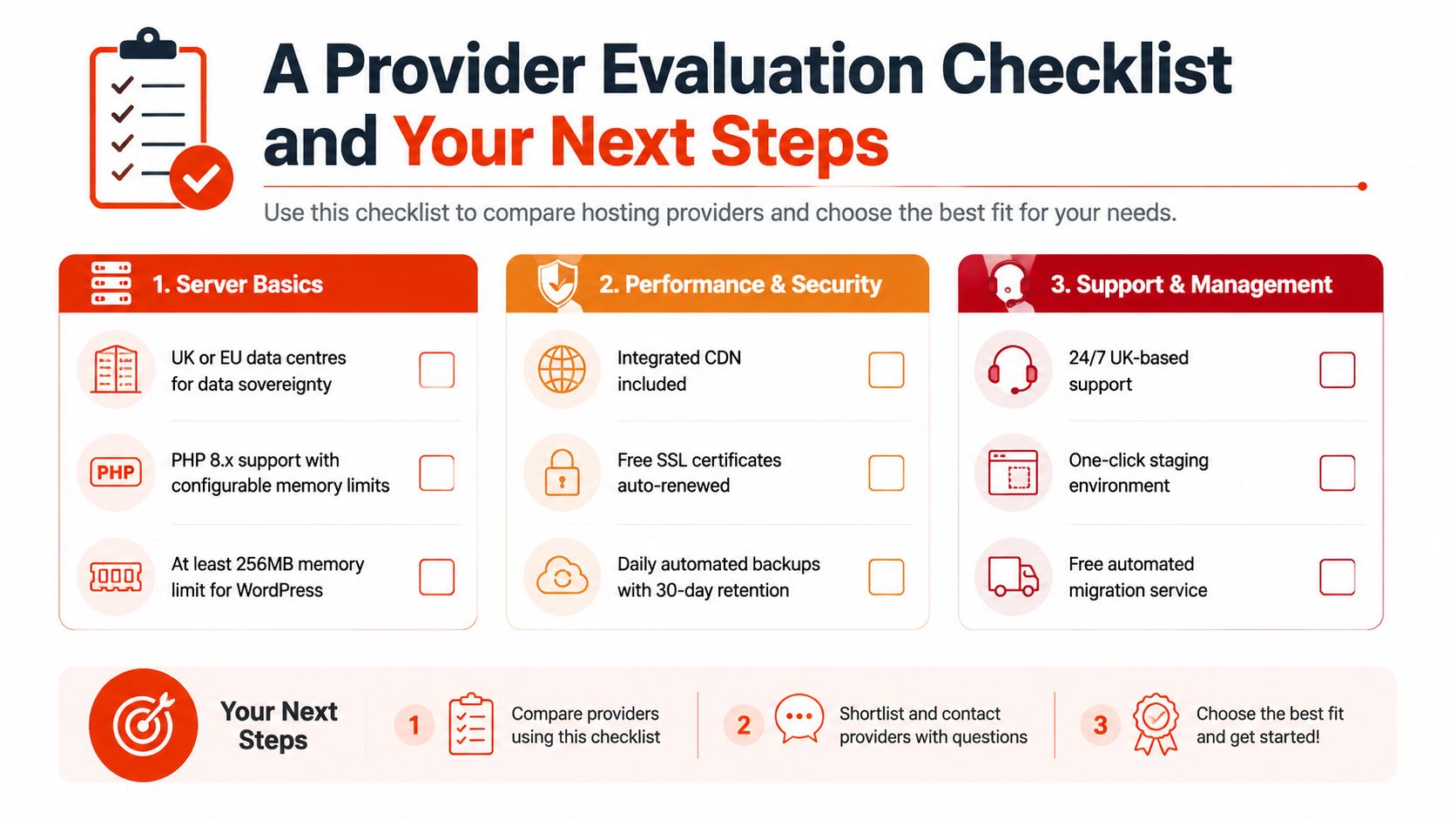
- Server basics: Are the data centres in the UK or EU, do you support current PHP versions with configurable memory limits, and is server-level caching included?
- Performance and security: Is CDN delivery built in, are SSL certificates auto-renewed, and do daily backups have sensible retention and one-click restore?
- Support reality: Is there 24/7 support from people who work with WordPress, and what is the escalation path when a site goes down?
- Contract terms: What are the bandwidth and visitor limits, what does renewal cost, and what help is included if you need to migrate away?
The UK government’s guidance on certificates makes the SSL point clear, because certificates are used to identify and authenticate clients and gateways when encrypted connections are established (NCSC certificate guidance). UK government security advice also makes it clear that an expired certificate leads to browser warnings, unencrypted transmission, and lost trust, so renewal should be part of the hosting service, not a side chore (expired certificate guidance).
The site should also use HTTPS and redirect traffic from HTTP to HTTPS as a standard deployment practice for public-facing services (UK government HTTPS guidance). That’s not a “nice security extra”, it’s the baseline for any business that wants to look credible online.
A sensible buying process
- Shortlist three hosts and compare the renewal terms, not just the intro rate.
- Run a 14-day trial on a staging copy if the provider allows it.
- Measure TTFB and uptime, then check whether support answered like WordPress specialists.
- Decide on the contract length last, after you’ve seen how the service behaves.
If a provider can’t explain its limits, you’re not buying flexibility, you’re buying uncertainty. I’d rather see a clear list of constraints than a vague promise that sounds generous until the first problem appears.
Common Questions UK Small Business Owners Still Ask
Visitor numbers only tell part of the story. A low-traffic brochure site can still justify managed hosting if the owner wants fewer moving parts, fewer surprises, and less exposure when a form breaks or a certificate warning appears.
WooCommerce needs more care, not less. A product catalogue, basket, checkout, and payment gateway add pressure to caching, plugin compatibility, and support, so the host must know what can be accelerated and what has to stay dynamic. If a plugin clashes with managed security rules, the right move is to adjust the setup or replace the plugin, not shrug at the risk.
Agencies can still work with the file system and database, but access should be controlled and logged. That gives the business owner a clear trail when something changes, a recovery path when it goes wrong, and tighter limits on who can touch the live site.
Custom themes and legacy code can keep running, but they need proper staging tests before anything goes live. Some builds are too bespoke for standard managed WordPress hosting, and some regulated workloads need a dedicated server model instead. In those cases, forcing WordPress into every job is the wrong call.
UK buyers also ask where data lives. London or Manchester infrastructure will often suit domestic audiences better than a US-only setup, but GDPR alignment still depends on the full chain of storage, processing, backups, and access, not just the city name on a sales page.
The honest answer is simple. Managed hosting helps most when a business wants a lighter operational load and a steadier website. It does not remove the need for discipline, and it will not rescue a site loaded with bad code, weak governance, or unrealistic expectations.
1stNet AI Ltd builds and manages websites for UK small businesses, and its hosting and maintenance model fits the same problem this guide has been talking about, cutting the noise around domains, SSL, updates, and support. If you want a provider that handles the website side more completely, visit 1stNet AI Ltd and compare its managed options against the cost of keeping your current setup alive.