Launching a startup website should not feel like a second full-time job. The goal is simple: get a credible site live fast, explain what you do clearly, and give potential customers an easy next step. That is what most early-stage businesses actually need.
Many UK founders get delayed because web design is framed as a long, technical process involving hosting, SSL, templates, page builders, copy decks, plugins, SEO settings, and agency timelines that don’t fit startup reality. The result is a website project that becomes increasingly complex before the business has even had a chance to gain traction.
Most startups do not need a sprawling digital build. They need a focused website that supports launch, builds trust, and starts conversations. If the site cannot do that quickly, it becomes a delay instead of a growth tool.
That pressure is real in the UK. It takes roughly 13 days to start a small business in the UK, compared to 6 days in the U.S., which means founders already face a slower route to market before they even think about launching online, according to UK small business statistics on startup timelines. Adding another month or two for a website build is often the wrong call. Speed matters because early traction matters.
A faster, more practical approach is to treat your website as a business asset, not a technical puzzle. You want one clear scope, one launch path, and a setup that gets you live without unnecessary delays. If you’re weighing AI-generated templates against human input, human creativity still matters, while AI website building rises because the hard part is not producing pages. It is making the right decisions quickly.
A founder I’d recognise instantly is the one juggling five jobs at once. Sales call at 10. Supplier email at 11. Accountant’s message at noon. Then someone asks for the website link, and there isn’t one yet. Or worse, there is one, but it looks half-finished, says almost nothing, and undermines the business.
That’s the core problem with website design for startups. It isn’t design theory. Its credibility is under pressure.
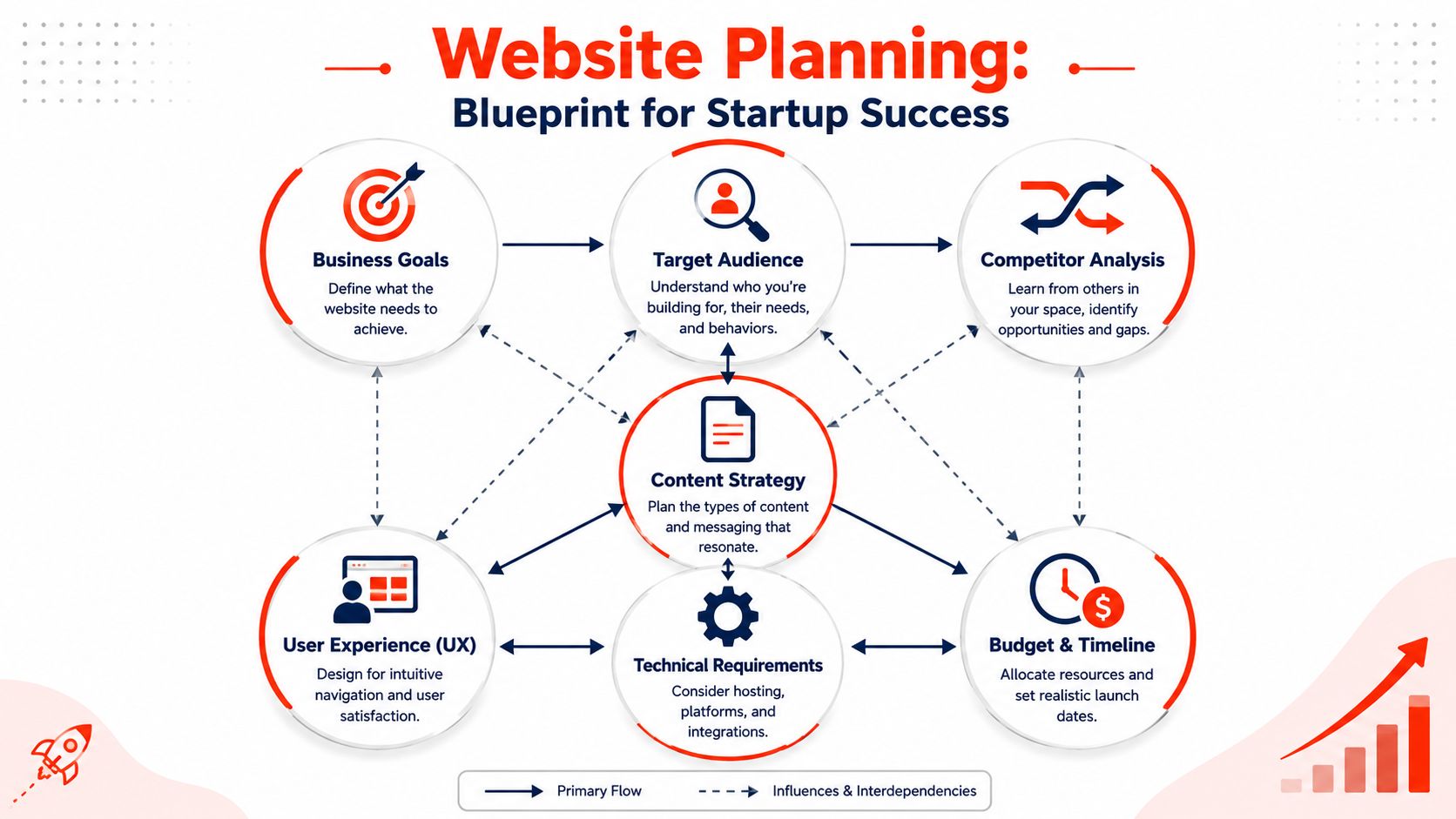
In the early stage, your website has to do three things well. It has to make you look legitimate. It has to explain what you do without waffling. It has to give people a clear next step. If it fails on any of those, people leave, and you don’t even get the chance to have the conversation.
Start with one business goal.
Most weak startup websites are built backwards. The founder starts with colours, themes, and examples from competitors, then hopes the site will somehow become useful. Start the other way round. Decide what the site is for.
Pick one primary outcome:
Lead generation: You want enquiries, bookings, calls, or quote requests.
Sales: You want someone to buy a product or pay for a service online.
Credibility: You need a polished online presence for investors, partners, or early customers.
Validation: Test demand with a landing page before spending more.
If you can’t say the goal in one sentence, your website will drift. That drift gets expensive.
Decide what your visitor needs to believe.
For startups, trust is built fast or lost fast. 48% of users say web design is the primary factor in judging a business’s reliability. First,t impressions are formed within 0.05 seconds based on design quality, according to Forbes Advisor’s website statistics. That means your visitor isn’t carefully grading your effort. They’re making an instant call on whether you look credible.
Before any design work starts, answer these questions plainly:
Who is the site for? Not “everyone”. Name the buyer.
What problem do you solve? Use the language your customer would use.
Why should they trust you? Founder background, process, specialism, proof.
What should they do next? Book a call, request a quote, buy, or message.
Practical rule: If a stranger lands on your homepage and can’t understand your offer in seconds, the homepage has failed.
Good planning also saves money. Founders overspend when they redesign pages that they never properly defined in the first place. If you settle the messaging, page priorities, and functionality early, design becomes faster and sharper. That’s the blueprint that stops your website from becoming a digital brochure nobody acts on.
Core Pages and SEO-Friendly Site Structure
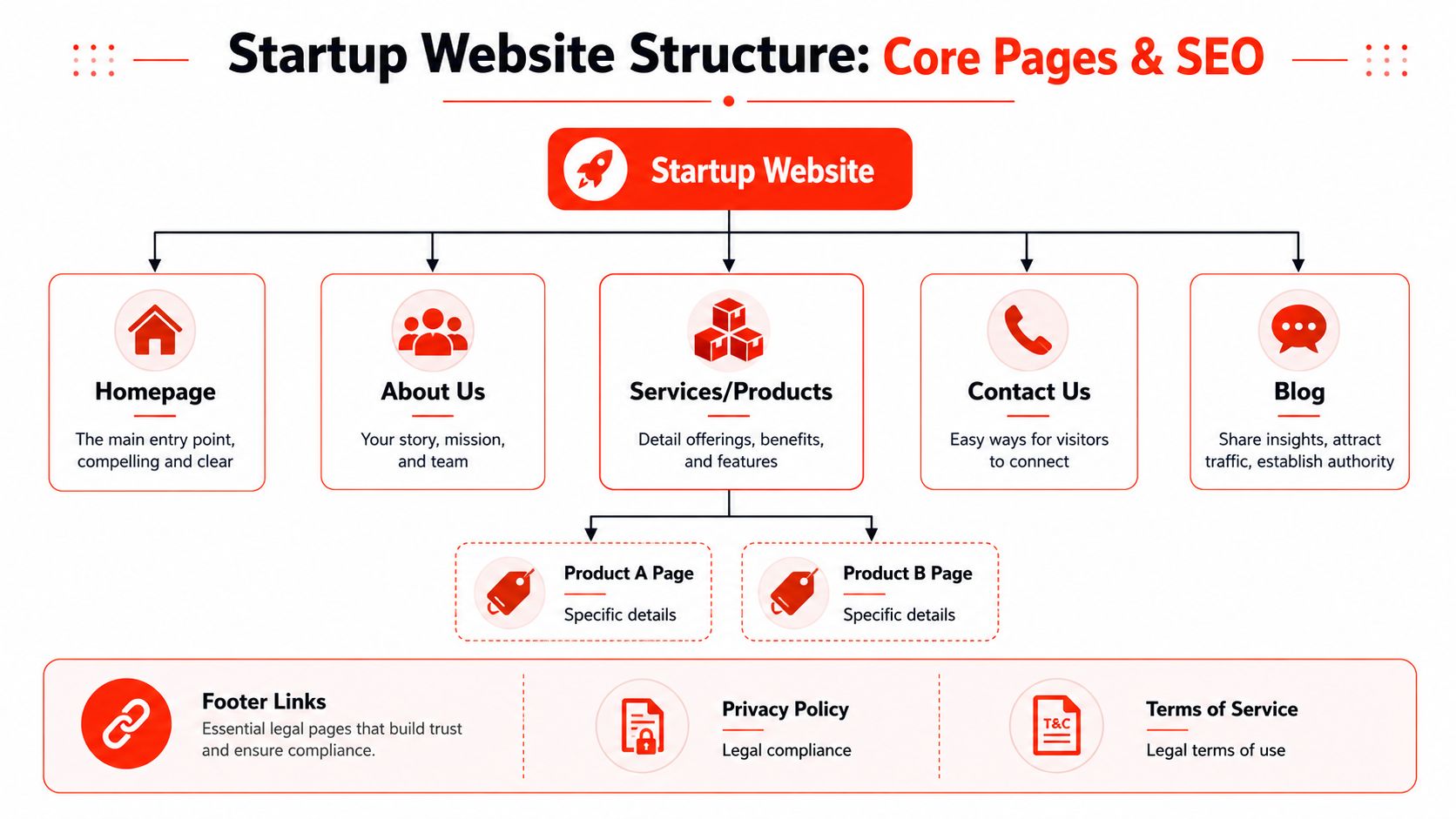
A startup website doesn’t need dozens of pages at launch. It needs the right pages in the right order, written for a buyer who wants clarity. If you clutter the structure early, you slow down the build and confuse visitors.
Build the minimum page set first.
Start with the pages that carry the commercial load.
Homepage: This is the front door. It should say what you do, who it’s for, why you’re credible, and what action to take next.
About page: Not a life story. Explain who’s behind the business, what you believe, and why you’re qualified to solve the problem.
Services or Products page: Spell out the offer. Separate offers if they serve different buyer intents.
Contact page: Keep it simple—phone, email, form, and any booking option that reduces friction.
Privacy and terms pages: Boring, yes. Still necessary.
If you’ve got a service business, add individual service pages once the core pages are solid. If you’re in SaaS or e-commerce, product pages and feature pages can follow the same logic. Don’t publish empty shells, just make the site look bigger.
Structure for search and action
The site structure should help both people and search engines. That means clean navigation, pages grouped logically, and no dead ends. A founder should be able to answer this question quickly: where does a visitor go after the homepage?
A basic journey often looks like this:
Page
Visitor question
Your job
Homepage
What is this business?
Make the offer obvious.
About
Can I trust these people?
Build confidence
Services or Products
Is this right for me?
Explain benefits and fit
Contact
How do I move forward?
Remove friction
User experience transitions from a design buzzword to a commercial imperative. Websites that prioritise user experience can achieve up to 400% higher visit-to-lead conversion rates, and investing in UX and design delivers a 9,900% ROI, with approximately £100 returned for every £1 spent, according to Figma’s web design statistics. That’s why navigation, mobile layout, page clarity, and call-to-action placement matter.
For search visibility, keep your pages purposeful. Give each core page one main topic. Write headings that match what your buyer is looking for. Make the site easy to crawl and easy to scan. If you want a practical benchmark, this guide to SEO-friendly web design is the right place to start. Build pages that rank because they’re useful, not because they’re stuffed with keywords.
Your website structure should guide a visitor towards action without making them think too hard.
Responsive design also isn’t optional. Your buyer will almost certainly view the site on a phone at some point, and if the mobile experience feels awkward, trust drops. In startup terms, simple wins. Clear menu. Clear pages. Clear next step.
Comparing Your Website Build Options
Founders usually have four realistic options. DIY builder. Freelancer. Traditional agency. All-in-one managed service. The wrong choice costs time first, and money second.
The four realistic paths
Here’s the straight comparison.
Option
Upfront Cost
Time to Launch
Technical Burden
Best For
DIY builder
Lower upfront spend, but variable add-ons
Usually, it depends on how much time you can personally commit
High, because you manage setup, content, and ongoing fixes
Founders with time, confidence, and simple needs
Freelancer
Varies by skill and scope
Often faster than an agency, but it depends heavily on availability
Medium, because you may still handle hosting or third-party tools
Lower day-to-day, but handoffs and change requests add friction
Established businesses with bigger budgets
All-in-one managed service
Predictable packaged pricing if bundled properly
Faster when design, hosting, SSL, and support sit with one provider
Low, because one team handles the stack
Startups that need speed and budget certainty
DIY looks cheap at first. Then you discover the actual cost is your own time. That’s the scarcest thing you’ve got. Every hour spent wrestling with templates, mobile spacing, forms, or plugin issues is an hour not spent selling.
Freelancers can work well if your brief is sharp and your expectations are realistic. The problem is dependency. If the freelancer disappears, gets busy, or only handles design but not hosting, you’re back to coordinating pieces.
What a founder should actually optimise for
Traditional agencies still make sense for some businesses. If you need a custom platform, deep integrations, or a major brand rollout, the agency route can be justified. Early-stage startups usually don’t need that. They need a website that launches quickly, looks credible, and doesn’t generate extra admin.
That’s where bundled services are usually the practical choice. One example is 1stNet AI’s web hosting for small businesses, which sits inside a broader managed setup that can include design, hosting, SSL, and maintenance under one roof. That model reduces supplier juggling, removes common setup gaps, and gives founders a single point of contact.
Use this filter before you choose:
Speed: Can this route get you live fast enough to support the business now?
Clarity: Do you know exactly what’s included?
Support: If something breaks, who fixes it?
Ownership: Can you update the site without rebuilding everything?
Budget certainty: Will the total cost stay predictable after launch?
Cheap websites often become expensive once you add all the missing parts.
If you’re pre-revenue, keep it lean. If you’ve got traction, buy more substance, not more decoration. That’s the decision rule that saves startups from paying for complexity they don’t yet need.
Your Rapid Launch and Maintenance Checklist
The site isn’t live because the design appears finished in the preview link. It’s live when the domain works, the SSL is active, the pages load properly, forms are tested, and somebody is responsible for keeping it secure after launch.
That’s the part founders often underestimate. Build is only half the job.
What has to be ready before launch
Simple projects can move quickly, but timelines still drift. 80.7% of simple web design projects can be completed within one month. Yet the average time often extends to 2 months due to complexity, according to GoodFirms’ research on small-business web design. If you want a fast launch, you need a tight checklist and fewer moving parts.
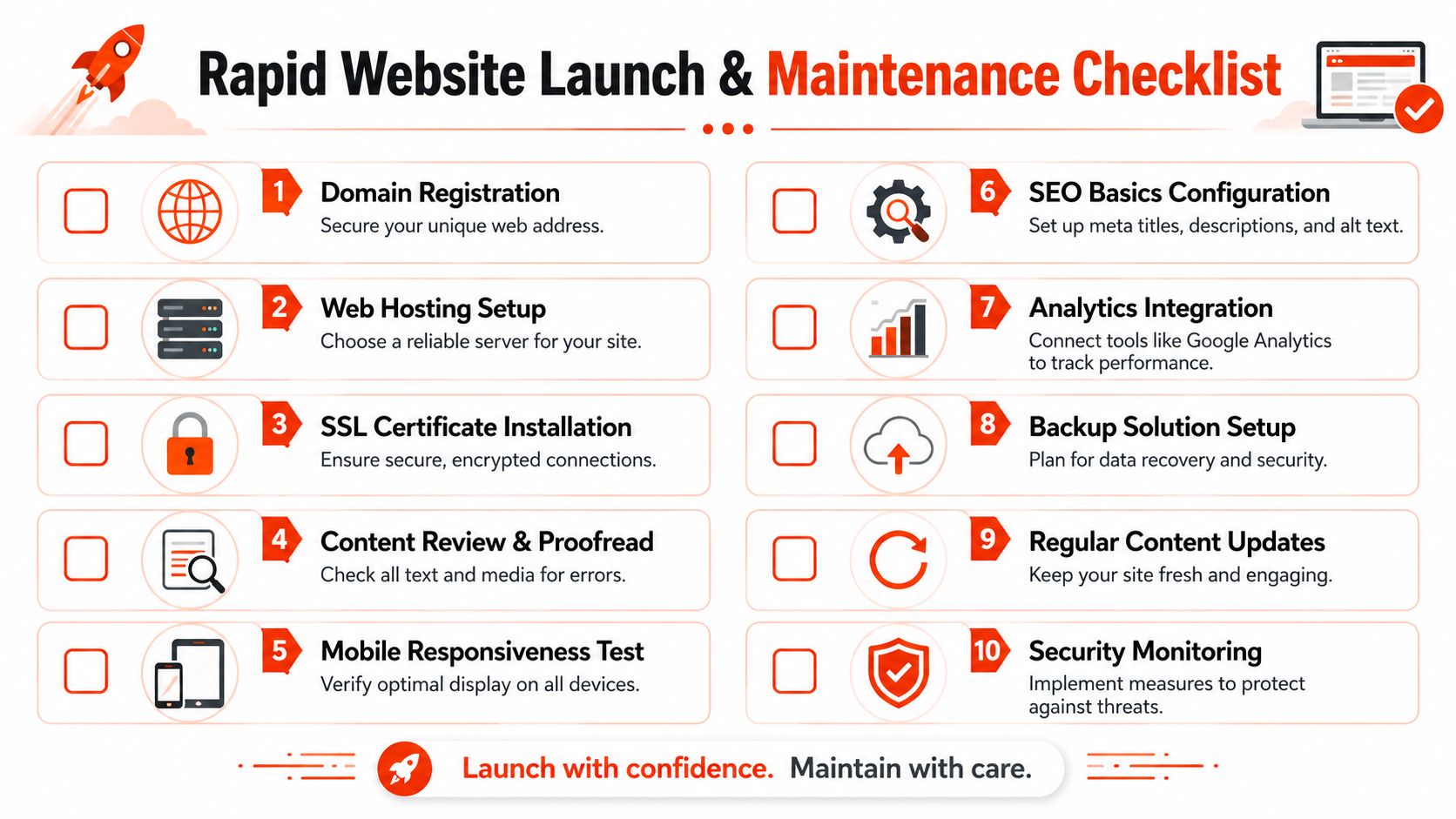
Use this launch list:
Domain registration: Make sure the business owns the domain and can access it.
Hosting setup: Put the site on reliable managed hosting, not the cheapest option you can find.
SSL installation: The site must load securely over HTTPS.
Content review: Check every page for weak copy, placeholders, and broken messaging.
Form testing: Submit every form and confirm the enquiry arrives.
Mobile review: Open the site on a physical phone, not only in a browser preview.
SEO basics: Set page titles, meta descriptions, and image alt text.
Analytics: Connect tracking to measure what happens after launch.
A fast launch is possible when these tasks are assigned to a single team. It becomes slow when the founder has to chase a designer, a hosting company, a domain provider, and a developer separately.
What must continue after launch?
Launch day isn’t the finish line. It’s the start of maintenance.
A practical post-launch routine should include:
Backups: If something goes wrong, you need recovery options.
Software updates: Themes, plugins, CMS files, and security patches can’t be ignored.
Security monitoring: Small business sites still get targeted.
Content updates: Outdated service pages erode trust.
Performance checks: Slow pages frustrate visitors and weaken results.
A neglected website ages faster than most founders realise. Broken forms, expired plugins, and outdated copy make a business look inactive.
This is why all-in-one services suit non-technical founders. They remove the handover problem. You don’t want a website team that disappears the moment the homepage goes live. You want one that still exists when an update breaks something on a Tuesday morning.
FAQs About Website Design for Startups
Can a startup website really launch that quickly?
Yes, if the scope is controlled. A fast launch usually means a focused page set, a proven build process, prepared content, and live collaboration instead of endless revision cycles. It doesn’t mean cutting corners on the essentials. It means cutting delays.
The mistake founders make is thinking speed requires a fully custom design from scratch. It usually doesn’t. A strong startup site often comes from a clear template structure, focused messaging, and quick decisions.
How much should a startup spend
Spend based on stage, not ego. Pre-revenue startups should keep the first version lean and commercially focused. If you’ve already got traction, more investment in stronger service pages, cleaner positioning, and better lead capture makes sense.
Bad spending goes in two directions. Some founders overspend on pages and features they don’t need. Others underspend so badly that the site looks untrustworthy. The right answer sits in the middle. Buy credibility and clarity first.
Do I need ongoing maintenance if the site is small
Yes. Small doesn’t mean risk-free. It means you’re less likely to have someone internal watching it.
That’s especially relevant in the UK, where there are approximately 5.7 million private sector businesses, and 75% of them, or 4.3 million, are non-employing businesses aside from owners, according to the UK business population statistical release. A large share of businesses don’t have in-house technical support. If your form stops working or your SSL certificate fails, there may be no one around to spot it quickly.
Here’s a useful overview of what founders should look for in launch support and managed care.
Does website design affect SEO
Absolutely. SEO isn’t just blog articles and keywords. It starts with the build itself. Poor structure, weak page hierarchy, clumsy mobile layouts, and slow-loading pages create problems before content strategy even begins.
A search-friendly startup website should have:
Clear page hierarchy: Home, service, about, contact, and any supporting pages linked logically.
Focused content: One clear topic per page.
Strong internal pathways: Visitors should move naturally from information to action.
Mobile usability: A layout that works properly on smaller screens.
Technical cleanliness: Secure setup, sensible metadata, and no broken elements.
Should I build it myself first and upgrade later?
Only if you’re sure you can produce something credible without draining your schedule. DIY can work, but many founders end up rebuilding quickly because the first version looks generic, loads poorly, or says too little. If that happens, the “cheap first step” becomes a duplicate cost.
What should be included in a startup website package
At minimum, look for domain support, SSL, hosting, design, launch support, and ongoing maintenance. If those are split across separate suppliers, you’ll spend more time managing the website than you’ll benefit from it.
A startup website should reduce friction, not create a second operations job.
If you want a practical route, 1stNet AI Ltd offers a managed setup for UK startups that includes website design, hosting, SSL, maintenance, and support in one service. That’s the sensible option if you want to get live quickly, avoid fragmented suppliers, and keep your budget predictable.