

Most UK small businesses don’t start with a legal project. They start with a contact form, a newsletter box, maybe live chat, and a hope that the site will bring in work. Then someone asks where enquiries are stored, who can see them, how long they’re kept, and whether the cookie banner is doing anything. That’s where data protection regulations stop being abstract and start sitting inside your build, your hosting, your CRM, and your day-to-day operations.
If you run a UK website, you’re already handling personal data the moment a visitor types a name, email address, phone number, payment detail, or even leaves an IP address in your logs. The cleanest way to deal with this is to treat privacy as part of the site build, not a bolt-on after launch. That’s the approach I use with clients, because it keeps the work practical, fast, and far easier to maintain.
Table of Contents
- Why Data Protection Regulations Hit Small UK Businesses First
- The UK GDPR and Data Protection Act 2018 Explained
- Core Principles and Lawful Bases You Can Use Today
- Data Subject Rights, Controller and Processor Duties, and Breach Reporting
- Privacy by Design and Why Consent Is Not a Magic Shield
- Fines, Enforcement, and What the ICO Cares About
- A Practical Compliance Checklist for UK Small Business Websites
Why Data Protection Regulations Hit Small UK Businesses First
A local trades business switches on a quote form on Monday. By Tuesday, the owner’s inbox has names, email addresses, phone numbers, project notes, and a few accidental extras in free-text fields. The site also runs analytics, so the browser is already passing tracking data around in the background. None of that feels like “compliance work” to the owner, but all of it is personal data processing under the UK regime.
The real risk starts in the form field
This is why small firms get caught early. They don’t have a legal department, but they do have contact forms, CRMs, hosting logs, and email tools. Under the UK framework, those everyday tools are part of the compliance surface, not separate from it. The UK GDPR and the Data Protection Act 2018 both came into force on 25 May 2018 CMS Enforcement Tracker database, and the shift from the older Data Protection Act 1998 moved UK privacy law into a continuous governance model rather than a simple registration mindset. CookieYes privacy statistics overview.
Practical rule: if a visitor can type it, upload it, or trigger it, treat it as regulated data until you’ve checked the purpose, the lawful basis, and the retention period.
Why owners misread the problem
Most small business owners think the issue is a privacy policy. It isn’t. The issue is whether the site is collecting more than it needs, sharing data with the wrong tools, or keeping it indefinitely because nobody owns the clean-up. A basic lead-generation site can already process names, emails, IP addresses, chat transcripts, and payment details, and each one creates a different handling question.
The mistake I see most often is this. A team believes compliance is something they’ll “sort later” once the site starts converting. That’s backwards. The legal regime is live on day one, and the business risk grows every time you add a new tool, a new form, or a new integration without checking what data it touches.
The right frame is operational. Decide what the site should collect, where it should go, who can see it, how long it should stay, and how you’ll delete it. If you do that early, the legal side becomes manageable. If you don’t, you end up untangling a mess after launch, when the site is already collecting real customer data.
The UK GDPR and Data Protection Act 2018 Explained
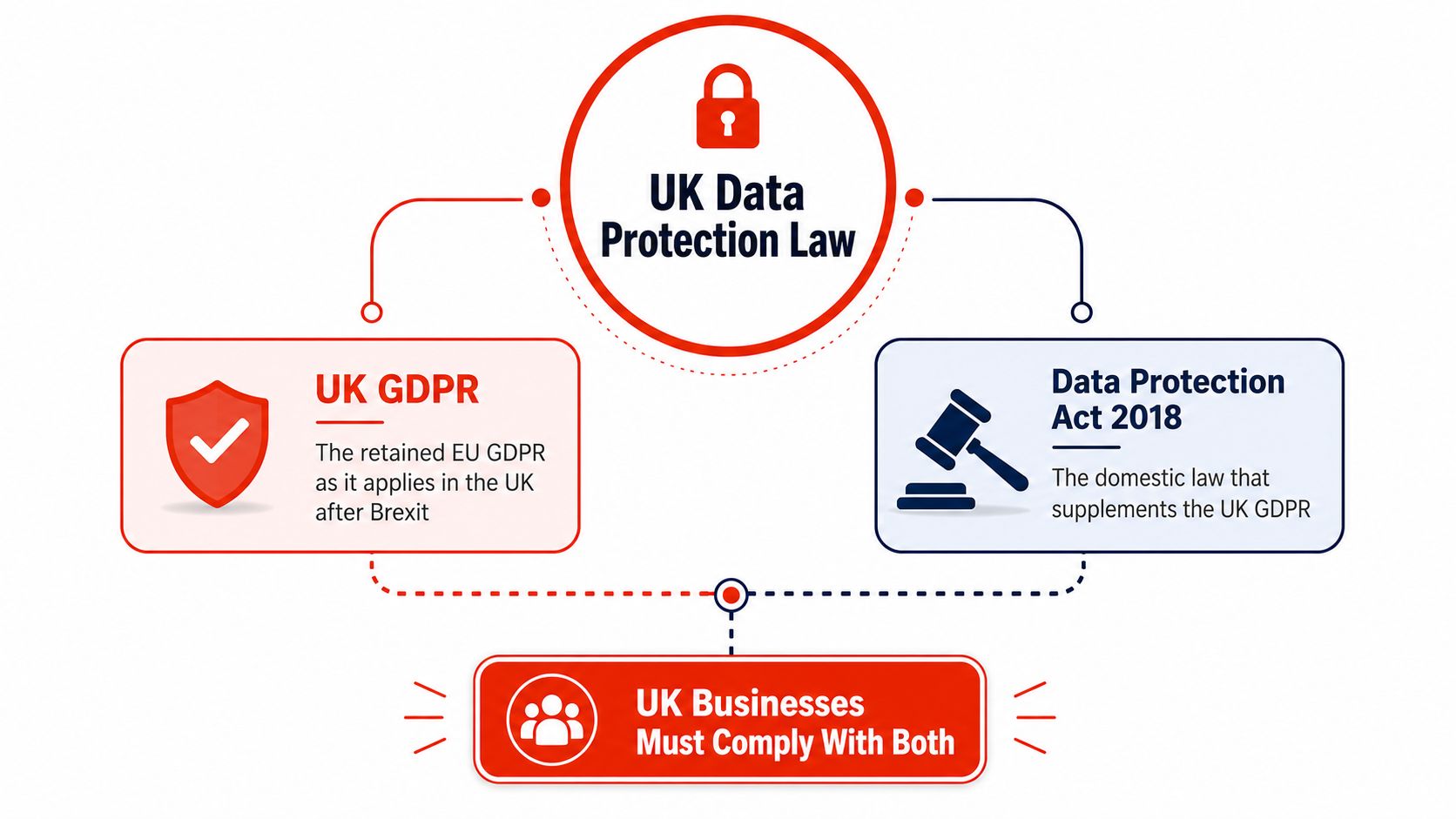
The UK’s working pair is simple. You need to know the UK GDPR and the Data Protection Act 2018. The UK GDPR carries the main GDPR-style obligations in domestic law, while the DPA 2018 adds national rules for areas such as law enforcement, intelligence services, and certain exemptions to the European Commission legal framework.
What changed in 2018
The practical milestone is 25 May 2018, when the GDPR became applicable, and the UK regime modernised around the same launch date, European Parliament factsheet. That date matters because it marks the end of the old registration-style mindset. Businesses are no longer being asked merely to declare that they hold data. They’re being asked to show how they handle it, secure it, and justify it.
That’s also why the law now focuses so heavily on accountability. If you collect customer details on a website, the question isn’t just whether you are allowed to hold them. The question is whether you can explain why you collected them, where they go, and when they are deleted.
What counts as processing on a website
The GDPR defines processing broadly as any operation on personal data, including collecting, storing, disclosing, and erasing it, according to the European Parliament factsheet. For a website owner, that means a lead form submission, an email forward to sales, a record in the CRM, or a deletion from backups are all regulated activities. None of those steps is “just technical”.
So if you’re building or running a website, think in flows. A visitor submits a form. The data is sent to your CMS or form plugin. It may sync to email, a CRM, or a spreadsheet. Later, it gets archived or deleted. Every one of those touches needs a lawful reason and a clean handling rule.
Owner-level takeaway: the laws are not separate from the site. They sit inside the site’s content, tools, storage, and admin access.
Core Principles and Lawful Bases You Can Use Today
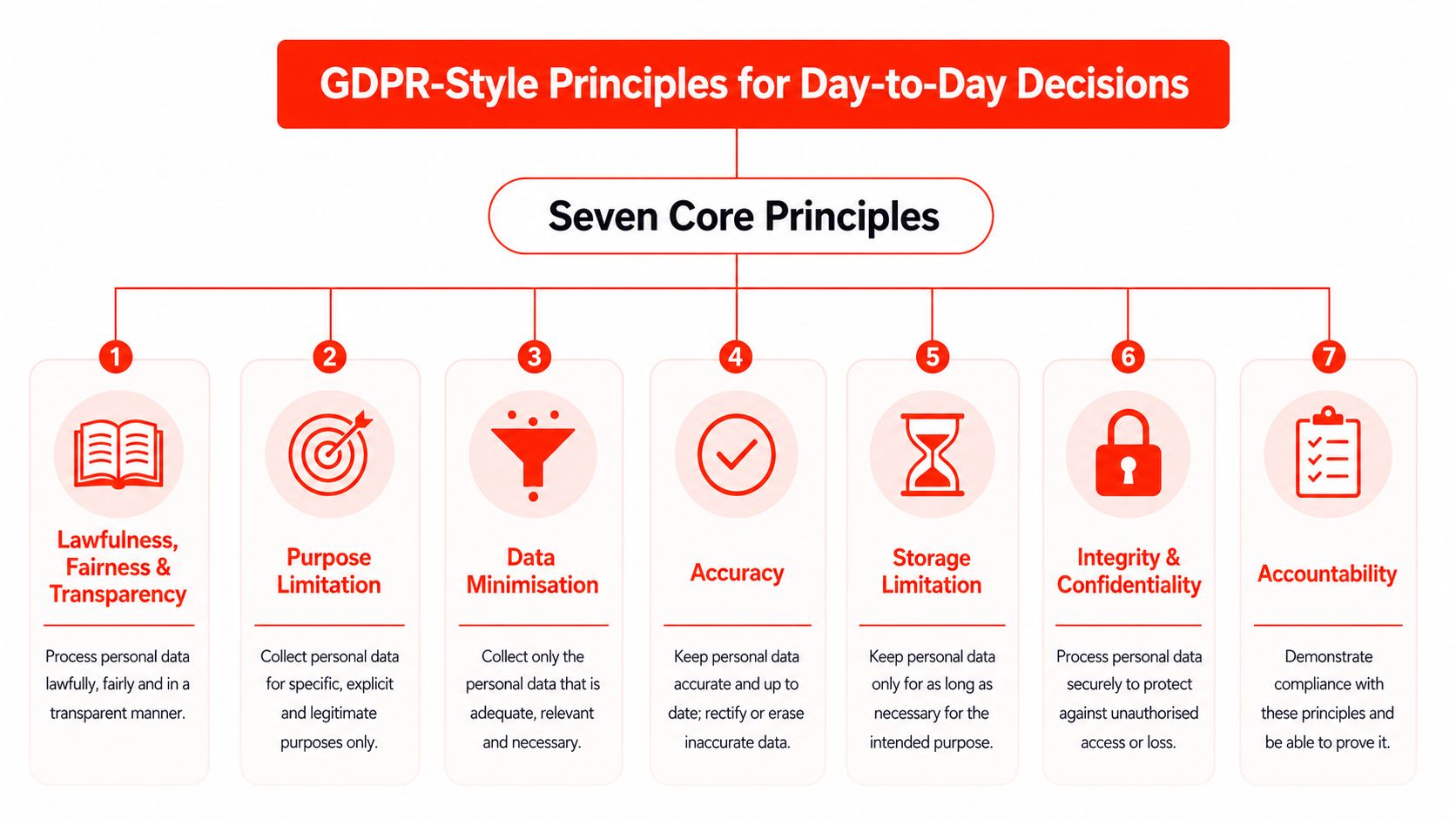
A small business website gets this wrong at the form field, not in a courtroom. The seven core principles are the part you need to build into forms, databases, retention rules, and admin habits. The ICO and EU frameworks both emphasise lawfulness, fairness and transparency, purpose limitation, data minimisation, accuracy, storage limitation, integrity, confidentiality, and accountability. European Commission legal framework.
Turn the principles into website decisions
Here’s how I translate them for clients. Purpose limitation means your support form should not ask for marketing preferences. Data minimisation means your quote form should not demand a date of birth unless there is a clear reason. Accuracy means you fix or remove stale customer records instead of leaving them buried in the CRM. Integrity and confidentiality mean restricting access, encrypting backups, and preventing staff from passing customer spreadsheets around the office.
The lawful bases sit beneath those principles, and many websites drift into guesswork. A contact form may rely on legitimate interests or a contract, depending on what the user is asking for. A newsletter sign-up usually sits on consent. Payroll sits on a legal obligation. Do not force consent everywhere just because it feels familiar. Choose the basis that matches the activity.
Do this first: map every form and integration to one lawful basis before you launch it.
Storage rules and what to do with old data
Storage limitations are the rules that prevent small businesses from hoarding useless records. If you no longer need the data for the purpose for which you collected it, delete it or anonymise it. That is not tidy-up work on the side; it is part of the standard you are meant to follow.
For a fast-launch service or a small-agency site, this also applies to forms, analytics, and payment gateways. If the tool stores more than it needs, you inherit the mess. Keep the setup simple. Collect less, retain less, and document why anything stays.
If you handle checkout or payment flows, keep the privacy setup aligned with the rest of the site. A useful reference point is the internal guide on website payment gateway setup, because payment data requires more careful thought than a standard enquiry form.
Data Subject Rights, Controller and Processor Duties, and Breach Reporting
Your customers have rights, and your team needs a basic plan for responding to them. The main ones you’ll deal with are access, rectification, erasure, restriction, portability, and objection. In plain English, that means people can ask what you hold, correct it, delete it, limit it, move it, or object to certain uses.
Who does what
The role split matters more than most owners realise. A controller decides why and how personal data is processed. A processor handles data on the controller’s behalf. In practice, your business is usually the controller, while your website agency, hosting provider, email platform, analytics tool, or live chat vendor may be processors.
| Area | Controller (Your Business) | Processor (Third-Party Tool) |
|---|---|---|
| Purpose for data use | Decides why the data is collected | Follows your instructions |
| Lawful basis | Chooses and documents it | Doesn’t choose it for you |
| Privacy notices | Must explain the processing | Supports with contract terms and details |
| Rights requests | Owns the response | Assists where needed |
| Breach handling | Leads the report and decisions | Notifies you quickly if something goes wrong |
The ICO’s breach rule is the hard deadline most small businesses underestimate. Qualifying breaches must be reported within 72 hours of the controller becoming aware of them, ICO technical requirements PDF. That makes incident response a formal compliance task, not a panic exercise.
What does that mean in practice
If a laptop goes missing, a mailbox is compromised, or a vendor leaks customer data, somebody on your side has to triage it fast. The job is to decide whether the incident is reportable, which data are affected, and whether people need to be notified. The faster your records are organised, the easier that decision is.
A small business doesn’t need a giant incident framework. It needs one person to own escalation, one place to log the event, and one rule for who calls the ICO clock.
The main mistake is leaving this to whoever notices the problem first. Don’t do that. Put the ownership in writing. Make sure your suppliers know how to notify you. Then test the process with a fake incident before you need it for real.
Privacy by Design and Why Consent Is Not a Magic Shield
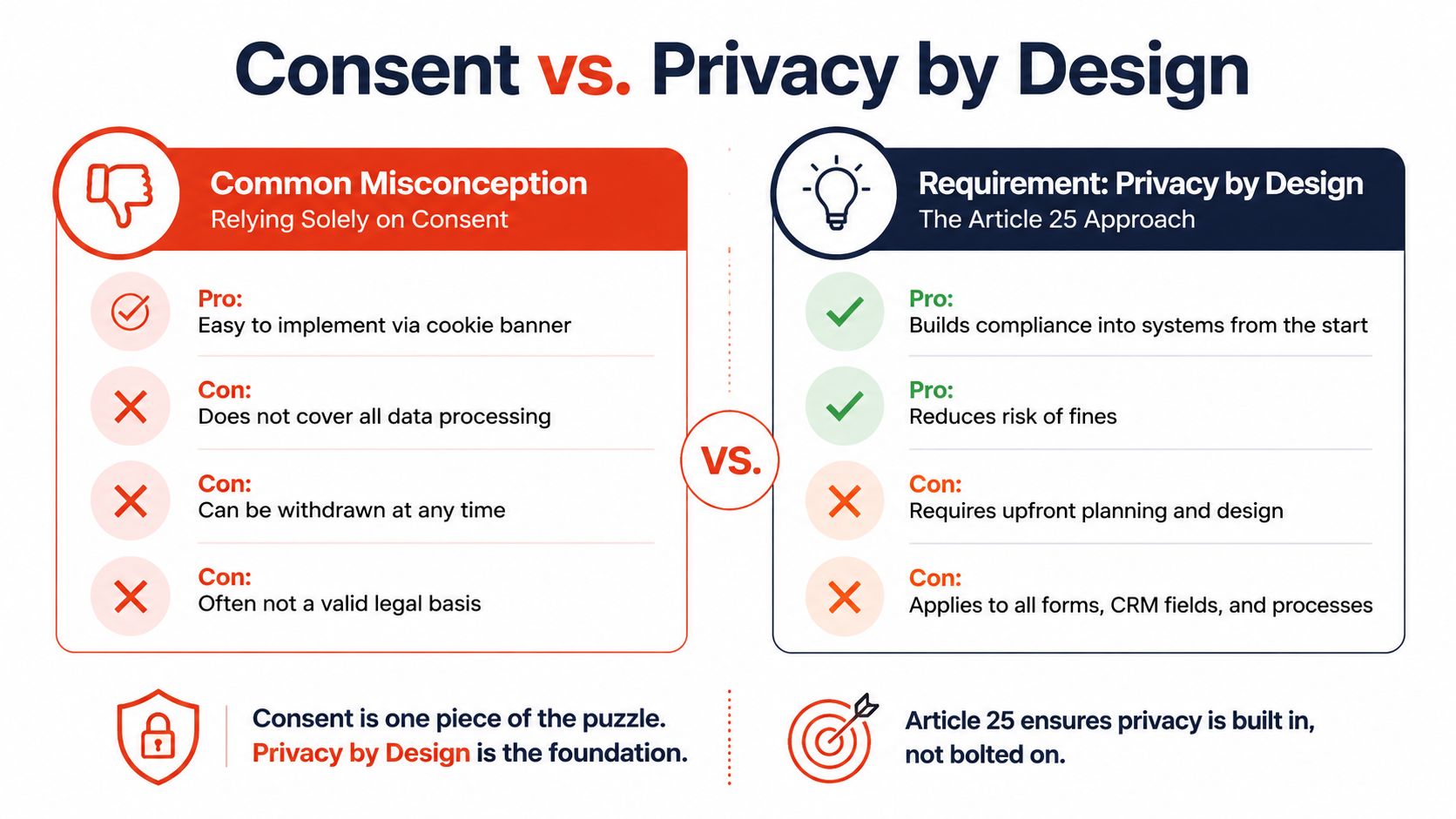
A cookie banner doesn’t make a site compliant. It just means you’ve displayed a choice mechanism for some types of tracking. Under Article 25, data protection by design and by default means you build privacy into forms, CRM fields, backups, and workflows from the start, ICO technical requirements PDF.
Consent is not the default answer
I see this mistake constantly. A business collects too much data, then tries to fix it with a banner. That’s the wrong order. Consent is useful in some cases, but it isn’t a universal shield and doesn’t excuse poor collection design. If your form asks for more than it needs, the problem starts before the banner ever appears.
The smarter approach is to make the form smaller. A contact form and a quote form should not look the same if they serve different purposes. The quote form can justify extra fields if those details are needed. The contact form should stay lean.
Build for the minimum collection first
The cleaner model is simple. Collect the least amount of data necessary to keep the business functioning. Then decide whether consent, legitimate interests, or another basis fits the remaining flow. That’s how you reduce exposure without making the site awkward for users.
I’d also push every team to review its retention and storage setup alongside the front-end forms. If you still save old submissions in multiple places, you’ve lost control of the data flow, even if the banner is perfect. For a practical privacy setup, the internal guide on cookie policy setup is a better starting point than a vague “we use cookies” message.
Fines, Enforcement, and What the ICO Cares About
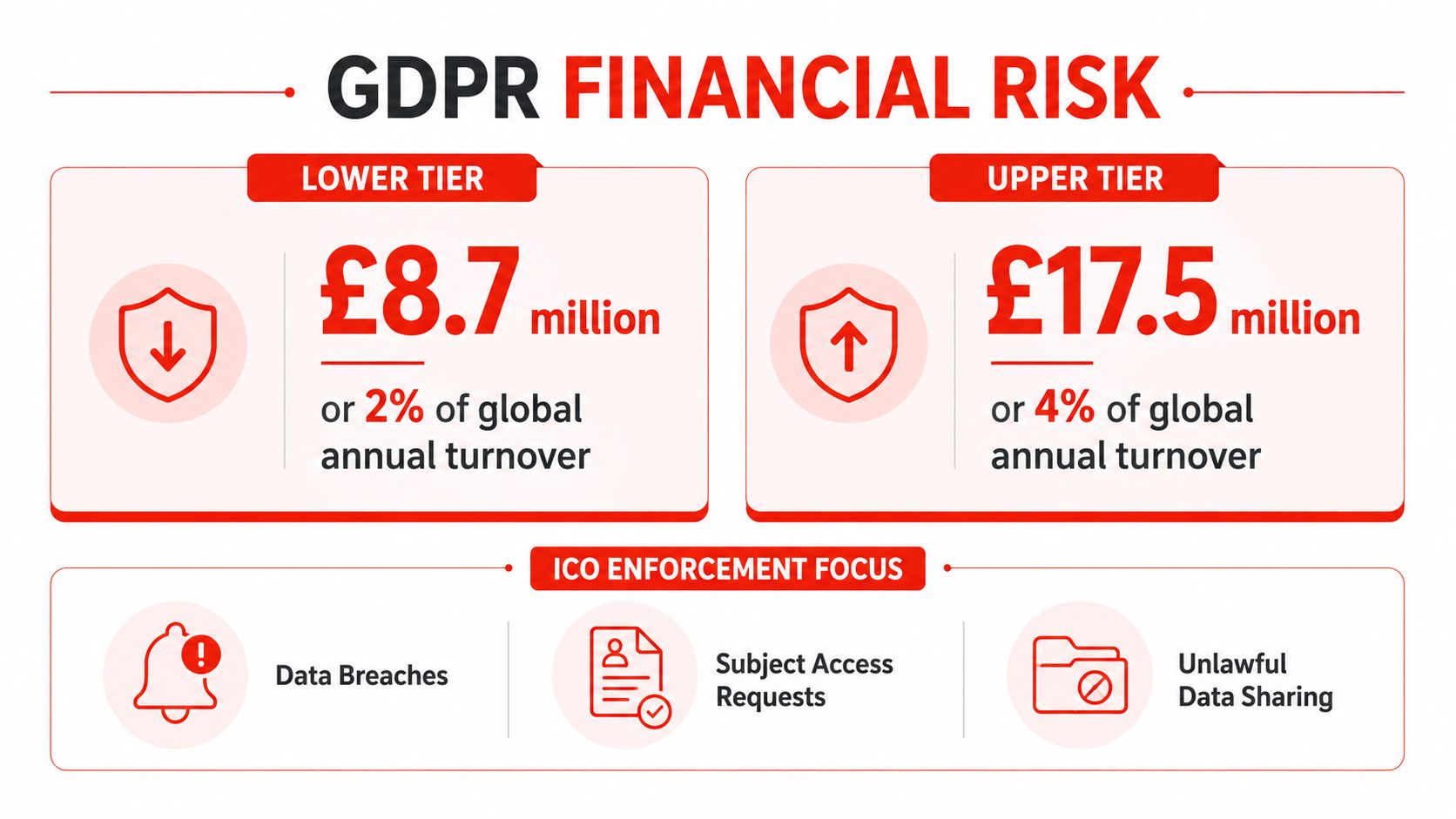
The penalty structure is not symbolic. GDPR fines come in two tiers, with the maximum reaching €20 million or 4% of global annual turnover, whichever is higher. GDPR.eu explanation of fines. The same source also notes that individuals can pursue compensation claims, so the risk is not limited to regulator action.
The size of the problem is already real
Regulators across Europe had recorded 2,685 fines totalling about €6.11 billion in the CMS Enforcement Tracker database by the time of the latest figures CMS Enforcement Tracker database. Public reporting also shows steady breach notifications, with the latest figures cited in the brief averaging 443 per day, up 22% year over year, and cumulative fines said to have passed €7 billion in early 2026 CookieYes privacy statistics overview. That is the point where compliance stops being theory and becomes part of operating costs.
The ICO does not need every small business to be perfect. It does care when a firm is sloppy in the same predictable ways. Weak privacy notices, poor consent handling, missing contracts with suppliers, unsafe storage of customer data, and slow breach reporting are the patterns that create trouble. Clean records and clear ownership stop most of that before it turns into an investigation.
What to fix before anything else
Start with the obvious weak spots. A broken cookie setup is easier to fix than a whole data inventory. A vague supplier contract is easier to fix than a post-incident explanation. A missed breach deadline is the one mistake that can turn a minor issue into a serious one, because it shows the business has no working process.
I would rather see a small team with a simple, documented system than a large stack of policies nobody follows. The regulator looks for effectiveness, not theatre. If your site keeps taking data it does not need, or your vendors cannot explain their role, those are the problems to fix first. If you need a practical starting point for policy wording, the internal privacy policy guide is the right reference.
A Practical Compliance Checklist for UK Small Business Websites
Start with the website itself, because that’s where the data enters your business. Your privacy notice needs to say what you collect, why you collect it, how long you keep it, and who you share it with. If a tool, plugin, or platform touches personal data, it belongs in that notice too. The internal privacy policy guide is a useful reference point if you’re shaping the wording for a live site.
The seven things I’d fix in week one
Publish a clear privacy notice. Tell people what data you collect, why you collect it, who gets it, and when it’s deleted. Don’t bury that in vague legal language.
Make cookie and consent settings behave properly. Non-essential trackers should wait for opt-in. If the site uses analytics or marketing tags, ensure the banner controls them.
Harden the site’s security basics. Use HTTPS, restrict admin access, keep backups encrypted, and patch the stack regularly. Article 32 is risk-based, so your controls need to match the sensitivity of the data. GDPR Article 32 summary.
Put processor contracts in place. Hosting, email, analytics, payment, and live chat providers need proper terms if they handle personal data for you.
Check your ICO position. If you need to register and pay the fee, do it. Don’t leave that until someone asks.
Write a short breach response plan. Make it clear who gets alerted, who decides whether the issue is reportable, and who handles the 72-hour clock ICO technical requirements PDF.
Set a review cadence. Check the privacy notice quarterly, review vendors annually, and reassess the setup whenever you add a new tool.
My rule for small teams: if you can’t explain the data flow on one page, you don’t control it yet.
If you’re a UK business and you want a site that launches quickly without privacy becoming a mess, work with a team that handles design, hosting, maintenance, and support as part of a single build. 1stNet AI Ltd offers that kind of managed website delivery, and it’s a sensible fit when you want the launch done properly, the data handling mapped cleanly, and the ongoing site upkeep kept simple. Visit 1stNet AI Ltd if you want a website built with compliance and operation in mind from the start.