
The worst time to learn about an SSL certificate for website security is usually the moment the checkout breaks. A small business owner can go to bed with orders coming in, then wake up to a browser warning, a missing padlock, and customers backing out before they’ve even typed their card details.
That’s the part many owners miss. SSL isn’t just something you buy once and forget, it’s an ongoing control that keeps a site usable, trusted, and reachable through HTTPS. For UK small businesses, that means treating certificate setup, renewal, and monitoring as part of normal website upkeep, not as a one-off admin chore.
When the Padlock Disappears and Orders Stop
A florist in Bristol can feel this problem in one morning. Valentine’s Day traffic hits, customers click through to the checkout, and the browser throws up a warning because the certificate expired overnight. The result is simple and painful, fewer orders, more abandoned carts, and a site that looks unsafe before anyone has even seen the bouquet range.
That kind of failure is what makes SSL operational, not decorative. The National Cyber Security Centre recommends using TLS 1.3 and/or TLS 1.2 with its Recommended Profiles, while explicitly disabling TLS 1.1 and TLS 1.0 and other insecure features, and for public-facing services it also says to use a certificate from a public CA, publish services only over HTTPS, redirect HTTP to HTTPS, and enable HSTS plus secure cookies (NCSC TLS guidance). In other words, a site that still negotiates legacy protocol versions is already outside the recommended UK security posture.
Why expiry hurts so fast
Browsers don’t treat a lapse as a small admin issue. They turn it into a visible trust problem immediately, which is exactly why owners feel the impact in sales before they understand the cause. A secure connection is signalled by the closed padlock in the address bar, and when that signal disappears, the site is telling visitors not to proceed with confidence (Fortinet SSL certificate overview).
Practical rule: if the certificate can expire without anyone noticing, the website doesn’t really have SSL protection in a business sense.
The fix is straightforward, but it has to be managed. You need to know who owns the certificate, where renewal happens, and how the site behaves if something goes wrong. That’s the difference between a website that merely exists and one that stays open for business.
What an SSL Certificate Does on Your Website
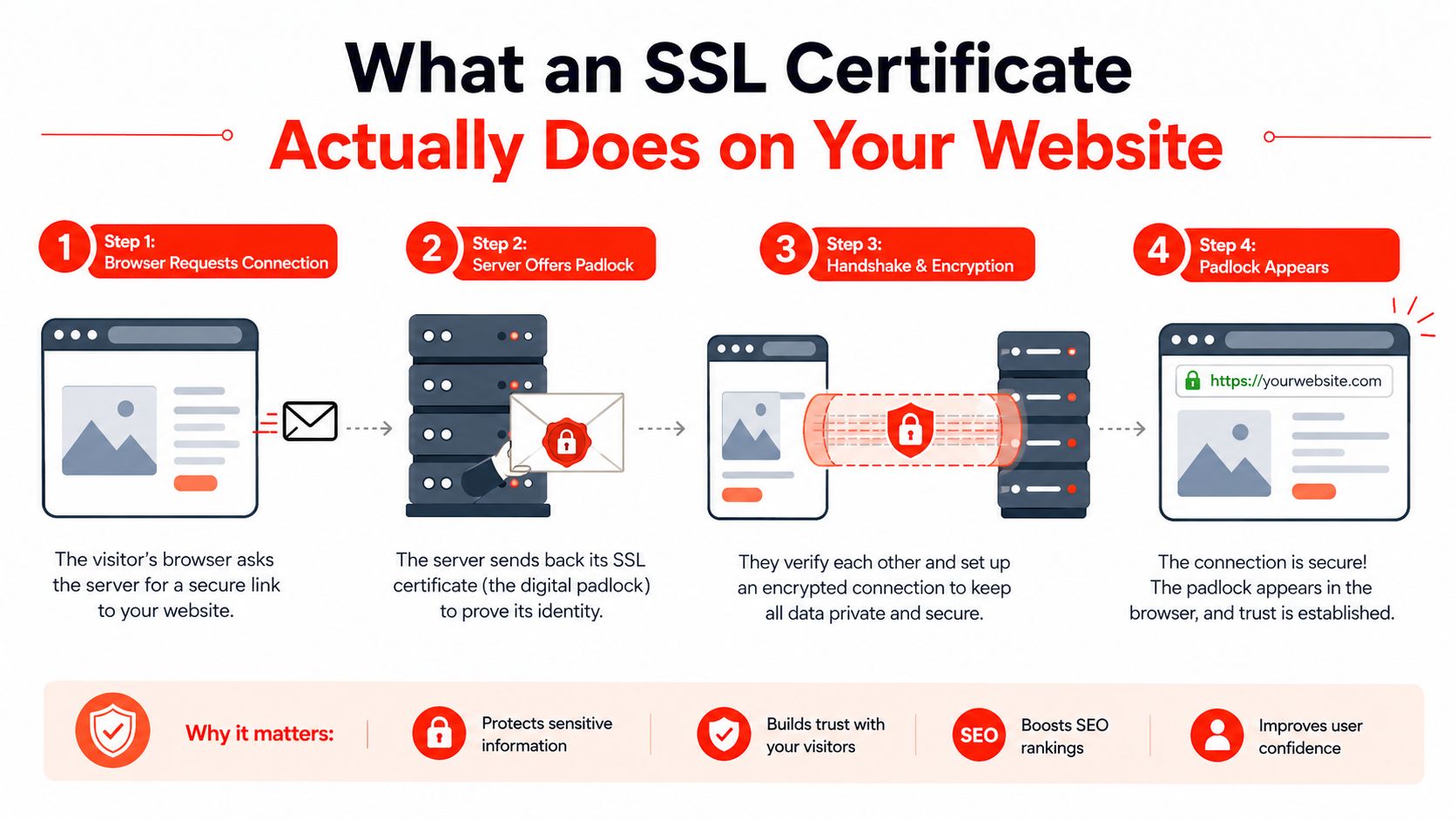
Your website uses an SSL certificate every time a visitor opens a page that needs to be trusted, such as a contact form or checkout. The certificate proves the server’s identity, the browser checks that proof against a trusted Certificate Authority, and only then do both sides set up a secure channel before private information moves.
Three jobs the certificate performs
First, it encrypts data in transit. If a customer submits a contact form, enters card details through PayPal or Stripe, or shares personal information, the certificate scrambles that data while it travels between the browser and the server.
Second, it authenticates the domain. The browser gets a way to confirm that the visitor is reaching your real business, not a lookalike page set up to copy your shop. That check matters even when customers never read the technical details.
Third, it creates the HTTPS and padlock trust signals people look for before they share anything online. Plain HTTP pages can trigger a “Not Secure” warning in Chrome, which is a clear signal that the connection is not protected.
A simple way to judge it
An SSL certificate does not make the whole website trustworthy by itself. It secures the connection, which is only one part of trust. The rest still depends on your content, your checkout, your support, and how well the site is maintained.
A padlock is a transport signal, not a full business audit.
For a small business in the UK, that distinction matters. SSL protects the route between the customer and the site, but it does not fix a broken shopfront, repair a hacked theme, or stop a fake retailer from building a convincing clone elsewhere. Managed hosting helps here because renewal, monitoring, and installation become part of day-to-day site operations, not a certificate you buy once and forget.
Choosing the Right Validation Level for Your Business
The main SSL question is how much checking the Certificate Authority does before it issues the certificate, and what that means for the trust signals visitors see. Domain Validation, Organisation Validation, and Extended Validation sit at different points on that spectrum.
DV, OV, and EV in plain English
DV checks control of the domain. It is the lightest option and often suits blogs, portfolios, and small brochure sites. OV goes further by checking the organisation behind the site, which adds a clearer business identity for a UK shop taking card payments or enquiries from customers who want to see a named company. EV uses the most intensive validation process, so it is usually chosen by banks and large retailers that want deeper vetting.
All three provide the same encryption strength. The difference is the checking process and the visible trust context around the certificate, not whether one tier is “more encrypted” than another.
Here’s the simplest way to compare them.
| Validation Level | What It Verifies | Typical Cost | Best For |
|---|---|---|---|
| DV | Control of the domain | Often free or low cost | Blogs, portfolios, small brochure sites |
| OV | Domain control plus business identity checks | Higher than DV | UK shops, service firms, growing businesses |
| EV | More extensive business vetting | Highest | Banks, large retailers, regulated brands |
A local electrician in Leeds with a contact form may only need DV if the site is otherwise well maintained. A Manchester retailer processing orders every day may prefer OV because the company name carries more weight with cautious buyers. The right choice depends on how customers use the site and how much identity checking you want the certificate issuer to do.
For many small firms, the decision is DV plus good operations versus paying more for OV reassurance. If you keep the certificate renewed, the site updated, and the checkout stable, DV often does the job. If you want a stronger business identity check for customer confidence, OV can be a sensible upgrade.
That choice works best as part of ongoing site management. Managed hosting can handle renewal, monitoring, and installation as routine tasks, which helps prevent an expired certificate from undermining the trust signal customers expect when they see the padlock.
How SSL Certificates Are Issued and Installed
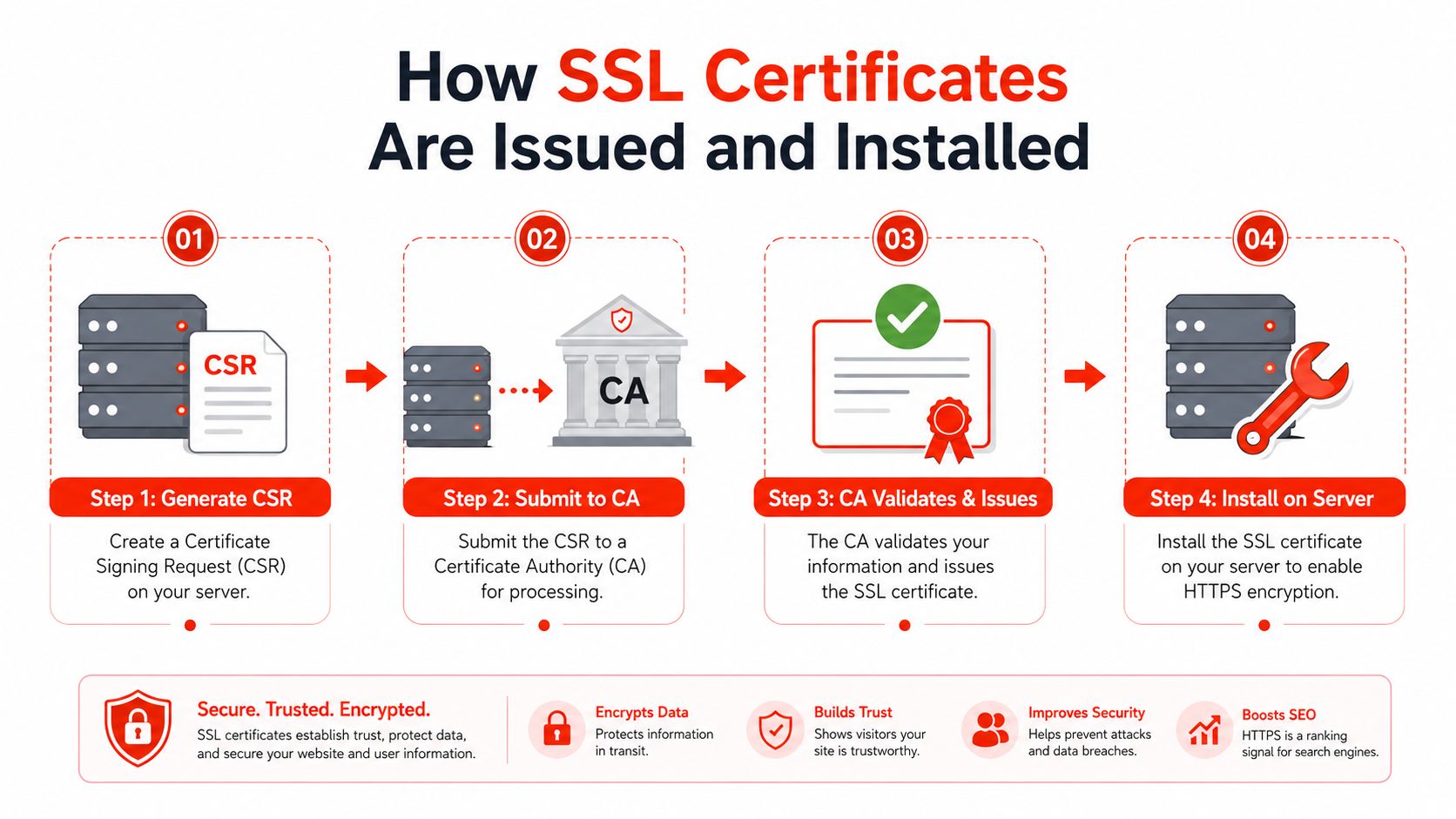
A padlock on a website starts with a chain of small handoffs. Someone creates a request on the server, sends it to a Certificate Authority, completes the checks, and installs the returned files on the hosting platform. For a small business owner, the process is less like buying a product and more like keeping a business lock in working order.
The four steps that matter
Step 1, generate a CSR. A Certificate Signing Request is created on the server. It carries the details the Certificate Authority needs to issue the certificate.
Step 2, submit it to the CA. The request goes to the Certificate Authority, which checks that the applicant controls the domain or belongs to the business named in the request.
Step 3, complete validation. The CA performs the checks required for the certificate type. DV and OV ask for different levels of proof, so the paperwork is different too.
Step 4, install the files. The issued certificate is added to the hosting platform so the website can serve secure HTTPS traffic.
The part that catches owners out is the handover after installation. Certificates do not stay useful on their own. The NCSC has noted a trend toward shorter certificate lifetimes and recommends preparing for that shift, while UK government security guidance says certificates must stay valid, current, and managed so they do not expire (NCSC certificate lifecycle guidance).
That makes renewal an operating task, not a one-time purchase. Set reminders, check auto-renew settings, and make sure one person is responsible for expiry dates. A checkout page can turn into a warning screen quickly if renewal slips. For a non-technical owner, automation is usually the safer default because it removes the memory problem from the process.
Self-Managed SSL Versus Managed Hosting Bundles
Self-managed SSL is usually the cheaper path up front. You buy or obtain the certificate, install it yourself, and keep track of expiry dates, server settings, and any hostname changes. That works fine if you’ve got technical staff or you’re comfortable handling hosting tasks.
Managed hosting bundles push those responsibilities into one place. The certificate, installation, monitoring, and renewal sit inside the hosting service, so the business owner isn’t juggling separate suppliers or calendar reminders. For a sole trader or local retailer, that often matters more than shaving a bit off the monthly bill.
The trade-offs side by side
| Factor | Self-Managed SSL | Managed Hosting Bundle |
|---|---|---|
| Upfront cost | Lower | Higher, but bundled |
| Time | More owner time required | Less owner time required |
| Technical effort | Manual setup and monitoring | Provider handles it |
| Renewal risk | Higher if reminders are missed | Lower because renewal is managed |
| Best fit | Teams with in-house technical help | Non-technical owners, sole traders, small shops |
The UK small-business security picture makes that decision more practical than theoretical. One UK-wide scan reported 254,000+ sites with invalid certificates and 150,000 sharing the same certificates, while only 7.12% of small firms and 1.37% of micro firms held Cyber Essentials certification in the year to March 2026 (UK SSL adoption statistics). That gap suggests plenty of owners are still managing the hard parts manually, or not managing them well enough.
Where managed fits naturally
Managed hosting makes sense when uptime matters and nobody on the team wants to touch server files. It also suits businesses that need the website live quickly and don’t want to coordinate between a registrar, a host, and a separate certificate provider. A service such as 1stNet AI Ltd bundles domain, SSL, hosting, and maintenance into one workflow, which removes some of the handoff risk that causes certificate problems in the first place.
Self-managed still has a place if you’ve got internal support and a process for renewals. But if the website is a sales tool, not a hobby project, the key question is who carries the risk when something expires at the wrong time.
Common SSL Misconceptions UK Business Owners Have
Many UK business owners assume a padlock icon guarantees the whole site is trustworthy. It doesn’t. It shows the connection is encrypted, which helps protect data in transit, but it cannot tell a customer whether the trader is genuine, the products are real, or the site has been set up with honest intent.
That confusion matters because a fake site can still display a padlock. A copycat storefront built to resemble a familiar UK retailer, or a lookalike domain such as a slight misspelling of a local shop’s name, can still appear secure in the browser while steering people toward a scam.
Paid certificates can also be misunderstood. Free certificates from reputable authorities can provide the same encryption strength as paid ones, so the difference is usually support, business validation, and warranty cover. If someone says free is automatically less secure, that is too simple.
Trust comes from the full site experience, not from one icon in the address bar.
What SSL does not solve
SSL does not fix a slow site, a hacked plugin, weak passwords, or poor refund handling. It does not make vague business terms clearer either. A customer still wants to see a real company, readable contact details, and a checkout that feels safe to use.
For a UK shop, that might mean a bakery in Manchester with a polished checkout still needs clear opening hours, a genuine contact number, and accurate branding. A locksmith in Birmingham with an encrypted site still loses trust fast if the site name looks different from the invoice name.
SSL is one layer in a wider trust setup. It protects the connection. The rest of the business still has to earn confidence.
Putting It All Together for a Secure Website Launch
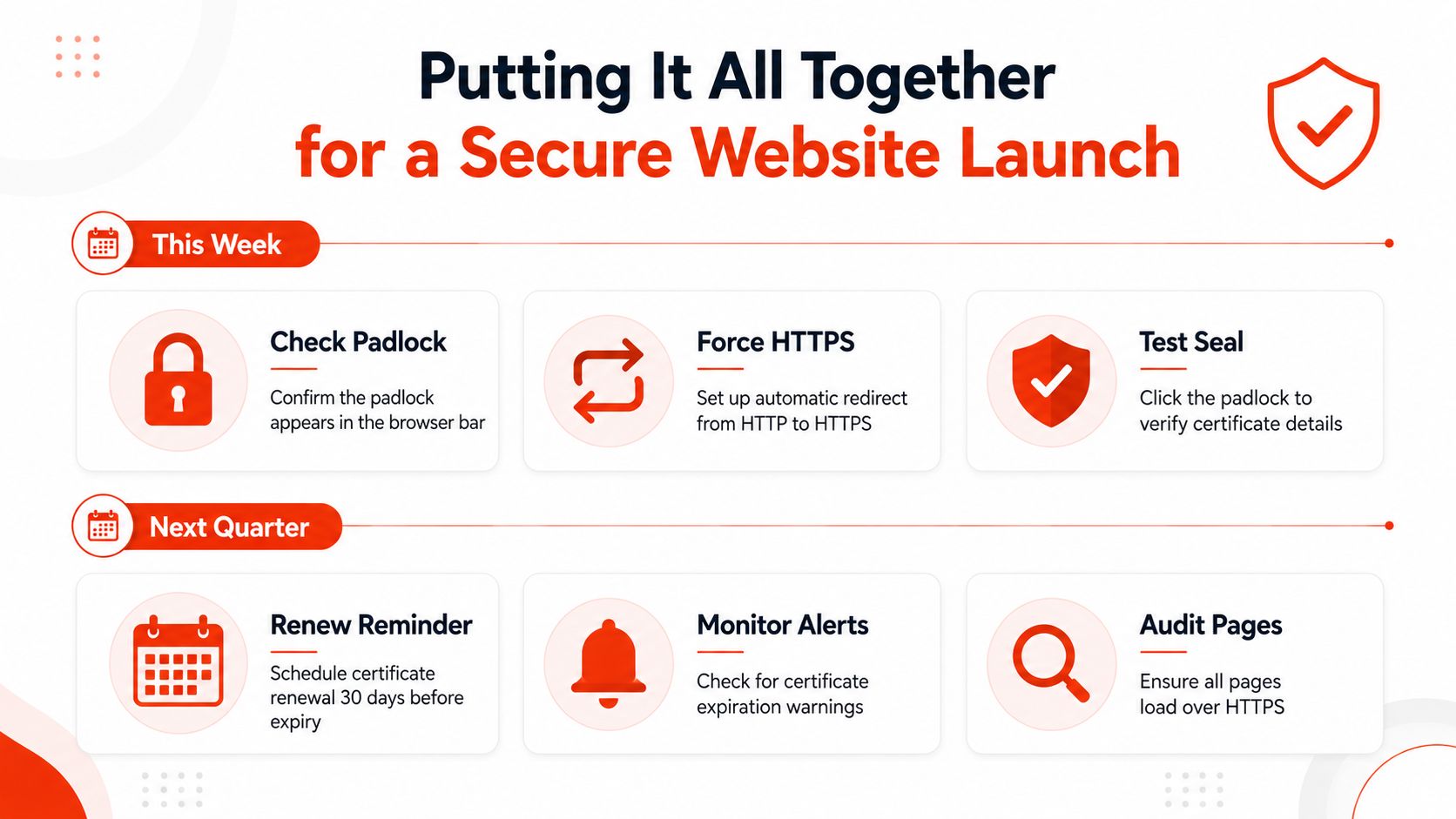
A secure launch is easier to manage when you split it into what needs doing now and what needs keeping on a schedule. This week, confirm the padlock appears in the browser, force HTTP to HTTPS, enable HSTS if your host supports it, and make sure auto-renew is switched on. That takes care of the visible trust signal and the most common failure points.
A practical checklist for the next quarter
- Check the padlock: Confirm the browser shows a secure connection on your main pages and checkout.
- Force HTTPS: Make sure visitors are redirected automatically from HTTP to HTTPS.
- Test the certificate details: Click the padlock and verify the site is serving the expected certificate.
- Review renewal timing: Schedule renewal well before expiry, not on the expiry date itself.
- Watch for warnings: Keep an eye on alerts from your host or certificate provider.
- Audit subdomains: Check that all relevant pages and subdomains are covered, especially if you’ve added new services.
What to revisit as the business grows
Across the next quarter, revisit whether your validation level still fits the business, and whether your certificate coverage matches every hostname you rely on. If the site grows, a wildcard or multi-domain certificate may reduce admin across related pages. Certificate Transparency logs are also worth monitoring for unexpected issuances, especially if your brand becomes more visible.
For many non-technical owners, a managed bundle is the easier path because it combines the certificate, hosting, maintenance, and renewal into one service model. That fits the reality of a 30-day guarantee and ongoing monitoring better than a pile of separate tools and reminders. It also keeps the focus on running the business, not chasing expiry dates.
If you want a website setup that includes domain registration, SSL, hosting, and maintenance in one managed process, 1stNet AI Ltd offers that as part of its small-business website service. Visit 1stNet AI Ltd if you want a faster route to a secure, launch-ready site with ongoing support built in.